
A data generating app is created with Python, and it ingests the theLook eCommerce data continuously into a PostgreSQL database. A WebSocket server, built by FastAPI, periodically queries the data to serve its clients. In this series, we develop real-time monitoring dashboard applications, and this post walks through the data generation app and backend API. The monitoring dashboards will be developed using Streamlit and Next.js, with Apache ECharts for visualization. They will be discussed in later posts.
Services
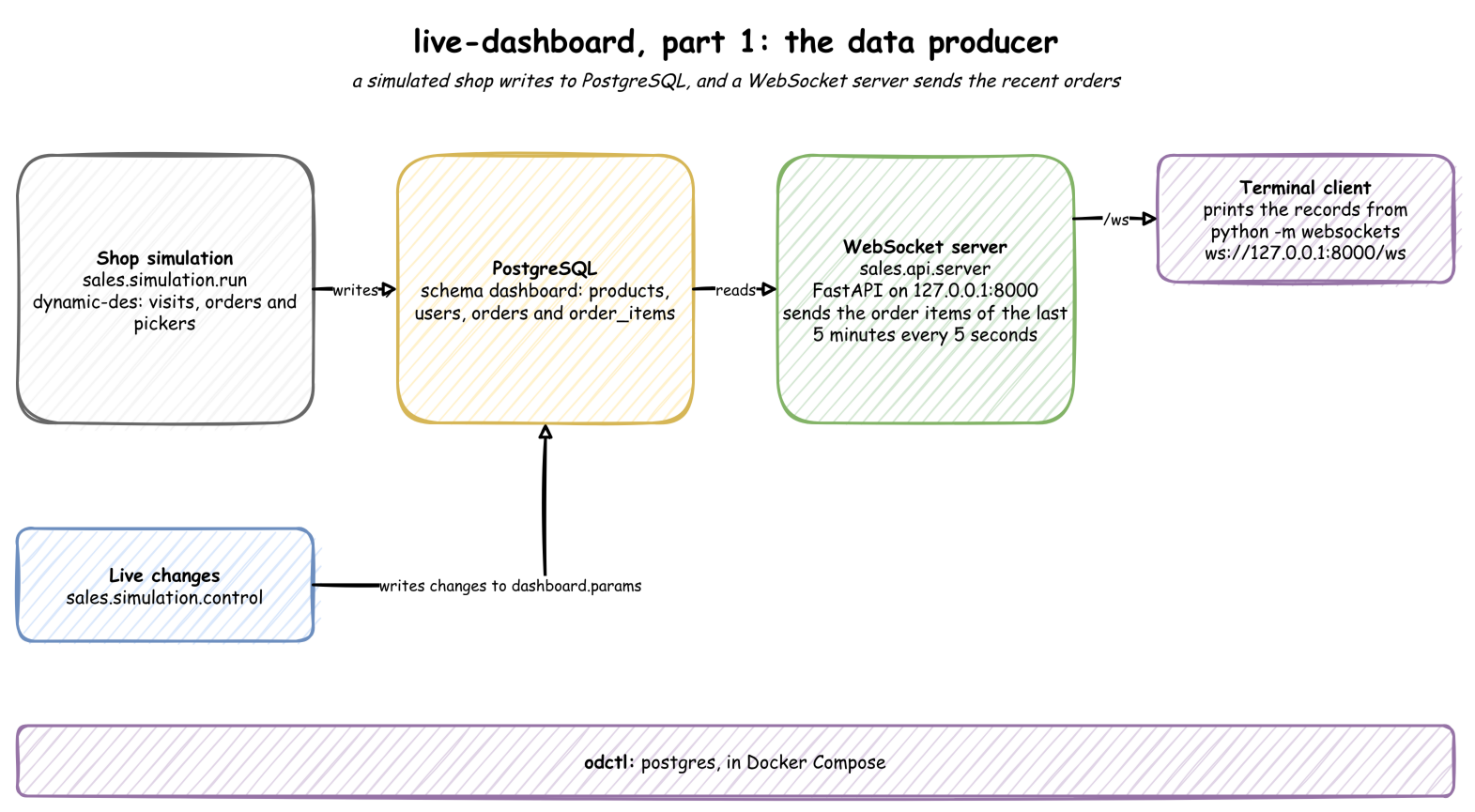
We have three services, and they are illustrated separately below. The source of this post can be found in the live-dashboard folder of the benchtop GitHub repository. It is one of the Benchtop projects, which run locally from a fresh clone. The development environment can be constructed as follows:
1$ git clone https://github.com/jaehyeon-kim/benchtop.git
2$ cd benchtop/live-dashboard
3$ uv venv
4$ source .venv/bin/activate
5(.venv) $ uv pip install -r requirements.txt
PostgreSQL
A PostgreSQL database server is started with odctl, which runs it with Docker Compose on port 5432.
1(.venv) $ odctl up postgres
The data generator creates a dedicated schema named dashboard and its tables when it starts.
 1# live-dashboard/sales/stores/postgres.py
 2TABLES = ("products", "users", "orders", "order_items")
 3UPSERT_KEYS = {"orders": ["id"], "order_items": ["id"]}  # rows whose status changes
 4
 5_DDL = f"""
 6CREATE SCHEMA IF NOT EXISTS {SCHEMA};
 7CREATE TABLE IF NOT EXISTS {SCHEMA}.products (id BIGINT PRIMARY KEY, name TEXT,
 8    category TEXT, department TEXT, retail_price FLOAT8, cost FLOAT8);
 9CREATE TABLE IF NOT EXISTS {SCHEMA}.users (id TEXT PRIMARY KEY, age INT, gender TEXT,
10    country TEXT, traffic_source TEXT, created_at TEXT);
11CREATE TABLE IF NOT EXISTS {SCHEMA}.orders (id TEXT PRIMARY KEY, user_id TEXT,
12    status TEXT, num_of_item INT, created_at TEXT);
13CREATE TABLE IF NOT EXISTS {SCHEMA}.order_items (id TEXT PRIMARY KEY, order_id TEXT,
14    user_id TEXT, product_id BIGINT, status TEXT, sale_price FLOAT8, created_at TEXT);
15CREATE TABLE IF NOT EXISTS {PARAMS_TABLE} (id SERIAL PRIMARY KEY,
16    param_path VARCHAR(255) NOT NULL, param_value TEXT NOT NULL,
17    is_applied BOOLEAN DEFAULT FALSE, created_at TIMESTAMP DEFAULT CURRENT_TIMESTAMP);
18"""
Data Generator
The data generator is a dynamic-des simulation of the shop, and it runs in its own terminal. It connects to the PostgreSQL database with the settings in sales/core/config.py, and runs until it is stopped (--minutes stops it after that many minutes).
1(.venv) $ python -m sales.simulation.run
Data Generator Source
The theLook eCommerce dataset is reduced to four entities, three of which are dynamically generated. Visitors arrive at random, view a few pages, and some buy. A buyer is a new or a returning user, and each purchase creates an order with one or more order items. Each order waits for a warehouse picker, then ships and completes, or is cancelled when no picker comes in time. Every change of status updates the order and its items. dynamic-des’s PostgresEgress writes each row to its table, and PostgresIngress applies parameter changes while the simulation runs.
  1# live-dashboard/sales/simulation/run.py
  2"""The shop as a discrete-event model in dynamic-des, run in real time into PostgreSQL.
  3
  4Visitors arrive and browse, and some buy. Each order waits for a picker, ships and
  5completes, or is cancelled when no picker comes in time. Every rate, time and chance is
  6a registry parameter, so `sales.simulation.control` can change it while the model runs.
  7"""
  8
  9import argparse
 10import asyncio
 11import logging
 12from datetime import UTC, datetime, timedelta
 13
 14from dynamic_des import PostgresEgress, PostgresIngress, SimulationContext
 15
 16from sales.core.config import (
 17    ARRIVALS,
 18    CHANCES,
 19    DSN,
 20    MAX_PICKERS,
 21    PARAMS_TABLE,
 22    PICKERS,
 23    SCHEMA,
 24    SERVICES,
 25    SIM_ID,
 26)
 27from sales.core.models import User
 28from sales.simulation.catalogue import products
 29from sales.simulation.shop import basket, new_user, with_status
 30from sales.stores import postgres
 31
 32
 33def _wait(app: SimulationContext, service: str):
 34    """Returns a timeout drawn from a service's live distribution."""
 35    config = app.env.registry.get_config(f"{SIM_ID}.service.{service}")
 36    return app.env.timeout(app.sampler.sample(config))
 37
 38
 39def _chance(app: SimulationContext, name: str) -> bool:
 40    """Returns True with the probability of a chance variable's live value."""
 41    return (
 42        app.sampler.rng.random()
 43        < app.env.registry.get(f"{SIM_ID}.variables.{name}").value
 44    )
 45
 46
 47def build(seed: int | None = None, start: datetime | None = None) -> SimulationContext:
 48    """
 49    Builds the shop's model: its parameters, its pickers and its processes.
 50
 51    Args:
 52        seed (int, optional): The seed for every random choice. None varies them.
 53        start (datetime, optional): The simulated start time, in UTC. Defaults to now.
 54
 55    Returns:
 56        SimulationContext: The model, ready for egress, ingress and `run`.
 57    """
 58    start = start or datetime.now(UTC)
 59    app = SimulationContext(
 60        SIM_ID,
 61        factor=1.0,
 62        random_seed=seed,
 63        logical_start_time=start.replace(tzinfo=None),
 64    )
 65    for name, rate in ARRIVALS.items():
 66        app.add_arrival(name, dist="exponential", rate=rate)
 67    for name, (mean, std) in SERVICES.items():
 68        app.add_service(name, dist="lognormal", mean=mean, std=std)
 69    app.add_resource("pickers", current_cap=PICKERS, max_cap=MAX_PICKERS)
 70    for name, chance in CHANCES.items():
 71        app.add_variable(name, chance)
 72    catalogue, users = products(), list[User]()
 73
 74    def now() -> str:
 75        """Returns the simulated time, in UTC, as ISO 8601 text."""
 76        return (start + timedelta(seconds=app.env.now)).isoformat()
 77
 78    def publish(rows) -> None:
 79        """Writes rows to their tables."""
 80        for row in rows:
 81            app.env.publish_event(row.table, row.model_dump())
 82
 83    @app.arrival_loop("visitor")
 84    def visitors(ctx):
 85        """Writes the catalogue, then starts a visit at each visitor arrival."""
 86        publish(catalogue)
 87        while True:
 88            yield ctx.wait_for_arrival("visitor")
 89            ctx.spawn(visit())
 90
 91    def visit():
 92        """One visitor: a few page views, then possibly an order."""
 93        rng = app.sampler.rng
 94        user = (
 95            users[int(rng.integers(len(users)))]
 96            if users and _chance(app, "returning")
 97            else None
 98        )
 99        for _ in range(int(rng.integers(2, 6))):
100            yield _wait(app, "page_view")
101        if not _chance(app, "buy"):
102            return
103        if user is None:
104            user = new_user(rng, now())
105            users.append(user)
106            publish([user])
107        order, items = basket(rng, user, catalogue, now())
108        publish([order, *items])
109        app.spawn(fulfil([order, *items]))
110
111    def fulfil(rows):
112        """One order: wait for a picker or give up, then pack, ship and complete."""
113        with app.get_resource("pickers").request() as picker:
114            waited = yield picker | _wait(app, "patience")
115            if picker not in waited:
116                publish(with_status(rows, "Cancelled"))
117                return
118            yield _wait(app, "pick")
119        publish(with_status(rows, "Shipped"))
120        yield _wait(app, "transit")
121        publish(with_status(rows, "Complete"))
122        if _chance(app, "return"):
123            yield _wait(app, "return_after")
124            publish(with_status(rows, "Returned"))
125
126    return app
127
128
129def run(minutes: float | None = None, seed: int | None = None) -> None:
130    """
131    Runs the shop in real time, writing every row to PostgreSQL.
132
133    Args:
134        minutes (float, optional): How long to run. None runs until interrupted.
135        seed (int, optional): The seed for every random choice.
136    """
137    asyncio.run(postgres.create_tables())
138    app = build(seed)
139    app.add_ingress(PostgresIngress(DSN, table_name=PARAMS_TABLE))
140    app.with_batching(batch_size=4, flush_interval=1.0)  # a few rows arrive a second
141    for table in postgres.TABLES:
142        # Bare table names, found through the connection's search path.
143        egress = PostgresEgress(
144            DSN,
145            table_name=table,
146            upsert_keys=postgres.UPSERT_KEYS.get(table),
147            server_settings={"search_path": SCHEMA},
148        )
149        app.add_egress(egress, when=lambda r, t=table: r.get("key") == t)
150    app.run(until=minutes * 60 if minutes else None)
151
152
153if __name__ == "__main__":
154    logging.basicConfig(level=logging.INFO, format="%(asctime)s %(name)s %(message)s")
155    parser = argparse.ArgumentParser(description="Runs the shop in real time.")
156    parser.add_argument(
157        "--minutes", type=float, help="how long to run (default: forever)"
158    )
159    parser.add_argument("--seed", type=int, help="seed for the random choices")
160    args = parser.parse_args()
161    run(args.minutes, args.seed)
In the following example, the simulation starts and connects to each table.
1(.venv) $ python -m sales.simulation.run
22026-09-30 22:44:19,294 dynamic_des.core.context Building SimulationContext for 'sales'...
32026-09-30 22:44:19,295 dynamic_des.core.context Simulation engine started.
42026-09-30 22:44:19,627 dynamic_des.connectors.egress.postgres PostgresEgress connected to order_items
52026-09-30 22:44:19,627 dynamic_des.connectors.egress.postgres PostgresEgress connected to users
62026-09-30 22:44:19,627 dynamic_des.connectors.egress.postgres PostgresEgress connected to orders
72026-09-30 22:44:19,627 dynamic_des.connectors.egress.postgres PostgresEgress connected to products
When the data gets ingested into the database, we see the following tables are created in the dashboard schema.
| Table | One row per |
|---|---|
products | product: 260, from 26 categories, 2 departments and 5 brands |
users | customer, with age, gender, country and traffic source |
orders | order, with its status and number of items |
order_items | product in an order, with its status and sale price |
WebSocket Server
This WebSocket server runs a FastAPI-based API using uvicorn, in its own terminal, on port 8000. It connects to the PostgreSQL database with the settings in sales/core/config.py. The service processes data with a 5-minute lookback window and refreshes every 5 seconds.
1(.venv) $ uvicorn sales.api.server:app --host 127.0.0.1 --port 8000
WebSocket Server Source
This FastAPI WebSocket server streams real-time data from a PostgreSQL database. It connects using asyncpg, fetches order-related data with a configurable lookback window, and sends updates every few seconds as defined by refresh seconds. Each update is a JSON list of records. The app continuously queries the database, sending fresh data to the connected client until it disconnects. Logging ensures visibility into connections and queries.
 1# live-dashboard/sales/api/server.py
 2"""Sends the recent order items to the dashboards over a WebSocket.
 3
 4Every `REFRESH_SECONDS`, `/ws` sends the order items of the last `LOOKBACK_MINUTES`,
 5with their users and products, as a JSON list of records.
 6
 7Run: uvicorn sales.api.server:app --host 127.0.0.1 --port 8000
 8"""
 9
10import asyncio
11import logging
12
13import asyncpg
14from fastapi import FastAPI, WebSocket, WebSocketDisconnect
15
16from sales.core.config import DSN, LOOKBACK_MINUTES, REFRESH_SECONDS
17from sales.stores import postgres
18
19logger = logging.getLogger("uvicorn.error")
20app = FastAPI()
21
22
23@app.websocket("/ws")
24async def stream(websocket: WebSocket) -> None:
25    """
26    Sends the recent order items every `REFRESH_SECONDS`, until the client leaves.
27
28    Args:
29        websocket (WebSocket): The client.
30    """
31    await websocket.accept()
32    conn = await asyncpg.connect(DSN)
33    try:
34        while True:
35            records = await postgres.recent_items(conn, LOOKBACK_MINUTES)
36            logger.info("Sending %d records", len(records))
37            await websocket.send_json(records)
38            await asyncio.sleep(REFRESH_SECONDS)
39    except WebSocketDisconnect:
40        logger.info("Client disconnected")
41    finally:
42        await conn.close()
The query and the function that runs it are in the store module.
 1# live-dashboard/sales/stores/postgres.py
 2# The order items of the last $1 minutes, with their users and products.
 3# clock_timestamp() is the time now; current_timestamp would stay at the transaction's start.
 4RECENT_ITEMS = f"""
 5SELECT u.id AS user_id, u.age, u.gender, u.country, u.traffic_source,
 6    o.order_id, o.id AS item_id, p.category, p.cost, o.status AS item_status,
 7    o.sale_price, o.created_at
 8FROM {SCHEMA}.order_items AS o
 9JOIN {SCHEMA}.users AS u ON u.id = o.user_id
10JOIN {SCHEMA}.products AS p ON p.id = o.product_id
11WHERE o.created_at::timestamptz >= clock_timestamp() - make_interval(mins => $1)
12"""
 1# live-dashboard/sales/stores/postgres.py
 2async def recent_items(conn: asyncpg.Connection, minutes: int) -> list[dict]:
 3    """
 4    Reads the order items of the last `minutes`, with their users and products.
 5
 6    Args:
 7        conn (asyncpg.Connection): An open connection.
 8        minutes (int): The lookback window.
 9
10    Returns:
11        list[dict]: One record per order item.
12    """
13    return [dict(row) for row in await conn.fetch(RECENT_ITEMS, minutes)]
Deploy Services
The services are started with the commands above: PostgreSQL first, then the data generator and the WebSocket server, each in its own terminal. Once started, the server can be checked with the WebSocket client of the websockets package, which is installed with uvicorn, by executing python -m websockets ws://127.0.0.1:8000/ws, and its logs are printed in its terminal.
The client prints each message the server sends: a list of the order items of the last five minutes, here 39 records in the first message.
1python -m websockets ws://127.0.0.1:8000/ws
1Connected to ws://127.0.0.1:8000/ws.
2< [{"user_id":"427f5544-f594-4127-826e-912dc0dd970e","age":40,"gender":"M","country":"China","traffic_source":"Search","order_id":"e8c140bd-087a-4dfe-ac01-29f40a36a27e","item_id":"40deff28-0310-49ed-b11b-fdf0a3dabb24","category":"Active","cost":24.7,"item_status":"Shipped","sale_price":55.04,"created_at":"2026-09-30T13:57:06.948553+00:00"}, ...]
The server logs how many records it sends every five seconds:
1INFO:     Started server process [...]
2INFO:     Waiting for application startup.
3INFO:     Application startup complete.
4INFO:     Uvicorn running on http://127.0.0.1:8000 (Press CTRL+C to quit)
5INFO:     127.0.0.1:54478 - "WebSocket /ws" [accepted]
6INFO:     connection open
7INFO:     Sending 39 records
8INFO:     Sending 54 records
9INFO:     Sending 67 records
Related posts
- Guide to Building Integrated Web Applications with FastAPI and NiceGUI - serves a FastAPI backend and the web UI from one Python process, compared with React and with Streamlit


Comments