
A Kafka producer that generates mock order data and a consumer that processes these orders are built with Kotlin, Apache Avro for data serialization, and Gradle for build management. This example highlights best practices such as schema management with Avro, robust error handling, and graceful shutdown, providing a solid foundation for your own Kafka-based projects. We’ll dive into the build configuration, the Avro schema definition, utility functions for Kafka administration, and the core logic of both the producer and consumer applications.
- Kafka Clients with JSON - Producing and Consuming Order Events
- Kafka Clients with Avro - Schema Registry and Order Events (this post)
- Kafka Streams - Lightweight Real-Time Processing for Supplier Stats
- Flink DataStream API - Scalable Event Processing for Supplier Stats
- Flink Table API - Declarative Analytics for Supplier Stats in Real Time
Kafka Client Applications
This project demonstrates two primary Kafka client applications:
- A Producer Application responsible for generating
Ordermessages and publishing them to a Kafka topic using Avro serialization. - A Consumer Application designed to subscribe to the same Kafka topic, deserialize the Avro messages, and process them, including retry logic and graceful handling of shutdowns.
Both applications are packaged into a single executable JAR, and their execution mode (producer or consumer) is determined by a command-line argument. The source code for the applications discussed in this post can be found in the orders-avro-clients folder of this GitHub repository. It is one of the Benchtop projects, which run locally from a fresh clone.
Build Configuration
The build.gradle.kts file is the heart of our project’s build process, defining plugins, dependencies, and custom tasks.
- Plugins:
kotlin("jvm"): Enables Kotlin language support for the JVM.com.github.davidmc24.gradle.plugin.avro: Manages Avro schema compilation into Java classes.com.github.johnrengelman.shadow: Creates a “fat JAR” or “uber JAR” containing all dependencies, making the application easily deployable.application: Configures the project as a runnable application, specifying the main class.
- Repositories:
mavenCentral(): The standard Maven repository.maven("https://packages.confluent.io/maven/"): The Confluent repository, necessary for Confluent-specific dependencies like the Avro serializer.
- Dependencies:
- Kafka:
org.apache.kafka:kafka-clientsfor core Kafka producer/consumer APIs. - Avro:
org.apache.avro:avrofor the Avro serialization library.io.confluent:kafka-avro-serializerfor Confluent’s Kafka Avro serializer/deserializer, which integrates with Schema Registry.
- Logging:
io.github.microutils:kotlin-logging-jvm(a Kotlin-friendly SLF4J wrapper) andch.qos.logback:logback-classic(a popular SLF4J implementation). - Faker:
net.datafaker:datafakerfor generating realistic mock data for our orders. - Testing:
kotlin("test")for unit testing with Kotlin.
- Kafka:
- Kotlin Configuration:
jvmToolchain(17): Specifies Java 17 as the target JVM.
- Application Configuration:
mainClass.set("me.jaehyeon.MainKt"): Sets the entry point of the application.
- Shadow JAR Configuration:
- The
tasks.withType<ShadowJar>block customizes the fat JAR output, setting its base name, classifier (empty, so no classifier), and version. mergeServiceFiles(): Important for merging service provider configuration files (e.g., for SLF4J) from multiple dependencies.- The
buildtask is configured to depend onshadowJar, ensuring the fat JAR is created during a standard build.
- The
 1plugins {
 2    kotlin("jvm") version "2.1.20"
 3    id("com.github.davidmc24.gradle.plugin.avro") version "1.9.1"
 4    id("com.github.johnrengelman.shadow") version "8.1.1"
 5    application
 6}
 7
 8group = "me.jaehyeon"
 9version = "1.0-SNAPSHOT"
10
11repositories {
12    mavenCentral()
13    maven("https://packages.confluent.io/maven/")
14}
15
16dependencies {
17    // Kafka
18    implementation("org.apache.kafka:kafka-clients:3.9.0")
19    // AVRO
20    implementation("org.apache.avro:avro:1.11.4")
21    implementation("io.confluent:kafka-avro-serializer:7.9.0")
22    // Logging
23    implementation("io.github.microutils:kotlin-logging-jvm:3.0.5")
24    implementation("ch.qos.logback:logback-classic:1.5.13")
25    // Faker
26    implementation("net.datafaker:datafaker:2.1.0")
27    // Test
28    testImplementation(kotlin("test"))
29}
30
31kotlin {
32    jvmToolchain(17)
33}
34
35application {
36    mainClass.set("me.jaehyeon.MainKt")
37}
38
39avro {
40    setCreateSetters(true)
41    setFieldVisibility("PRIVATE")
42}
43
44tasks.named("compileKotlin") {
45    dependsOn("generateAvroJava")
46}
47
48sourceSets {
49    named("main") {
50        java.srcDirs("build/generated/avro/main")
51        kotlin.srcDirs("src/main/kotlin")
52    }
53}
54
55tasks.withType<com.github.jengelman.gradle.plugins.shadow.tasks.ShadowJar> {
56    archiveBaseName.set("orders-avro-clients")
57    archiveClassifier.set("")
58    archiveVersion.set("1.0")
59    mergeServiceFiles()
60}
61
62tasks.named("build") {
63    dependsOn("shadowJar")
64}
65
66tasks.test {
67    useJUnitPlatform()
68}
Avro Schema and Code Generation
Apache Avro is used for data serialization, providing schema evolution and type safety.
- Schema Definition (
Order.avsc): Located insrc/main/avro/Order.avsc, this JSON file defines the structure of ourOrdermessages:This schema will generate a Java class1{ 2 "namespace": "me.jaehyeon.avro", 3 "type": "record", 4 "name": "Order", 5 "fields": [ 6 { "name": "order_id", "type": "string" }, 7 { "name": "bid_time", "type": "string" }, 8 { "name": "price", "type": "double" }, 9 { "name": "item", "type": "string" }, 10 { "name": "supplier", "type": "string" } 11 ] 12}me.jaehyeon.avro.Order. - Gradle Avro Plugin Configuration:
The
avroblock inbuild.gradle.ktsconfigures the Avro code generation:1avro { 2 setCreateSetters(true) // Generates setter methods for fields 3 setFieldVisibility("PRIVATE") // Makes fields private 4} - Integrating Generated Code:
tasks.named("compileKotlin") { dependsOn("generateAvroJava") }: Ensures Avro Java classes are generated before Kotlin code is compiled.sourceSets { named("main") { java.srcDirs("build/generated/avro/main") ... } }: Adds the directory containing generated Avro Java classes to the main source set, making them available for Kotlin compilation.
Kafka Admin Utilities
The me.jaehyeon.kafka package provides helper functions for interacting with Kafka’s administrative features using the AdminClient.
createTopicIfNotExists(...):- Takes topic name, bootstrap server address, number of partitions, and replication factor as input.
- Configures an
AdminClientwith appropriate timeouts and retries. - Attempts to create a new topic.
- Gracefully handles
TopicExistsExceptionif the topic already exists or is created concurrently, logging a warning. - Throws a runtime exception for other unrecoverable errors.
verifyKafkaConnection(...):- Takes the bootstrap server address as input.
- Configures an
AdminClient. - Attempts to list topics as a simple way to check if the Kafka cluster is reachable.
- Throws a runtime exception if the connection fails.
 1package me.jaehyeon.kafka
 2
 3import mu.KotlinLogging
 4import org.apache.kafka.clients.admin.AdminClient
 5import org.apache.kafka.clients.admin.AdminClientConfig
 6import org.apache.kafka.clients.admin.NewTopic
 7import org.apache.kafka.common.errors.TopicExistsException
 8import java.util.Properties
 9import java.util.concurrent.ExecutionException
10import kotlin.use
11
12private val logger = KotlinLogging.logger { }
13
14fun createTopicIfNotExists(
15    topicName: String,
16    bootstrapAddress: String,
17    numPartitions: Int,
18    replicationFactor: Short,
19) {
20    val props =
21        Properties().apply {
22            put(AdminClientConfig.BOOTSTRAP_SERVERS_CONFIG, bootstrapAddress)
23            put(AdminClientConfig.DEFAULT_API_TIMEOUT_MS_CONFIG, "5000")
24            put(AdminClientConfig.REQUEST_TIMEOUT_MS_CONFIG, "3000")
25            put(AdminClientConfig.RETRIES_CONFIG, "1")
26        }
27
28    AdminClient.create(props).use { client ->
29        val newTopic = NewTopic(topicName, numPartitions, replicationFactor)
30        val result = client.createTopics(listOf(newTopic))
31
32        try {
33            logger.info { "Attempting to create topic '$topicName'..." }
34            result.all().get()
35            logger.info { "Topic '$topicName' created successfully!" }
36        } catch (e: ExecutionException) {
37            if (e.cause is TopicExistsException) {
38                logger.warn { "Topic '$topicName' was created concurrently or already existed. Continuing..." }
39            } else {
40                throw RuntimeException("Unrecoverable error while creating a topic '$topicName'.", e)
41            }
42        }
43    }
44}
45
46fun verifyKafkaConnection(bootstrapAddress: String) {
47    val props =
48        Properties().apply {
49            put(AdminClientConfig.BOOTSTRAP_SERVERS_CONFIG, bootstrapAddress)
50            put(AdminClientConfig.DEFAULT_API_TIMEOUT_MS_CONFIG, "5000")
51            put(AdminClientConfig.REQUEST_TIMEOUT_MS_CONFIG, "3000")
52            put(AdminClientConfig.RETRIES_CONFIG, "1")
53        }
54
55    AdminClient.create(props).use { client ->
56        try {
57            client.listTopics().names().get()
58        } catch (e: Exception) {
59            throw RuntimeException("Failed to connect to Kafka at'$bootstrapAddress'.", e)
60        }
61    }
62}
Kafka Producer
The ProducerApp object is responsible for generating and sending Order messages to Kafka.
- Configuration:
- Reads
BOOTSTRAP(Kafka brokers),TOPIC_NAME, andREGISTRY_URL(Schema Registry) from environment variables, with sensible defaults. - Defines constants for
NUM_PARTITIONSandREPLICATION_FACTORfor topic creation.
- Reads
- Initialization:
- Calls
createTopicIfNotExiststo ensure the target topic exists before producing.
- Calls
- Producer Properties:
BOOTSTRAP_SERVERS_CONFIG: Kafka broker addresses.KEY_SERIALIZER_CLASS_CONFIG:StringSerializerfor message keys.VALUE_SERIALIZER_CLASS_CONFIG:io.confluent.kafka.serializers.KafkaAvroSerializerfor Avro-serializing message values. This serializer automatically registers schemas with the Schema Registry.schema.registry.url: URL of the Confluent Schema Registry.basic.auth.credentials.source&basic.auth.user.info: Configuration for basic authentication with Schema Registry.- Retry and timeout configurations (
RETRIES_CONFIG,REQUEST_TIMEOUT_MS_CONFIG, etc.) for resilience.
- Message Generation and Sending:
- Enters an infinite loop to continuously produce messages.
- Uses
net.datafaker.Fakerto generate random data for each field of theOrderobject (order ID, bid time, price, item, supplier).- Note that bid time is delayed by an amount of seconds configured by an environment variable named
DELAY_SECONDS, which is useful for testing late data handling.
- Note that bid time is delayed by an amount of seconds configured by an environment variable named
- Creates a
ProducerRecordwith the topic name, order ID as key, and theOrderobject as value. - Sends the record asynchronously using
producer.send().- A callback logs success (topic, partition, offset) or logs errors.
.get()is used to make the send synchronous for this example, simplifying error handling but reducing throughput in a real high-volume scenario.
- Handles
ExecutionExceptionandKafkaExceptionduring sending. - Pauses for 1 second between sends using
Thread.sleep().
 1package me.jaehyeon
 2
 3import me.jaehyeon.avro.Order
 4import me.jaehyeon.kafka.createTopicIfNotExists
 5import mu.KotlinLogging
 6import net.datafaker.Faker
 7import org.apache.kafka.clients.producer.KafkaProducer
 8import org.apache.kafka.clients.producer.ProducerConfig
 9import org.apache.kafka.clients.producer.ProducerRecord
10import org.apache.kafka.common.KafkaException
11import java.time.ZoneId
12import java.time.format.DateTimeFormatter
13import java.util.Properties
14import java.util.UUID
15import java.util.concurrent.ExecutionException
16import java.util.concurrent.TimeUnit
17
18object ProducerApp {
19    private val bootstrapAddress = System.getenv("BOOTSTRAP") ?: "127.0.0.1:9092"
20    private val inputTopicName = System.getenv("TOPIC_NAME") ?: "orders-avro"
21    private val registryUrl = System.getenv("REGISTRY_URL") ?: "http://127.0.0.1:8081"
22    private val delaySeconds = System.getenv("DELAY_SECONDS")?.toIntOrNull() ?: 5
23    private const val NUM_PARTITIONS = 3
24    private const val REPLICATION_FACTOR: Short = 1 // odctl kafka-lite has one broker
25    private val logger = KotlinLogging.logger {}
26    private val faker = Faker()
27
28    fun run() {
29        // Create the input topic if not existing
30        createTopicIfNotExists(inputTopicName, bootstrapAddress, NUM_PARTITIONS, REPLICATION_FACTOR)
31
32        val props =
33            Properties().apply {
34                put(ProducerConfig.BOOTSTRAP_SERVERS_CONFIG, bootstrapAddress)
35                put(ProducerConfig.KEY_SERIALIZER_CLASS_CONFIG, "org.apache.kafka.common.serialization.StringSerializer")
36                put(ProducerConfig.VALUE_SERIALIZER_CLASS_CONFIG, "io.confluent.kafka.serializers.KafkaAvroSerializer")
37                put("schema.registry.url", registryUrl)
38                put("basic.auth.credentials.source", "USER_INFO")
39                put("basic.auth.user.info", "admin:admin")
40                put(ProducerConfig.RETRIES_CONFIG, "3")
41                put(ProducerConfig.REQUEST_TIMEOUT_MS_CONFIG, "3000")
42                put(ProducerConfig.DELIVERY_TIMEOUT_MS_CONFIG, "6000")
43                put(ProducerConfig.MAX_BLOCK_MS_CONFIG, "3000")
44            }
45
46        KafkaProducer<String, Order>(props).use { producer ->
47            while (true) {
48                val order =
49                    Order().apply {
50                        orderId = UUID.randomUUID().toString()
51                        bidTime = generateBidTime()
52                        price = faker.number().randomDouble(2, 1, 150)
53                        item = faker.commerce().productName()
54                        supplier = faker.regexify("(Alice|Bob|Carol|Alex|Joe|James|Jane|Jack)")
55                    }
56                val record = ProducerRecord(inputTopicName, order.orderId, order)
57                try {
58                    producer
59                        .send(record) { metadata, exception ->
60                            if (exception != null) {
61                                logger.error(exception) { "Error sending record" }
62                            } else {
63                                logger.info {
64                                    "Sent to ${metadata.topic()} into partition ${metadata.partition()}, offset ${metadata.offset()}"
65                                }
66                            }
67                        }.get()
68                } catch (e: ExecutionException) {
69                    throw RuntimeException("Unrecoverable error while sending record.", e)
70                } catch (e: KafkaException) {
71                    throw RuntimeException("Kafka error while sending record.", e)
72                }
73
74                Thread.sleep(1000L)
75            }
76        }
77    }
78
79    private fun generateBidTime(): String {
80        val randomDate = faker.date().past(delaySeconds, TimeUnit.SECONDS)
81        val formatter =
82            DateTimeFormatter
83                .ofPattern("yyyy-MM-dd HH:mm:ss")
84                .withZone(ZoneId.systemDefault())
85        return formatter.format(randomDate.toInstant())
86    }
87}
Kafka Consumer
The ConsumerApp object consumes Order messages from Kafka, deserializes them, and processes them.
- Configuration:
- Reads
BOOTSTRAP(Kafka brokers),TOPIC(input topic), andREGISTRY_URL(Schema Registry) from environment variables, with defaults.
- Reads
- Initialization:
- Calls
verifyKafkaConnectionto check connectivity to Kafka brokers.
- Calls
- Consumer Properties:
BOOTSTRAP_SERVERS_CONFIG: Kafka broker addresses.GROUP_ID_CONFIG: Consumer group ID, ensuring messages are distributed among instances of this consumer.KEY_DESERIALIZER_CLASS_CONFIG:StringDeserializerfor message keys.VALUE_DESERIALIZER_CLASS_CONFIG:io.confluent.kafka.serializers.KafkaAvroDeserializerfor deserializing Avro messages.ENABLE_AUTO_COMMIT_CONFIG: Set tofalsefor manual offset management.AUTO_OFFSET_RESET_CONFIG:earliestto start consuming from the beginning of the topic if no offset is found.specific.avro.reader: Set tofalse, meaning the consumer will deserialize Avro messages intoGenericRecordobjects rather than specific generated Avro classes. This offers flexibility if the exact schema isn’t compiled into the consumer.schema.registry.url: URL of the Confluent Schema Registry.basic.auth.credentials.source&basic.auth.user.info: Configuration for basic authentication with Schema Registry.- Timeout configurations (
DEFAULT_API_TIMEOUT_MS_CONFIG,REQUEST_TIMEOUT_MS_CONFIG).
- Graceful Shutdown:
- A
ShutdownHookis registered withRuntime.getRuntime(). - When a shutdown signal (e.g., Ctrl+C) is received,
keepConsumingis set tofalse, andconsumer.wakeup()is called. This causes theconsumer.poll()method to throw aWakeupException, allowing the consumer loop to terminate cleanly.
- A
- Consuming Loop:
- Subscribes to the specified topic.
- Enters a
while (keepConsuming)loop. pollSafely(): A helper function that callsconsumer.poll()and handles potentialWakeupException(exiting loop if shutdown initiated) or other polling errors.- Iterates through received records.
processRecordWithRetry():- Processes each
GenericRecord. - Includes a retry mechanism (
MAX_RETRIES = 3). - Simulates processing errors using
(0..99).random() < ERROR_THRESHOLD(currentlyERROR_THRESHOLD = -1, so no errors are simulated by default). - If an error occurs, it logs a warning and retries with an exponential backoff (
Thread.sleep(500L * attempt.toLong())). - If all retries fail, it logs an error and skips the record.
- Successfully processed records are logged.
- Processes each
consumer.commitSync(): Manually commits offsets synchronously after a batch of records has been processed.
- Error Handling:
- General
Exceptionhandling around the main consumer loop.
- General
  1package me.jaehyeon
  2
  3import me.jaehyeon.kafka.verifyKafkaConnection
  4import mu.KotlinLogging
  5import org.apache.avro.generic.GenericRecord
  6import org.apache.kafka.clients.consumer.ConsumerConfig
  7import org.apache.kafka.clients.consumer.ConsumerRecord
  8import org.apache.kafka.clients.consumer.KafkaConsumer
  9import org.apache.kafka.common.errors.WakeupException
 10import java.time.Duration
 11import java.util.Properties
 12import kotlin.use
 13
 14object ConsumerApp {
 15    private val bootstrapAddress = System.getenv("BOOTSTRAP") ?: "127.0.0.1:9092"
 16    private val topicName = System.getenv("TOPIC") ?: "orders-avro"
 17    private val registryUrl = System.getenv("REGISTRY_URL") ?: "http://127.0.0.1:8081"
 18    private val logger = KotlinLogging.logger { }
 19    private const val MAX_RETRIES = 3
 20    private const val ERROR_THRESHOLD = -1
 21
 22    @Volatile
 23    private var keepConsuming = true
 24
 25    fun run() {
 26        // Verify kafka connection
 27        verifyKafkaConnection(bootstrapAddress)
 28
 29        val props =
 30            Properties().apply {
 31                put(ConsumerConfig.BOOTSTRAP_SERVERS_CONFIG, bootstrapAddress)
 32                put(ConsumerConfig.GROUP_ID_CONFIG, "$topicName-group")
 33                put(ConsumerConfig.KEY_DESERIALIZER_CLASS_CONFIG, "org.apache.kafka.common.serialization.StringDeserializer")
 34                put(ConsumerConfig.VALUE_DESERIALIZER_CLASS_CONFIG, "io.confluent.kafka.serializers.KafkaAvroDeserializer")
 35                put(ConsumerConfig.ENABLE_AUTO_COMMIT_CONFIG, false)
 36                put(ConsumerConfig.AUTO_OFFSET_RESET_CONFIG, "earliest")
 37                put("specific.avro.reader", false)
 38                put("schema.registry.url", registryUrl)
 39                put("basic.auth.credentials.source", "USER_INFO")
 40                put("basic.auth.user.info", "admin:admin")
 41                put(ConsumerConfig.DEFAULT_API_TIMEOUT_MS_CONFIG, "5000")
 42                put(ConsumerConfig.REQUEST_TIMEOUT_MS_CONFIG, "3000")
 43            }
 44
 45        val consumer = KafkaConsumer<String, GenericRecord>(props)
 46
 47        Runtime.getRuntime().addShutdownHook(
 48            Thread {
 49                logger.info { "Shutdown detected. Waking up Kafka consumer..." }
 50                keepConsuming = false
 51                consumer.wakeup()
 52            },
 53        )
 54
 55        try {
 56            consumer.use { c ->
 57                c.subscribe(listOf(topicName))
 58                while (keepConsuming) {
 59                    val records = pollSafely(c)
 60                    for (record in records) {
 61                        processRecordWithRetry(record)
 62                    }
 63                    consumer.commitSync()
 64                }
 65            }
 66        } catch (e: Exception) {
 67            RuntimeException("Unrecoverable error while consuming record.", e)
 68        }
 69    }
 70
 71    private fun pollSafely(consumer: KafkaConsumer<String, GenericRecord>) =
 72        runCatching { consumer.poll(Duration.ofMillis(1000)) }
 73            .getOrElse { e ->
 74                when (e) {
 75                    is WakeupException -> {
 76                        if (keepConsuming) throw e
 77                        logger.info { "ConsumerApp wakeup for shutdown." }
 78                        emptyList()
 79                    }
 80                    else -> {
 81                        logger.error(e) { "Unexpected error while polling records" }
 82                        emptyList()
 83                    }
 84                }
 85            }
 86
 87    private fun processRecordWithRetry(record: ConsumerRecord<String, GenericRecord>) {
 88        var attempt = 0
 89        while (attempt < MAX_RETRIES) {
 90            try {
 91                attempt++
 92                if ((0..99).random() < ERROR_THRESHOLD) {
 93                    throw RuntimeException(
 94                        "Simulated error for ${record.value()} from partition ${record.partition()}, offset ${record.offset()}",
 95                    )
 96                }
 97                logger.info { "Received ${record.value()} from partition ${record.partition()}, offset ${record.offset()}" }
 98                return
 99            } catch (e: Exception) {
100                logger.warn(e) { "Error processing record (attempt $attempt of $MAX_RETRIES)" }
101                if (attempt == MAX_RETRIES) {
102                    logger.error(e) { "Failed to process record after $MAX_RETRIES attempts, skipping..." }
103                    return
104                }
105                Thread.sleep(500L * attempt.toLong()) // exponential backoff
106            }
107        }
108    }
109}
Application Entry Point
The Main.kt file contains the main function, which serves as the entry point for the packaged application.
- It checks the first command-line argument (
args.getOrNull(0)). - If the argument is
"producer"(case-insensitive), it runsProducerApp.run(). - If the argument is
"consumer"(case-insensitive), it runsConsumerApp.run(). - If no argument or an invalid argument is provided, it prints usage instructions.
- A top-level
try-catchblock handles any uncaught exceptions from the producer or consumer, logs a fatal error, and exits the application with a non-zero status code (exitProcess(1)).
 1package me.jaehyeon
 2
 3import mu.KotlinLogging
 4import kotlin.system.exitProcess
 5
 6private val logger = KotlinLogging.logger {}
 7
 8fun main(args: Array<String>) {
 9    try {
10        when (args.getOrNull(0)?.lowercase()) {
11            "producer" -> ProducerApp.run()
12            "consumer" -> ConsumerApp.run()
13            else -> println("Usage: <producer|consumer>")
14        }
15    } catch (e: Exception) {
16        logger.error(e) { "Fatal error in ${args.getOrNull(0) ?: "app"}. Shutting down." }
17        exitProcess(1)
18    }
19}
Run Kafka Applications
We begin by setting up our local Kafka environment with odctl, which provisions a Kafka cluster along with Kafka UI for browsing topics and schemas, all managed via Docker Compose. Once our Kafka environment is running, we will start our Kotlin-based producer and consumer applications.
odctl
odctl starts a local data stack with Docker Compose. Its kafka-lite profile runs one Kafka broker, the Karapace schema registry and Kafka UI. Install odctl, clone the repository, and start the profile from its order-streams folder, where the rest of the commands also run:
1uv tool install odctl
2git clone https://github.com/jaehyeon-kim/benchtop.git
3cd benchtop/order-streams
4odctl up kafka-lite
Once the services are initialized, Kafka UI is at http://127.0.0.1:8086, where we can browse the topics, their messages and the registered schemas.
Launch Applications
Our Kotlin Kafka applications can be launched in a couple of ways, catering to different stages of development and deployment:
- With Gradle (Development Mode): This method is convenient during development, allowing for quick iterations without needing to build a full JAR file each time.
- Running the Shadow JAR (Deployment Mode): After building a “fat” JAR (also known as a shadow JAR) that includes all dependencies, the application can be run as a standalone executable. This is typical for deploying to non-development environments.
💡 To build and run the application locally, ensure that JDK 17 is installed.
 1# 👉 With Gradle (Dev Mode)
 2./gradlew :orders-avro-clients:run --args="producer"
 3./gradlew :orders-avro-clients:run --args="consumer"
 4
 5# 👉 Build Shadow (Fat) JAR:
 6./gradlew shadowJar
 7
 8# Resulting JAR:
 9# orders-avro-clients/build/libs/orders-avro-clients-1.0.jar
10
11# 👉 Run the Fat JAR:
12java -jar orders-avro-clients/build/libs/orders-avro-clients-1.0.jar producer
13java -jar orders-avro-clients/build/libs/orders-avro-clients-1.0.jar consumer

For this post, we demonstrate starting the applications in development mode using Gradle. Once started, we see logs from both the producer sending messages and the consumer receiving them.
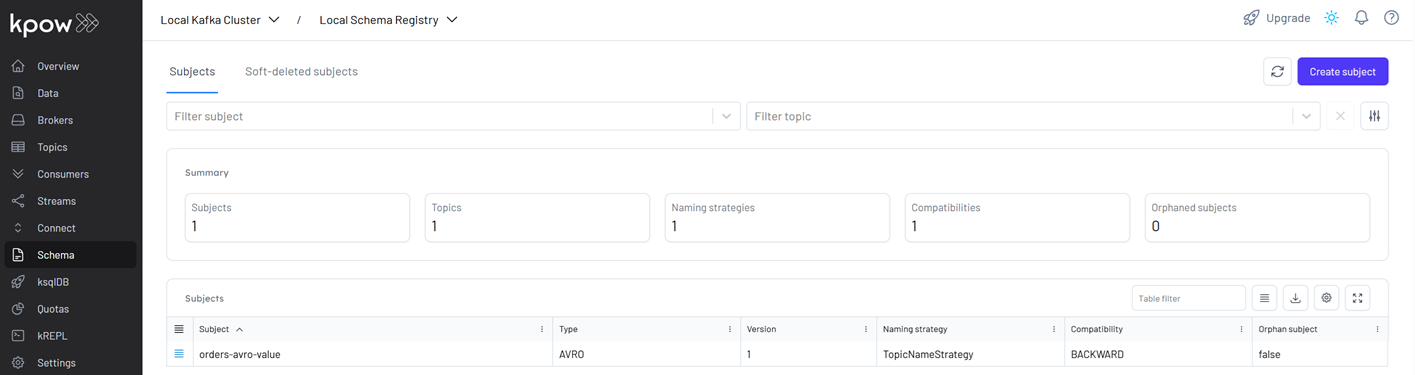
In Kafka UI at http://127.0.0.1:8086, the Schema Registry page shows that a new schema, orders-avro-value, is now registered in Karapace, the schema registry.
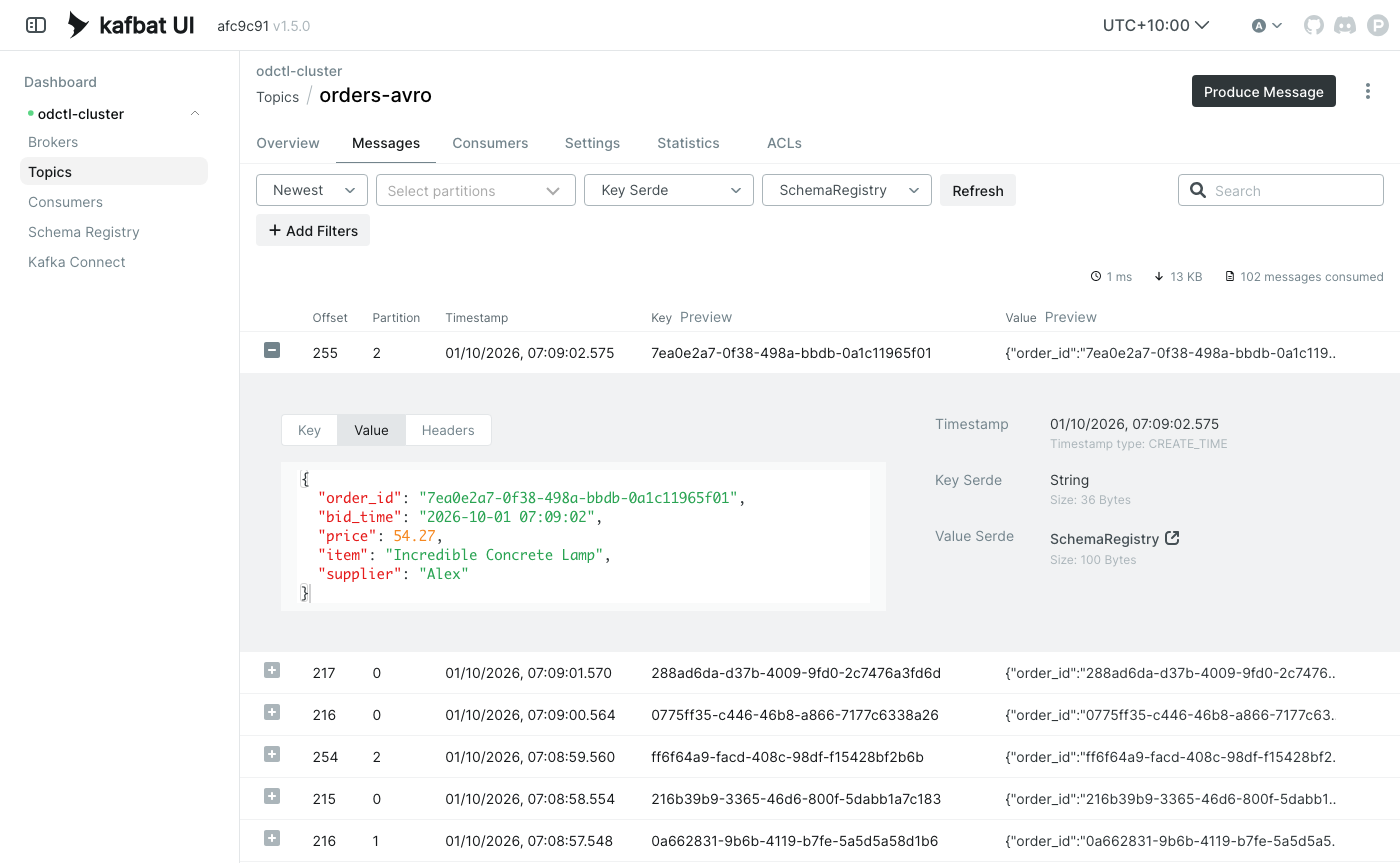
With the applications actively producing and consuming Avro data, Kafka UI enables inspection of messages on the orders-avro topic. In Kafka UI, open Topics, select orders-avro and go to the Messages tab. To decode the Avro values, set the Value Serde to SchemaRegistry, which reads each value’s schema from Karapace. The key is a plain string, which the default Key Serde shows as it is.
Conclusion
In this post, we successfully built robust Kafka producer and consumer applications in Kotlin, using Avro for schema-enforced data serialization and Gradle for an efficient build process. We demonstrated practical deployment with a local Kafka setup started with odctl, showcasing a complete workflow for developing type-safe, resilient data pipelines with Kafka and a Schema Registry.


Comments