
Most databases change all day: users sign up, orders are placed, and each order moves from one status to the next. Change data capture (CDC) turns those changes into a stream of events that other systems can read as they happen. In this post, a simulated online shop writes to PostgreSQL in real time, Debezium streams every change to Kafka, and a sink connector saves the changes as files in object storage. Everything runs on your own machine.
[Update 2026-10-16] dynamic-des is now desflow (0.20.0). The code and commands below use the new name: pip install desflow, import desflow and the desflow command.
The shop’s data model follows the theLook eCommerce dataset. The source code is in benchtop/ecommerce-cdc. It is one of the Benchtop projects, which run locally from a fresh clone.
What You Will Build
- Run the simulation, which fills the tables and keeps changing them.
- Deploy the connectors: Debezium streams every insert and update to Kafka, and the S3 sink saves them as files.
- Look at the changes in Kafka and in SeaweedFS.
- Change the simulation while it runs, and see the change in the stream.
To start again at any point, python -m ecommerce.stores.cleanup removes everything this project has created and keeps the services running. Clean Up describes what it removes.
Architecture
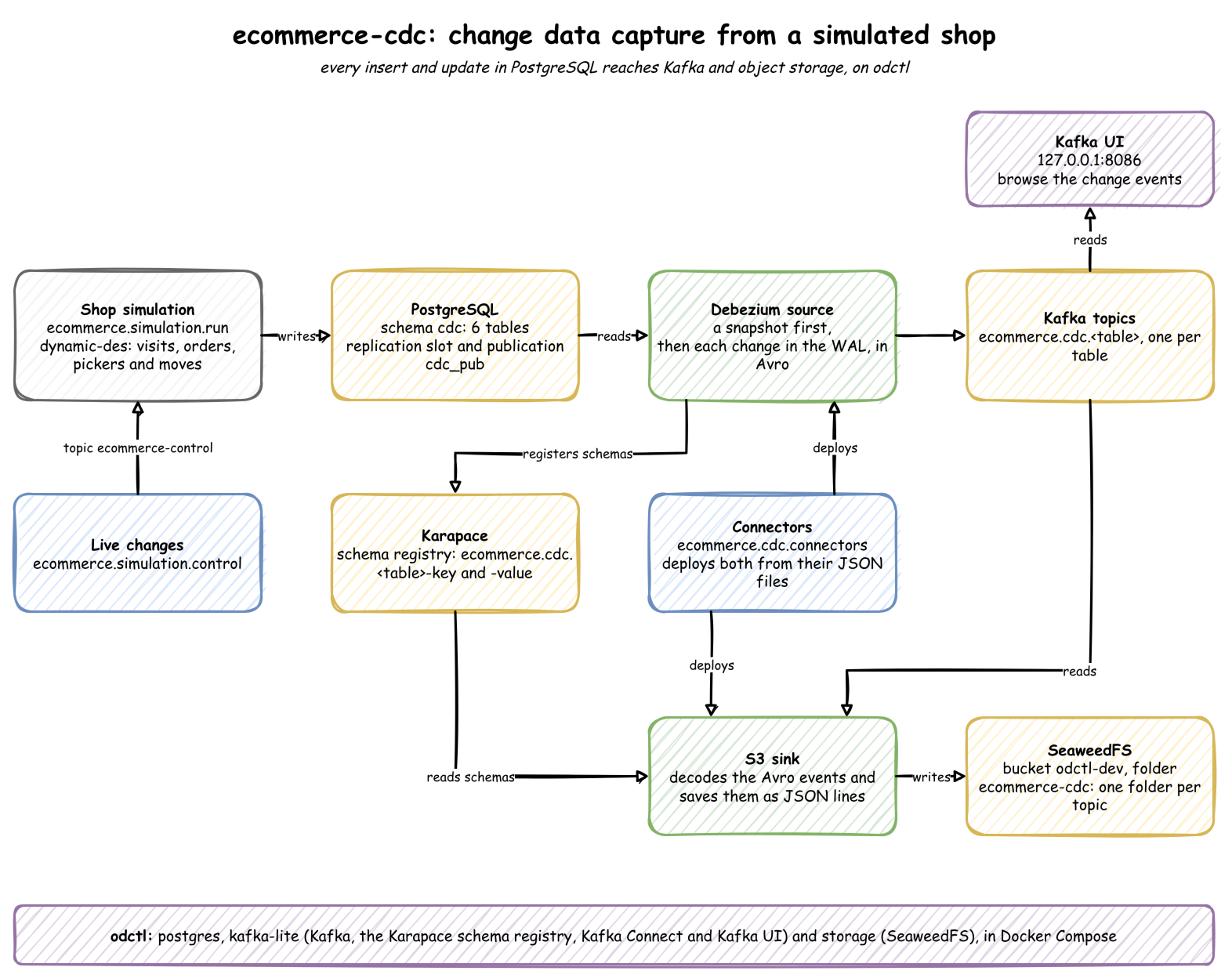
The data moves in one direction: a simulation writes to PostgreSQL, Debezium reads the changes into Kafka topics, and the S3 sink writes the topics to files in SeaweedFS.
- Change data capture means reading a database’s changes as a stream of events, instead of querying its tables again and again. PostgreSQL records every change in its write-ahead log (WAL) before it applies it, and CDC reads that log.
- Kafka stores streams of events in topics. A topic keeps its events in order, and any number of readers can read it.
- Kafka Connect runs connectors. A source connector copies data into Kafka, and a sink connector copies data out of it. You deploy a connector by sending its settings, as JSON, to Connect’s REST API.
- Debezium is a source connector for CDC. It first copies every existing row, which is called a snapshot. It then streams each new change from the WAL, and writes one topic per table.
- A replication slot is PostgreSQL’s record of how far a reader has got in the WAL. PostgreSQL keeps the part of the WAL the slot has not read yet, so Debezium can stop and carry on without losing a change.
- A publication names the tables whose changes PostgreSQL sends. odctl’s PostgreSQL has a publication,
cdc_pub, that covers every table in thecdcschema. - Aiven’s S3 sink is a sink connector. It reads the topics and writes their events to files in SeaweedFS, an object store with the same API as Amazon S3.
- desflow runs the simulation, a discrete-event model of the shop. desflow (documentation) is a Python library for simulations that stream their output.
The simulation writes six tables in PostgreSQL’s cdc schema:
| Table | Rows | Changes |
|---|---|---|
dist_centers | 10 distribution centres | inserted once |
products | 260 products | inserted once |
users | registered users | inserted, and updated when a user moves address |
orders | orders | inserted as Processing, then updated to Shipped, Delivered, Cancelled or Returned |
order_items | the products in each order | inserted, and updated with their order’s status |
events | page views in web sessions, including anonymous visitors | inserted only |
Setup
You need Docker (Docker Desktop, OrbStack or Docker Engine), uv and Python 3.13. Clone the repository and run every command from the project folder:
1git clone https://github.com/jaehyeon-kim/benchtop.git
2cd benchtop/ecommerce-cdc
3
4uv venv                             # create .venv
5source .venv/bin/activate           # activate it, in each new shell
6uv pip install -r requirements.txt
7
8odctl up postgres kafka-lite storage
odctl is a command line tool that starts a local data stack with Docker Compose. Its profiles start these services:
postgres: PostgreSQL, already set up for CDC. It runs withwal_level=logical, which makes the WAL hold enough detail for CDC. It also has the schemacdcwith the publicationcdc_pub.kafka-lite: one Kafka broker, Kafka Connect with the Debezium and Aiven S3 connectors, Karapace and Kafka UI. Karapace is a schema registry: it stores the schema of each topic’s messages, so a message carries only a short schema id.storage: SeaweedFS.
The web UIs:
- Kafka UI: http://127.0.0.1:8086, for the topics, their messages and the connectors
- SeaweedFS file browser: http://127.0.0.1:8889
Simulation Model
A discrete-event simulation (DES) moves a clock from one event to the next, such as a visitor arriving or an order being packed. Nothing happens between events, so the model only has to say what each event does and how long it is until the next one. Here the clock runs at the speed of real time.
The shop has three kinds of process. A process is a function that runs through simulated time and waits between its steps:
- Visitor: visitors arrive at random, about one a second. Each views the home page and one to four products, and spends a few seconds on each page. Six in ten are registered users. Three in ten buy: they view the cart, sign up first if they are new, and place an order of one to four products.
- Order: each order waits for one of the warehouse’s pickers. Three pickers pack orders, one at a time each. When orders arrive faster than they are packed, they queue. An order that waits longer than its customer’s patience, about two minutes, is cancelled. A packed order is shipped, delivered about a minute later, and one in ten is returned.
- Move: now and then a registered user moves to a new address.
desflow provides each part of this model:
| Part | desflow feature | Here |
|---|---|---|
| random arrivals | add_arrival, arrival_loop | visitors, and address moves |
| time spent on a step | add_service | a page view, packing, transit, patience and the time until a return |
| limited capacity | add_resource | the pickers, which make orders queue |
| chances | add_variable | a visitor is registered, a visitor buys, an order is returned |
| a process of its own | spawn | each visit and each order |
| live changes | the registry and KafkaIngress | any of the above, while it runs |
| writes | PostgresEgress | one per table, upserting on id |
Every parameter is in ecommerce/core/config.py. Each one is added to desflow’s registry, a store of named parameters that the model reads each time it draws a value:
 1SERVICES = {  # mean and standard deviation, in seconds, lognormal
 2    "page_view": (4.0, 2.0),  # time on a page before the next one
 3    # how long an order waits for a picker before it is cancelled
 4    "patience": (120.0, 60.0),
 5    "pick": (5.0, 2.0),  # a picker packs an order
 6    "transit": (60.0, 20.0),  # a shipped order reaches the customer
 7    "return_after": (60.0, 30.0),  # a returned order comes back after delivery
 8}
 9CHANCES = {  # shares of visitors or orders, from 0 to 1
10    "returning": 0.6,  # a visitor is a registered user
11    "buy": 0.3,  # a visitor buys at the end of the visit
12    "return": 0.1,  # a delivered order is returned
13}
14PICKERS, MAX_PICKERS = 3, 10  # warehouse pickers packing orders at once
The order process is in ecommerce/simulation/run.py. It asks for a picker and a patience timeout at once, and picker | _wait(ctx, "patience") resumes at whichever comes first. If the timeout comes first, the order is cancelled. Each status change is published with the same id as before:
 1def fulfil(
 2    ctx: SimulationContext, state: Shop, order: Order, items: list[OrderItem]
 3) -> Process:
 4    """One order: packed by a picker or cancelled, then shipped, delivered and maybe returned."""
 5    with ctx.get_resource("pickers").request() as picker:
 6        got = yield picker | _wait(ctx, "patience")
 7        if picker not in got:
 8            _publish(ctx, *shop.advance(order, items, "Cancelled", _now(ctx, state)))
 9            return
10        yield _wait(ctx, "pick")
11    order, items = shop.advance(order, items, "Shipped", _now(ctx, state))
12    _publish(ctx, order, items)
13    yield _wait(ctx, "transit")
14    order, items = shop.advance(order, items, "Delivered", _now(ctx, state))
15    _publish(ctx, order, items)
16    if _chance(ctx, "return"):
17        yield _wait(ctx, "return_after")
18        _publish(ctx, *shop.advance(order, items, "Returned", _now(ctx, state)))
The run function adds one PostgreSQL writer per table, each upserting on id. An upsert inserts a row, or updates it when a row with the same key exists. So a changed order reaches PostgreSQL as an update, and Debezium sees it as one. The same function adds the Kafka reader for live changes:
 1def run(minutes: float | None = None, seed: int | None = None) -> None:
 2    """
 3    Runs the shop in real time, writing every row to its table and reading live changes.
 4
 5    Args:
 6        minutes (float, optional): How long to run. None runs until interrupted.
 7        seed (int, optional): The seed for every random choice.
 8    """
 9    postgres.create_tables()
10    KafkaAdminConnector(KAFKA).create_topics([{"name": CONTROL_TOPIC}])
11    app = build(datetime.now(UTC), seed)
12    app.add_ingress(KafkaIngress(topic=CONTROL_TOPIC, bootstrap_servers=KAFKA))
13    app.with_batching(batch_size=4, flush_interval=1.0)  # a few rows a second per table
14    for table in TABLES.values():
15        app.add_egress(
16            PostgresEgress(DSN, table_name=table, upsert_keys=KEY),
17            when=lambda r, t=table: r["stream_type"] == "event" and r["key"] == t,
18        )
19    app.run(until=minutes * 60 if minutes else None)
Times are stored as ISO 8601 text in UTC. desflow publishes each row as JSON-friendly values, so a time reaches PostgreSQL as a string, and a timestamp column does not accept a string.
Step 1: Run the Simulation
1python -m ecommerce.simulation.run --minutes 16 # or leave out --minutes, and stop with Ctrl + C
It creates the six tables if they are missing, and writes the centres, the products and 100 users. It then runs in real time. With the default parameters it places about 20 orders a minute, and each order changes three or four times over the next few minutes. Its log shows the Kafka reader and one PostgreSQL writer per table:
2026-09-30 22:39:25,564 desflow.core.context Building SimulationContext for 'ecommerce'...
2026-09-30 22:39:25,565 desflow.core.context Simulation engine started.
2026-09-30 22:39:25,599 desflow.connectors.ingress.kafka Connected to Kafka Ingress topic: ecommerce-control
2026-09-30 22:39:25,966 desflow.connectors.egress.postgres PostgresEgress connected to dist_centers
2026-09-30 22:39:25,966 desflow.connectors.egress.postgres PostgresEgress connected to products
2026-09-30 22:39:25,966 desflow.connectors.egress.postgres PostgresEgress connected to events
2026-09-30 22:39:25,966 desflow.connectors.egress.postgres PostgresEgress connected to order_items
2026-09-30 22:39:25,966 desflow.connectors.egress.postgres PostgresEgress connected to orders
2026-09-30 22:39:25,967 desflow.connectors.egress.postgres PostgresEgress connected to users
Leave it running, and use a second terminal for the next steps.
Step 2: Deploy the Connectors
1python -m ecommerce.cdc.connectors
It sends two JSON files to Kafka Connect. Connect creates each connector, or updates it if it exists. The source connector’s settings are in ecommerce/cdc/source.json:
 1{
 2  "connector.class": "io.debezium.connector.postgresql.PostgresConnector",
 3  "tasks.max": "1",
 4  "database.hostname": "postgres",
 5  "database.port": "5432",
 6  "database.user": "user",
 7  "database.password": "password",
 8  "database.dbname": "odctl",
 9  "plugin.name": "pgoutput",
10  "publication.name": "cdc_pub",
11  "publication.autocreate.mode": "disabled",
12  "slot.name": "ecommerce_cdc",
13  "table.include.list": "cdc.users,cdc.products,cdc.dist_centers,cdc.orders,cdc.order_items,cdc.events",
14  "topic.prefix": "ecommerce",
15  "snapshot.mode": "initial",
16  "key.converter": "io.confluent.connect.avro.AvroConverter",
17  "key.converter.schema.registry.url": "http://karapace:8081",
18  "value.converter": "io.confluent.connect.avro.AvroConverter",
19  "value.converter.schema.registry.url": "http://karapace:8081"
20}
These settings tell Debezium to:
- read the database
odctlwith PostgreSQL’s built-inpgoutputdecoder; - use the existing publication
cdc_pub, and never create one (publication.autocreate.modeisdisabled); - keep its place in the WAL in its own replication slot,
ecommerce_cdc; - capture only this project’s six tables, and name the topics
ecommerce.cdc.<table>; - take a snapshot of the existing rows first (
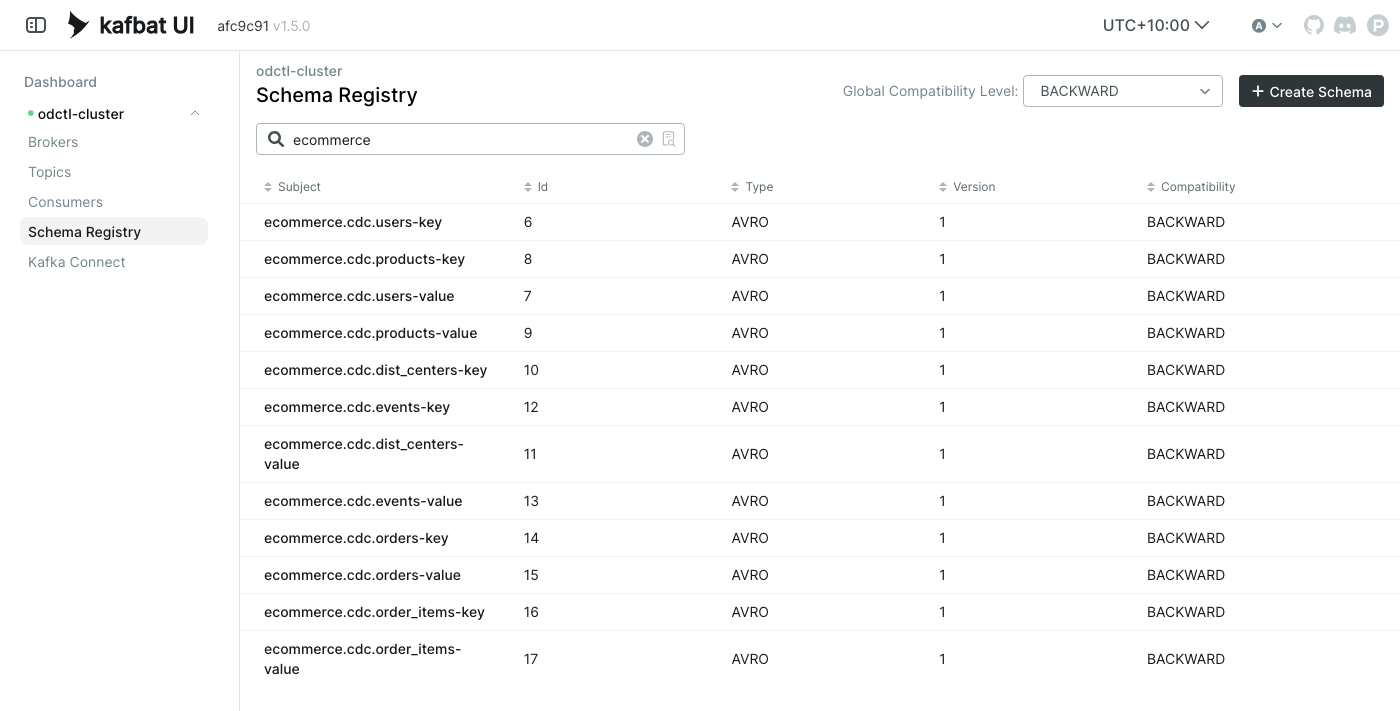
snapshot.modeisinitial); - write Avro, a compact binary format, with each table’s key and value schemas registered in Karapace as the subjects
ecommerce.cdc.<table>-keyandecommerce.cdc.<table>-value.
The sink connector’s settings are in ecommerce/cdc/s3-sink.json:
 1{
 2  "connector.class": "io.aiven.kafka.connect.s3.AivenKafkaConnectS3SinkConnector",
 3  "tasks.max": "1",
 4  "topics.regex": "ecommerce\\.cdc\\..*",
 5  "consumer.override.metadata.max.age.ms": "30000",
 6  "aws.access.key.id": "user",
 7  "aws.secret.access.key": "password",
 8  "aws.s3.endpoint": "http://seaweed:8333",
 9  "aws.s3.region": "us-east-1",
10  "aws.s3.bucket.name": "odctl-dev",
11  "file.name.template": "ecommerce-cdc/{{topic}}/{{partition}}-{{start_offset}}.jsonl",
12  "file.compression.type": "none",
13  "format.output.type": "jsonl",
14  "format.output.fields": "key,value,offset,timestamp",
15  "format.output.fields.value.encoding": "none",
16  "key.converter": "io.confluent.connect.avro.AvroConverter",
17  "key.converter.schema.registry.url": "http://karapace:8081",
18  "value.converter": "io.confluent.connect.avro.AvroConverter",
19  "value.converter.schema.registry.url": "http://karapace:8081"
20}
It reads every topic whose name matches ecommerce.cdc.*, and decodes each message with its schema from Karapace. It writes JSON lines files to the bucket odctl-dev, under ecommerce-cdc/<topic>/, with one change event on each line. The sink writes a file each time Connect commits its offsets, which record how far the sink has read. That happens about once a minute. The orders topic is created only when the first order is placed, after the sink has started. The sink subscribes by a topic pattern, and a Kafka consumer looks for new topics only when it refreshes its list of topics, every five minutes by default. consumer.override.metadata.max.age.ms makes the sink’s consumer refresh it every 30 seconds instead. In a test run, the first orders file appeared after about a minute.
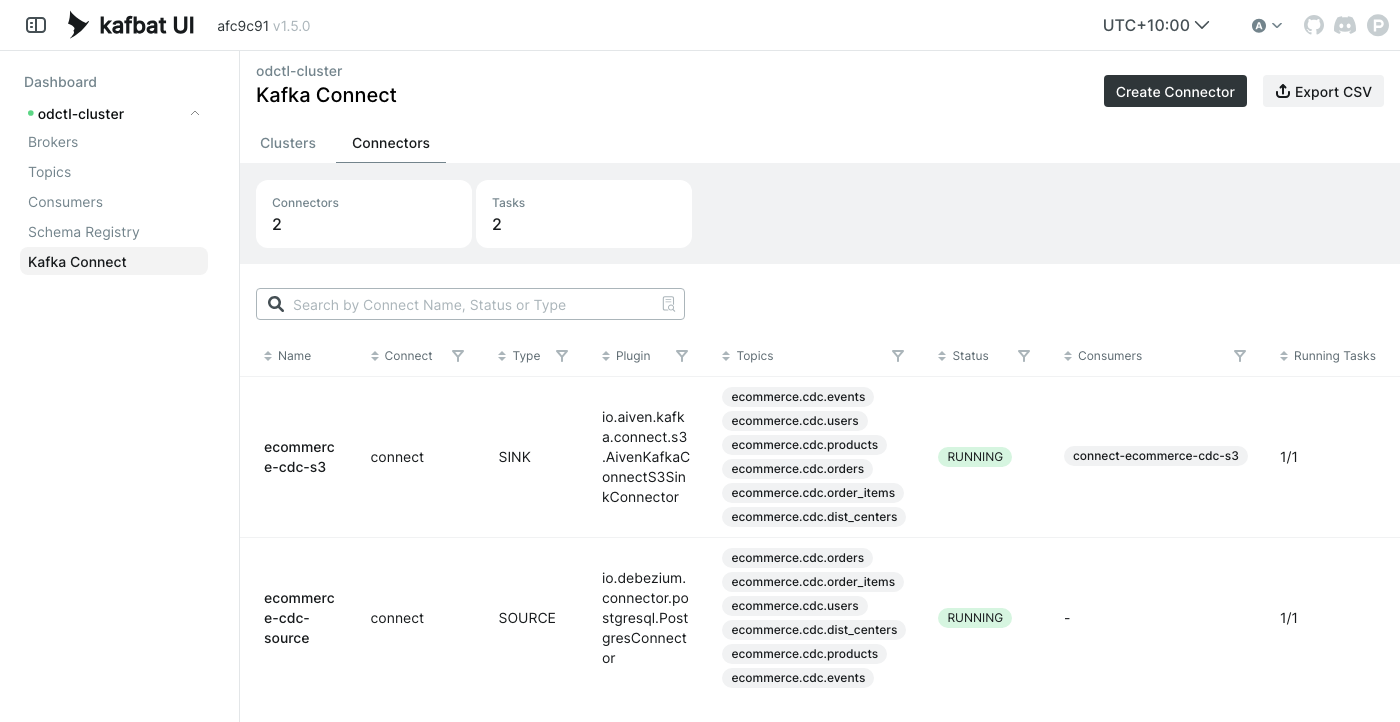
Each connector’s status should show RUNNING for the connector and its task:
1curl -s http://127.0.0.1:8083/connectors/ecommerce-cdc-source/status
2curl -s http://127.0.0.1:8083/connectors/ecommerce-cdc-s3/status
Kafka UI lists both connectors under Kafka Connect.
Step 3: Look at the Changes
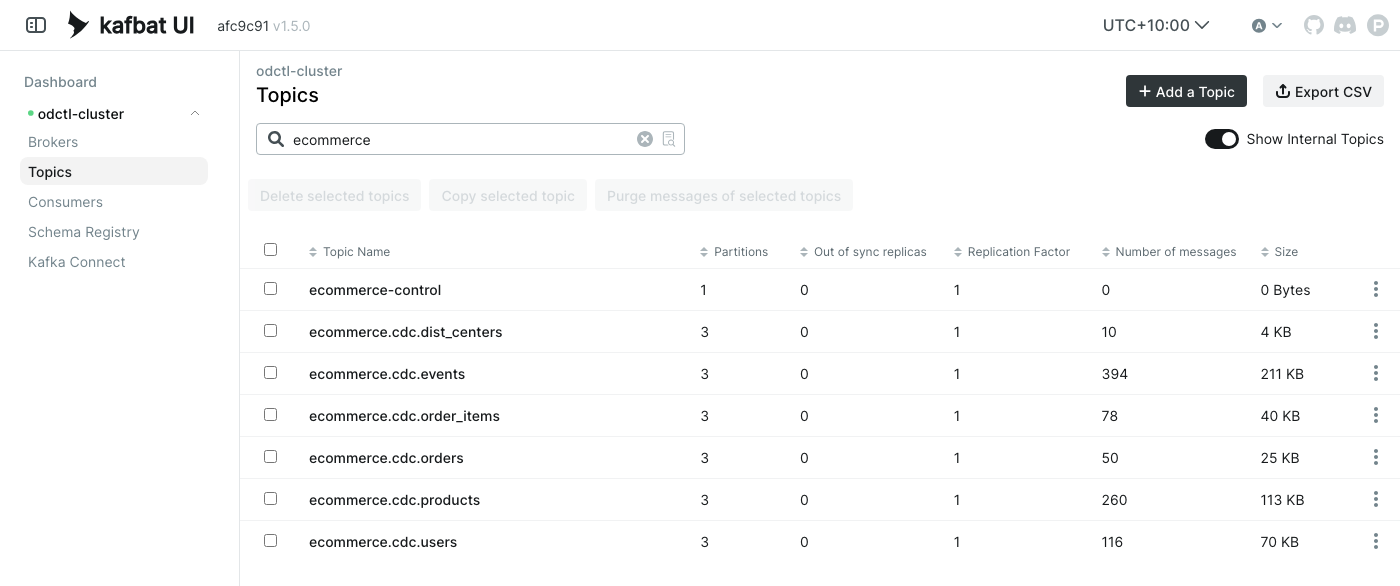
Debezium creates one topic per table. The simulation creates ecommerce-control, which carries parameter changes. The topics after a run:
ecommerce-control
ecommerce.cdc.dist_centers
ecommerce.cdc.events
ecommerce.cdc.order_items
ecommerce.cdc.orders
ecommerce.cdc.products
ecommerce.cdc.users
In Kafka UI, open a topic such as ecommerce.cdc.orders. Each message is one change, and its op field says which kind:
op | Meaning |
|---|---|
r | a row read in the first snapshot |
c | a new row (create) |
u | an update: after holds the row’s new values |
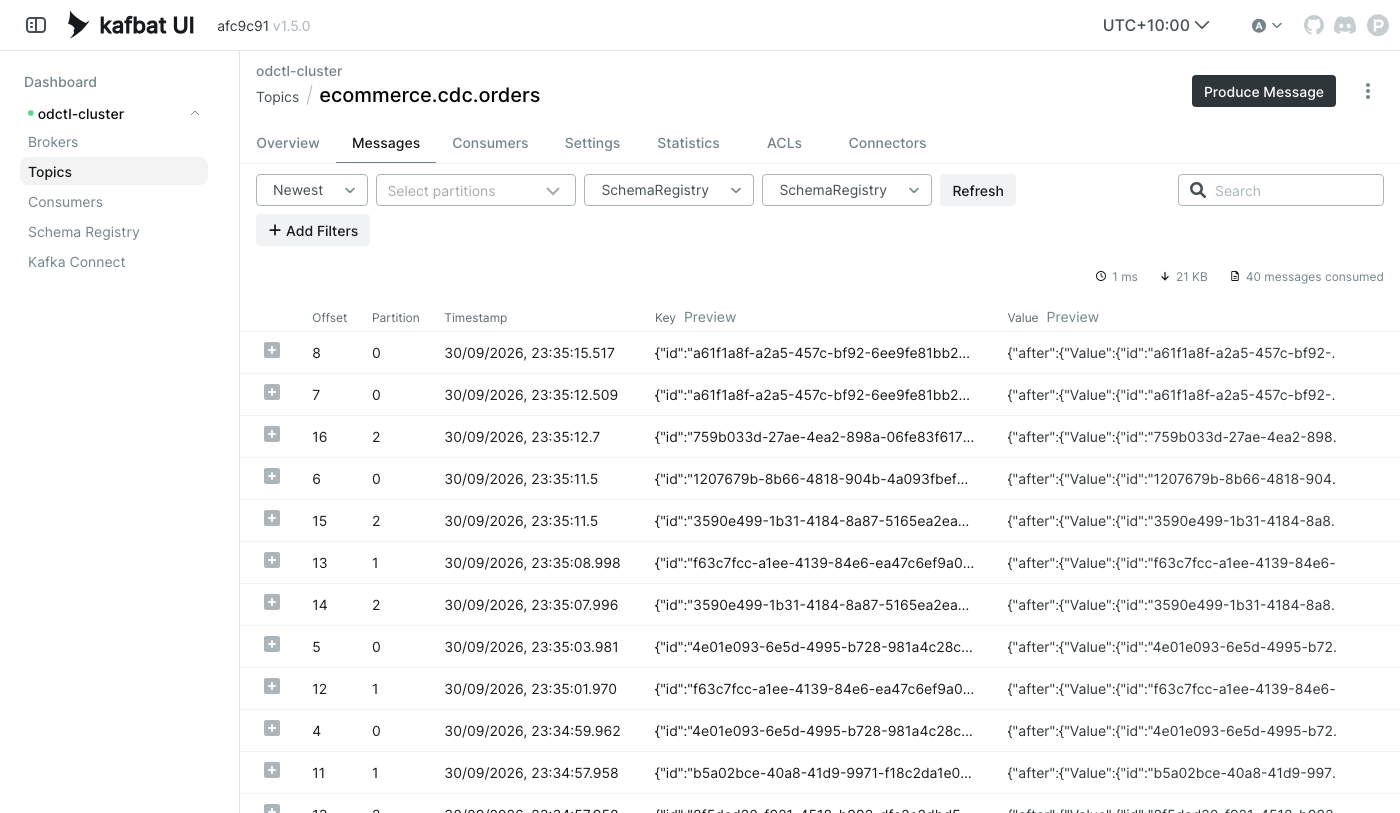
This update shows an order moving from Processing to Shipped, with the time it shipped. source records where the change came from: the table, the transaction and its position in the WAL (lsn).
 1{
 2  "before": null,
 3  "after": {
 4    "id": "23b2d4a9-360d-4973-a6da-fd1cc394ca10",
 5    "user_id": "862dd089-c746-4127-89d7-db4fcab59a2e",
 6    "status": "Shipped",
 7    "num_of_items": 1,
 8    "created_at": "2026-09-30T13:38:56+00:00",
 9    "updated_at": "2026-09-30T13:39:01+00:00",
10    "shipped_at": "2026-09-30T13:39:01+00:00",
11    "delivered_at": null,
12    "cancelled_at": null,
13    "returned_at": null
14  },
15  "source": {
16    "version": "3.5.1.Final",
17    "connector": "postgresql",
18    "name": "ecommerce",
19    "ts_ms": 1790775541329,
20    "snapshot": "false",
21    "db": "odctl",
22    "sequence": "[\"161004032\",\"161004832\"]",
23    "ts_us": 1790775541329358,
24    "ts_ns": 1790775541329358000,
25    "schema": "cdc",
26    "table": "orders",
27    "txId": 45922,
28    "lsn": 161004832,
29    "xmin": null,
30    "origin": null,
31    "origin_lsn": null
32  },
33  "transaction": null,
34  "op": "u",
35  "ts_ms": 1790775541830,
36  "ts_us": 1790775541830602,
37  "ts_ns": 1790775541830602065
38}
before is null for updates, because PostgreSQL logs only the new row by default.
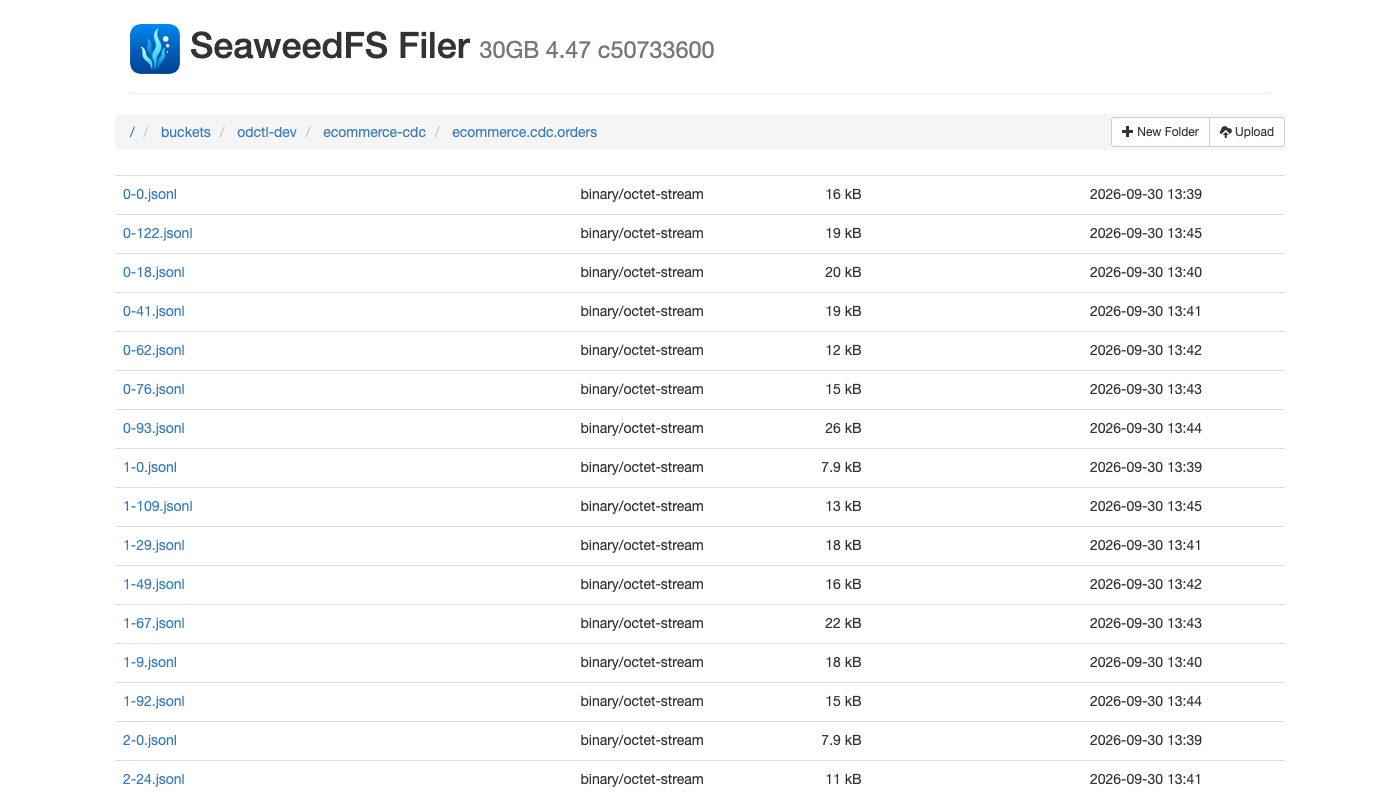
In the SeaweedFS file browser, go to odctl-dev/ecommerce-cdc/. There is a folder per topic. Each file holds the change events of one partition, one per line. The first line of the first orders file, 0-0.jsonl, is a create event. The sink adds the message’s key, offset and time around the change event:
 1{
 2  "offset": 0,
 3  "value": {
 4    "before": null,
 5    "after": {
 6      "id": "23b2d4a9-360d-4973-a6da-fd1cc394ca10",
 7      "user_id": "862dd089-c746-4127-89d7-db4fcab59a2e",
 8      "status": "Processing",
 9      "num_of_items": 1,
10      "created_at": "2026-09-30T13:38:56+00:00",
11      "updated_at": "2026-09-30T13:38:56+00:00",
12      "shipped_at": null,
13      "delivered_at": null,
14      "cancelled_at": null,
15      "returned_at": null
16    },
17    "op": "c"
18  },
19  "key": {
20    "id": "23b2d4a9-360d-4973-a6da-fd1cc394ca10"
21  },
22  "timestamp": "2026-09-30T13:38:57.992Z"
23}
The line is shown across several lines here. source, transaction and the ts_* times are left out of value, because they have the same fields as the change event above.
Step 4: Change the Simulation While It Runs
The simulation reads parameter changes from the Kafka topic ecommerce-control, through desflow’s KafkaIngress. It uses each new value from the next time it draws one. control.py sends a change. With the simulation and both connectors running, cut the pickers from three to one:
1python -m ecommerce.simulation.control ecommerce.resources.pickers.current_cap 1
Sent ecommerce.resources.pickers.current_cap = 1.0 to ecommerce-control
One picker packs about 12 orders a minute, which is fewer than the 20 or so placed, so the queue grows. The Shipped updates in ecommerce.cdc.orders fall from about 20 a minute to about 11. Cancelled updates appear as customers’ patience runs out, which never happens with three pickers. In one run, the change was sent at 12:45:02 UTC. These are the changes per minute in ecommerce.cdc.orders, counted by the minute of each Debezium event:
| Minute (UTC) | Pickers | New orders | Shipped | Cancelled |
|---|---|---|---|---|
| 12:40 | 3 | 22 | 22 | 0 |
| 12:41 | 3 | 18 | 18 | 0 |
| 12:42 | 3 | 23 | 22 | 0 |
| 12:43 | 3 | 20 | 21 | 0 |
| 12:44 | 3 | 27 | 27 | 0 |
| 12:45 | 1 from 12:45:02 | 22 | 13 | 0 |
| 12:46 | 1 | 18 | 10 | 3 |
| 12:47 | 1 | 10 | 13 | 6 |
| 12:48 | 1 | 20 | 10 | 0 |
| 12:49 | 1 | 16 | 13 | 4 |
| 12:50 | 1 | 24 | 12 | 7 |
| 12:51 | 1 | 16 | 9 | 4 |
| 12:52 | 1 | 17 | 12 | 10 |
| 12:53 | 1 | 13 | 10 | 8 |
Other parameters work the same way, such as ecommerce.arrival.visitor.rate for visitors a second, or ecommerce.variables.buy for the chance a visitor buys. python -m ecommerce.simulation.control --help lists them all. A change lasts until the simulation stops.
Clean Up
1python -m ecommerce.stores.cleanup
It removes only this project’s objects, and keeps the services running:
- Connectors: it stops both and deletes their stored offsets, so a new source connector takes a fresh snapshot. It then deletes them.
- Replication slot: it drops
ecommerce_cdc. PostgreSQL keeps the WAL for an unused slot forever, so a slot left behind makes the WAL grow without limit. - Tables: it drops the six tables in
cdc. - Kafka: it deletes the topics starting with
ecommerce., andecommerce-control. - SeaweedFS: it deletes the files under
odctl-dev/ecommerce-cdc/.
In a test run, the first clean-up deleted both connectors, the seven topics and 45 files. A second run found nothing left to delete, so it is safe to run twice.
To stop the services and delete their data:
1odctl down --all --volumes          # answer y; --volumes also deletes the data
2deactivate
3rm -rf .venv
Related posts
- Change Data Capture (CDC) Local Development with PostgreSQL, Debezium Server and Pub/Sub Emulator - change data capture from PostgreSQL with Debezium Server and a Pub/Sub emulator instead of Kafka Connect
- Data Lake Demo using Change Data Capture (CDC) on AWS - Part 1 Local Development - an earlier local setup with Debezium and an S3 sink connector on Kafka Connect, the start of a data lake series
- Defining Data-Streaming Simulations in YAML, Without Writing Python - the simulation library that runs the shop, now configurable in plain YAML


Comments