Connectors
Connectors are the integration gateways of desflow. They handle the communication flow between the internal simulation registry/event queue and external systems.
Each snippet below attaches a connector to a SimulationContext called app with add_ingress or add_egress. The low-level API passes the same objects to env.setup_ingress and env.setup_egress, and a YAML blueprint lists them under ingress and egress.
Four ingress connectors bring parameter changes into the registry, and seven egress connectors write records out:
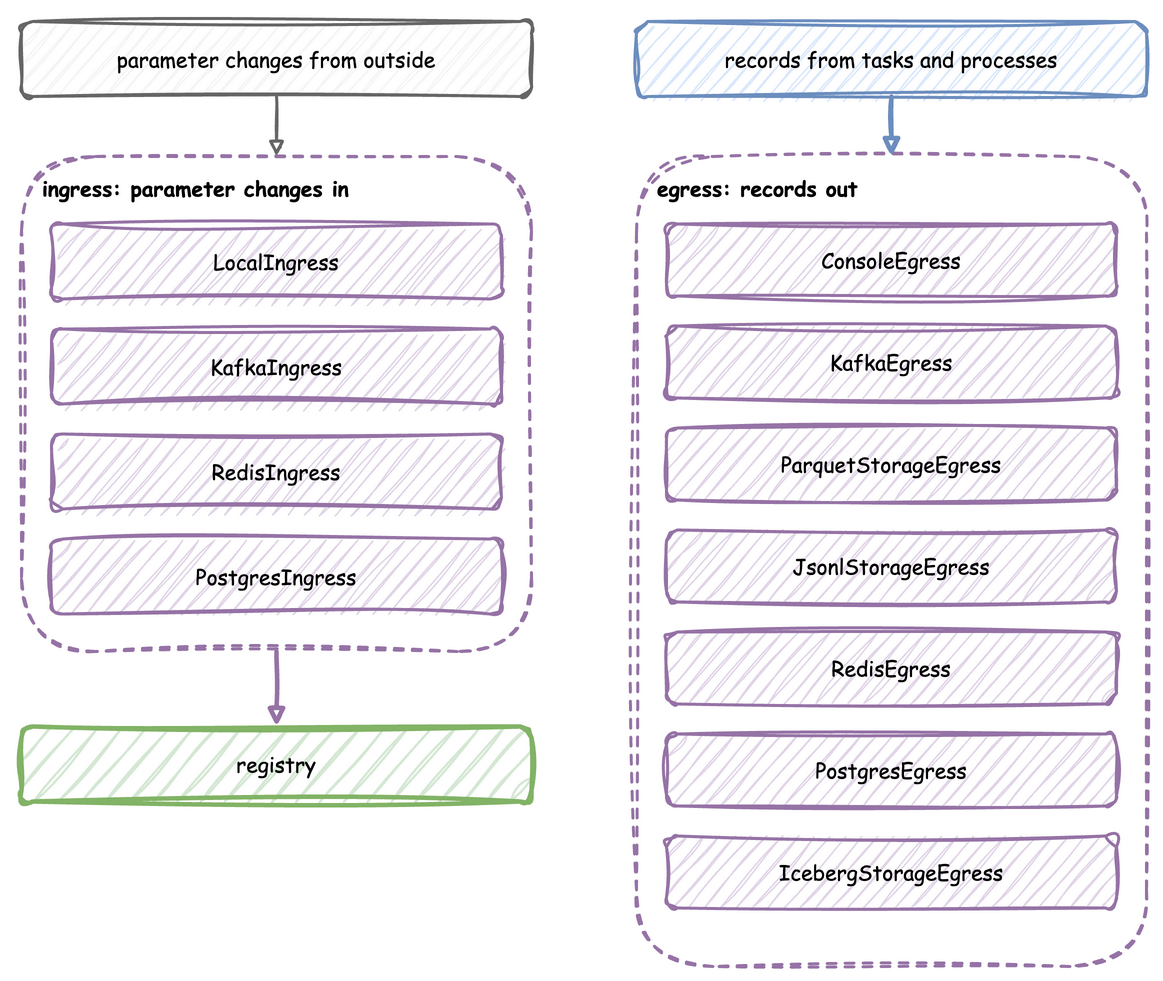
Ingress Connectors (Inputs)
Ingress connectors listen to external sources and dynamically apply modifications to the simulation registry during runtime. Live Parameters explains how an update reaches the simulation.
Local Ingress (LocalIngress)
Applies scheduled overrides after set delays in wall-clock seconds from the start of the run. It waits with asyncio.sleep, so the delays do not follow simulation time: at factor=0 the run can finish before the first change, and at any other factor the simulation time of each change varies a little from run to run. For changes at exact simulation times, use a YAML scenario.
# 10 wall-clock seconds after the start, set the packers capacity to 3
app.add_ingress(
    LocalIngress(schedule=[(10.0, "Shop.resources.packers.current_cap", 3)])
)
Kafka Ingress (KafkaIngress)
Spawns a consumer in the background thread that listens to a Kafka control topic. External admin tools can write a command payload to the topic (such as changing the number of packers), and the connector automatically applies the change to the Registry in real time. Each message is a JSON object with path_id and value, such as {"path_id": "Shop.resources.packers.current_cap", "value": 3}.
# Reads {"path_id": ..., "value": ...} messages from the sim-config topic
app.add_ingress(KafkaIngress(topic="sim-config", bootstrap_servers="localhost:9092"))
Redis Ingress (RedisIngress)
Subscribes to a Redis Pub/Sub channel. Each message is a JSON object with param_path and param_value, such as {"param_path": "Shop.arrival.orders.rate", "param_value": 10.0}.
# Reads {"param_path": ..., "param_value": ...} messages from a Pub/Sub channel
app.add_ingress(
    RedisIngress(
        "redis://user:password@localhost:6379/0", channel_name="simulation_params"
    )
)
PostgreSQL Ingress (PostgresIngress)
Polls a table of parameter updates, every 2 seconds by default (poll_interval). At start it replays the latest applied value of each path, so a restarted simulation resumes from the last settings. It then applies every row whose is_applied is FALSE and marks it TRUE, so the table keeps the history of every change. The connector creates the table if it is missing.
# Applies new rows of simulation_params, checking every 2 seconds
app.add_ingress(
    PostgresIngress(
        "postgresql://user:password@localhost:5432/odctl",
        table_name="simulation_params",
        poll_interval=2.0,
    )
)
Egress Connectors (Outputs)
Egress connectors consume the simulation's event stream, serialize payloads, and dispatch them to downstream consumers. Records and Telemetry shows the records every egress receives, and Batching and Delivery explains how they reach each one.
Console Egress (ConsoleEgress)
Prints formatted telemetry and event payloads to the system logger.
Kafka Egress (KafkaEgress)
Streams telemetry and events in real time to designated Kafka topics.
app.add_egress(
    KafkaEgress(
        bootstrap_servers="localhost:9092",
        event_topic="sim-events",
        telemetry_topic="sim-telemetry",
    )
)
Storage Egress (ParquetStorageEgress / JsonlStorageEgress)
Writes records to chunked files using PyArrow: compressed Parquet, or JSON Lines. Writes to local directories and S3-compatible storage such as AWS S3 or SeaweedFS.
# Parquet files on the local disk
app.add_egress(ParquetStorageEgress(default_path="output/events"))

# JSON Lines files on S3-compatible storage, here SeaweedFS from odctl
seaweedfs = fs.S3FileSystem(
    access_key="user",
    secret_key="password",
    endpoint_override="127.0.0.1:8333",
    scheme="http",
)
app.add_egress(
    JsonlStorageEgress(default_path="warehouse/events", filesystem=seaweedfs)
)
Redis Egress (RedisEgress)
Appends each record to a Redis Stream with XADD, as one payload field holding the record as JSON. A __stream__ key inside the record's value picks the stream, and records without one go to stream_name.
# XADD to the events stream, unless a record's value names another in __stream__
app.add_egress(
    RedisEgress("redis://user:password@localhost:6379/0", stream_name="events")
)
PostgreSQL Egress (PostgresEgress)
Inserts records into a PostgreSQL table in batches, through asyncpg. Only records whose value is a dictionary are written. The record's sim_ts, timestamp, and its key (as event_id) or path_id are merged into the value, and keys with no matching column are dropped. A __table__ key in the value sends the record only to the instance whose table_name matches, which is how one stream fills several tables.
dsn = "postgresql://user:password@localhost:5432/odctl"
app.add_egress(PostgresEgress(dsn, table_name="orders"))
By default a record whose key already exists is skipped. Pass upsert_keys to update that row instead, for simulations that change rows they wrote earlier, such as an order moving from processing to shipped:
app.add_egress(PostgresEgress(dsn, table_name="orders", upsert_keys=["order_id"]))
The key columns need a unique index or constraint. An update sets only the columns the record carries, so a record with just the key and a new status leaves the other columns as they were. Within one flush, the last record for a key wins.
Iceberg Egress (IcebergStorageEgress)
Appends records into an Apache Iceberg table through an Iceberg REST catalog the caller supplies. One flush is one commit, which is why this provider wants a large batch_size of its own: every commit writes a manifest, a manifest list and a new metadata.json, and query planning degrades as snapshots accumulate.
catalog = RestCatalog(
    "odctl",
    uri="http://localhost:8181",
    warehouse="s3://warehouse/",
    **{
        "s3.endpoint": "http://localhost:8333",
        "s3.access-key-id": "user",
        "s3.secret-access-key": "password",
        "s3.region": "us-east-1",
    },
)
# One commit per flush, so this sink gets a large batch of its own
app.add_egress(
    IcebergStorageEgress(catalog=catalog, default_table="sim.events"),
    batch_size=200_000,
)
Pass upsert_keys to upsert a table on its key columns instead of appending, so rerunning a seeded simulation over the same window does not duplicate rows:
app.add_egress(
    IcebergStorageEgress(
        catalog=catalog,
        default_table="sim.orders",
        upsert_keys={"sim.orders": ["order_id"]},
    ),
    batch_size=200_000,
)
An upsert reads the matching rows before writing, so it is slower than an append, and it never deletes rows. It replaces the whole row, so every record must carry every column. The option needs pyiceberg 0.9.0 or later. Within one flush, the last record for a key wins. An upsert flush is still one commit, but it can add up to three snapshots.