Runnable Examples
Each example is a complete model that you can download with desflow examples get and run, as Get an Example shows. Each is written three ways: as a YAML blueprint, with the builder API and with the low-level API. Its page shows the versions in tabs.
| Example | What it covers |
|---|---|
| Local Simulation | prints events and telemetry, with no container |
| Kafka Digital Twin | takes updates from Kafka and publishes events and telemetry to Kafka |
| Fast-Forward to Parquet | data generated unpaced at factor=0.0: a week written to Parquet |
| Fast-Forward to Iceberg | data generated unpaced at factor=0.0: a day appended to an Iceberg table |
| PostgreSQL | writes orders to PostgreSQL and takes updates from a table |
| Redis | writes to a Redis Stream and takes updates from Pub/Sub |
| Parquet History, Kafka Live | backdated history to Parquet, then live to Kafka |
| Related Records | orders and their line items, in two PostgreSQL tables |
Each example page says how to download and run it, and which odctl profile from Services for the Examples it needs. desflow examples get prints the extra an example needs, and pip install "desflow[all]" installs every extra, so each example runs once its profile is up.
desflow examples list prints every example in the terminal, with the odctl profile each one needs. The list also has the shop examples, such as stock and breakdowns, which are shown on the page that teaches their feature. desflow examples get NAME downloads the files of the release you installed into NAME/yaml/, NAME/builder/ and NAME/low-level/. --api keeps one version, --dest downloads into another folder, --ref names another tag or branch, such as main, and --force replaces files that are already there:
The second command writes work/local/yaml/local.yaml.
Services for the Examples
Every example that needs a broker, a database or an object store gets it from odctl, a separate CLI that manages curated Docker Compose stacks. Install it once:
odctl list -d shows every profile and the ports it publishes. The examples here use five of them: kafka-lite, postgres, valkey, storage and catalog.
Starting a Profile
Each example needs at most one odctl profile. Start the profile before you run the example, and stop it afterwards:
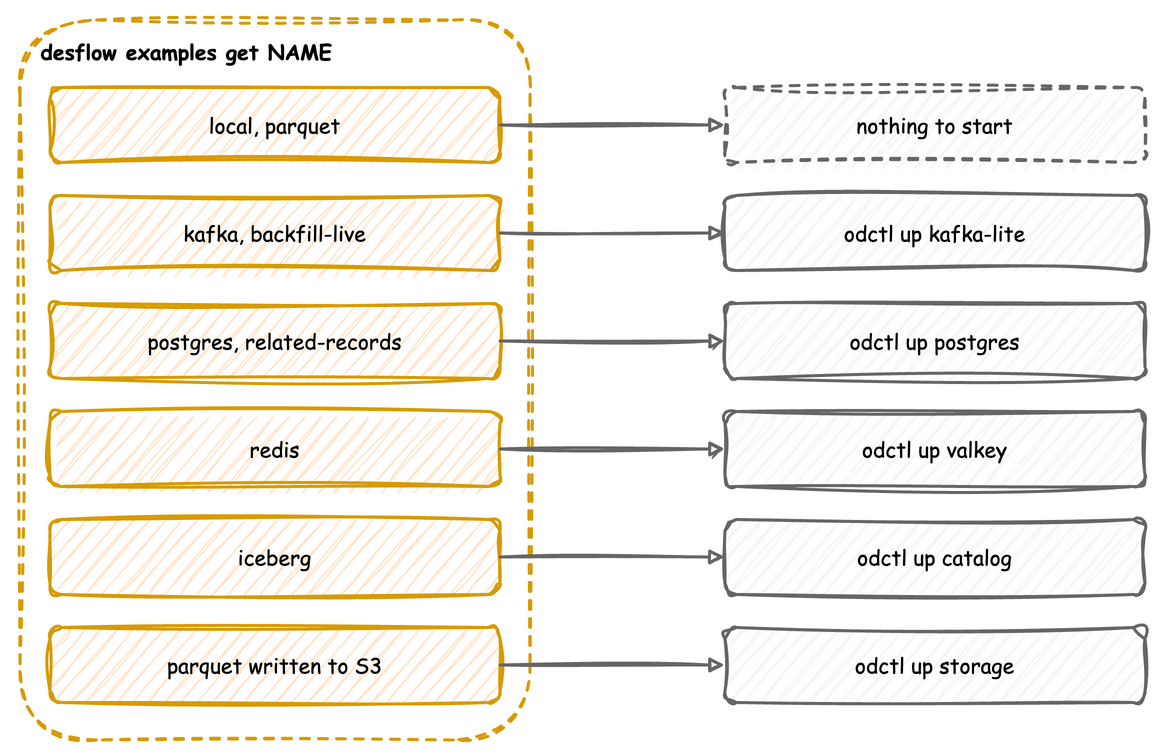
| Example | Start | Stop |
|---|---|---|
every example that desflow examples marks (no service), such as local, parquet and stock |
nothing needed | |
| kafka, backfill-live | odctl up kafka-lite |
odctl down kafka-lite --volumes |
| postgres, related-records | odctl up postgres |
odctl down postgres --volumes |
| redis | odctl up valkey |
odctl down valkey --volumes |
parquet with PARQUET_FILESYSTEM=s3 |
odctl up storage |
odctl down storage --volumes |
| iceberg | odctl up catalog |
odctl down catalog --volumes |
An example's YAML version needs the same profile as its builder version: desflow examples get <name> prints the profile with the run command.
The Kafka and Redis profiles are not named after their service. odctl's one-broker Kafka profile is kafka-lite and its three-broker Kafka profile is kafka-full. odctl runs Valkey in place of Redis, so its Redis profile is valkey. The Kafka examples run on either Kafka profile, because both publish a broker at 127.0.0.1:9092.
Endpoints These Profiles Publish
These are the addresses the examples use. Every profile publishes on your machine only, on 127.0.0.1. Use that address rather than localhost, which macOS resolves to the IPv6 address ::1 first, where nothing listens.
| Profile | Service | Address the examples use |
|---|---|---|
kafka-lite |
Kafka, one broker, with the Karapace schema registry | 127.0.0.1:9092; schema registry http://127.0.0.1:8081 |
kafka-full |
Kafka, three brokers, with the same schema registry | 127.0.0.1:9092,127.0.0.1:9093,127.0.0.1:9094; schema registry http://127.0.0.1:8081 |
postgres |
PostgreSQL, database odctl |
postgresql://user:password@127.0.0.1:5432/odctl |
valkey |
Valkey (Redis protocol) | redis://user:password@127.0.0.1:6379/0 |
storage |
S3-compatible object store, bucket odctl-dev |
http://127.0.0.1:8333, access key user, secret key password |
catalog |
Iceberg REST catalog, warehouse s3://warehouse/ |
http://127.0.0.1:8181 |
odctl list -d shows every port a profile publishes.