Builder API
The SimulationContext acts as the entry point and configuration builder for standard desflow simulations. It implements the Builder Pattern to construct the simulation environment and register resources, statistical samplers, and ingress/egress connectors. First Simulation builds a first shop this way, in its Builder tabs; this page lists every builder call, with an example of each.
Builder Lifecycle
Creating a simulation with SimulationContext follows a strict two-phase lifecycle to guarantee thread safety and determinism:
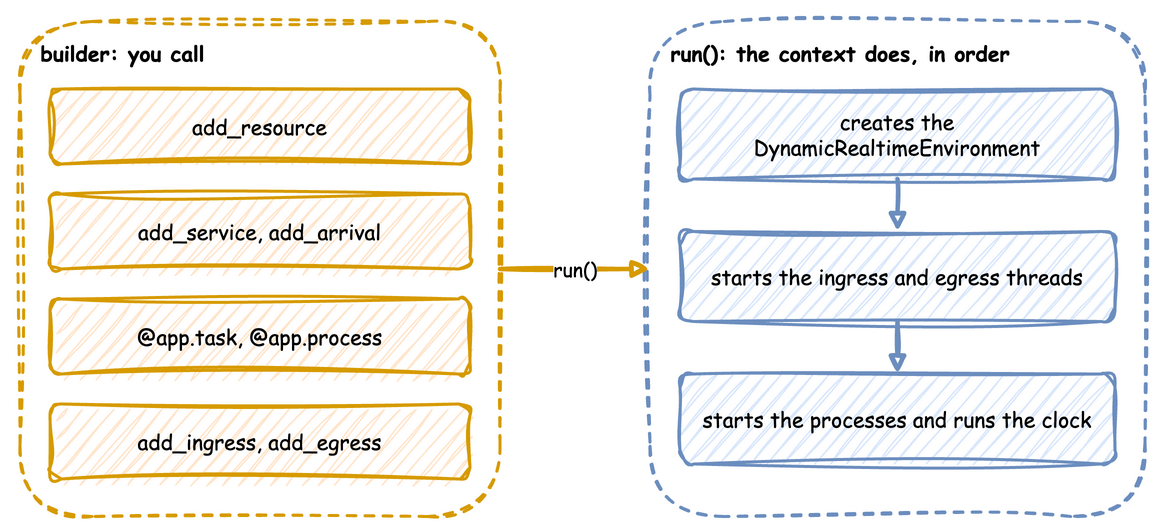
- Builder Phase (Pre-Compilation): You register resources, services, and connectors. Everything is held as passive configuration data structures (
SimParameter,DistributionConfig, etc.) in memory. - Compilation & Execution Phase (Post-Compilation): The moment you call
app.run(...), the builder compiles the configuration. It instantiates theDynamicRealtimeEnvironment, boots background network connector threads, and starts the SimPy event loop.
Architectural Guarantee: You cannot call runtime helpers like
context.spawn(),context.get_resource(), orcontext.envduring the Builder Phase. Attempting to do so will raise aRuntimeError. This prevents partial state leaks and guarantees that the environment clock is strictly controlled.
Builder API Reference
The fluent builder API allows chaining configurations:
Resource Configuration
.add_resource(name, current_cap, max_cap): Stages a discrete token-based resource (such as packers or packing benches)..add_container(name, current_cap, max_cap): Stages a continuous container (such as a stock of boxes or a battery charge level)..add_variable(name, value): Stages generic variables or physical parameters (such as a conveyor speed).
app.add_resource("packers", current_cap=2, max_cap=5)  # 2 packers now, room for 5
app.add_container("boxes", current_cap=100.0, max_cap=200.0)  # boxes in stock
app.add_variable("conveyor_speed", 1.5)  # any other live value
Clock and Pacing
SimulationContext(sim_id, factor=1.0, random_seed=None, logical_start_time=None):factorsets the pacing (0.0 runs unpaced),random_seedseeds the sharedSampler, andlogical_start_timesets the instant that simulation time 0 maps to in every record'stimestamp.SimulationContext(..., go_live_at): Logical instant, a datetime on the same clock aslogical_start_time, at whichfactorgives way to real-time pacing. One run can therefore backfill unpaced and then tail live. See Backfill Then Go Live in One Run.
app = SimulationContext(
    sim_id="Shop",
    factor=0.0,  # 0.0 unpaced, 1.0 real time
    random_seed=42,  # the same draws on every run
    logical_start_time=datetime(2026, 10, 1, 9, 0),  # what simulation time 0 is
)
Statistical Profiles
.add_arrival(name, dist, rate, mean, std, low, value): Configures an inter-arrival time distribution..add_service(name, dist, mean, std, rate, low, value): Configures a task processing duration distribution.- Each
distreads only its own parameters, and an invalid value raisesValueErrorhere, so a mistake fails before the run. YAML Blueprints lists the distributions and their rules.
app.add_arrival("orders", dist="exponential", rate=0.5)  # an order every 2 s on average
app.add_service("packing", dist="truncated_normal", mean=3.0, std=1.0, low=0.5)
app.add_service("inspection", dist="constant", value=0.5)
Decorators
@app.task(service_id, resource_id): Wraps a function into a task that emitsqueued, waits for the resource, emitsstarted, waits a time sampled from the service, and emits the finished event. The finished event's value is exactly the dictionary the function returns, so returnstatusorpath_idyourself if consumers need them.@app.arrival_loop(arrival_id): Starts a generator function with the context when the run starts, typically a loop overcontext.wait_for_arrival(arrival_id).@app.telemetry_loop(interval): Calls a function with the context everyintervalsimulation seconds.
@app.task(service_id="packing", resource_id="packers")
def pack(order_id: int):
    # The finished event's value is exactly this dictionary
    return {"order_id": order_id, "status": "packed"}


@app.arrival_loop("orders")
def orders(context: SimulationContext):
    order_id = 0
    while True:
        yield context.wait_for_arrival("orders")
        context.spawn(pack(order_id))
        order_id += 1


@app.telemetry_loop(interval=5.0)
def report(context: SimulationContext):
    # Publishes Shop.packers.in_use every 5 simulation seconds
    context.publish("packers.in_use", context.get_resource("packers").in_use)
Processes
.add_process(func, **kwargs): Starts a generator function when the run starts, called asfunc(context, **kwargs). Use it for a process that is not an arrival or telemetry loop, such as a drift engine. It is the builder form ofcontext.spawn(), which only works once the run has started..compile_parameters(): Returns theSimParameterthatrun()registers, so the registry paths a configuration creates can be checked before the run. Registry paths lists them.
def speed_drift(context: SimulationContext, step: float):
    """Raises the conveyor speed a little every 10 simulation seconds."""
    path = "Shop.variables.conveyor_speed"
    while True:
        yield context.env.timeout(10.0)
        speed = context.env.registry.get(path).value
        context.env.registry.update(path, speed + step)


app.add_process(speed_drift, step=0.1)
paths = app.compile_parameters() # the SimParameter that run() registers
Connectors & Ingestion
.add_ingress(provider): Attaches an ingress connector (such asLocalIngressorKafkaIngress) to stream live configuration updates into the registry..add_egress(provider, when=None, batch_size=None, flush_interval=None): Attaches an egress connector (such asConsoleEgressorKafkaEgress) to publish event and telemetry streams. Every attached provider receives every record, so a stream sink and a lake sink can be written in one pass. Passwhento give a provider a predicate and route records instead, for example the hot tail to Kafka and cold history to Parquet. Passbatch_sizeorflush_intervalto give one provider its own cadence, so a stream sink can flush small and often while a lake sink writes large files..with_batching(batch_size, flush_interval): Sets the default queue batching size and flush timeout for highly efficient I/O. Every provider uses these unlessadd_egressoverrides them..with_batching(..., max_queued_batches, drain_stall_seconds): Bounds the egress queue and sets how long teardown keeps waiting for it. The queue is bounded so a sink that cannot keep up slows the simulation instead of building a backlog, and teardown drains until the queue stops shrinking rather than abandoning it on a fixed deadline. A sink that stops consuming altogether raisesRuntimeErrorrather than losing events silently.
app.add_ingress(LocalIngress(schedule=[(5.0, "Shop.resources.packers.current_cap", 3)]))
app.add_egress(ConsoleEgress(), batch_size=100, flush_interval=1.0)
app.with_batching(batch_size=1_000, flush_interval=5.0)  # defaults for other sinks
Building from YAML
SimulationContext.from_yaml(path) builds a context from a YAML blueprint. The file is validated first, and every error names the file and line. The context is then built with the builder methods above, in the order a script calls them, so the result is an ordinary SimulationContext. Here local.yaml is the local example, which desflow examples get local --api yaml downloads to local/yaml/.
from desflow import SimulationContext

app = SimulationContext.from_yaml("local.yaml")
app.run()  # calls run.before, then runs until run.until
run() calls the blueprint's run.before functions first, and uses run.until when no until is passed. The desflow run command does the same from a shell.