Builder API
This page writes a whole simulation as one Python file with the builder, SimulationContext: a shop that packs orders with boxes from stock, prints a label, and leaves the parcel for a courier. It builds on Writing a Model, which places the builder between a blueprint and the low-level API, and on Tasks and Processes, which describes what a task does.
What It Is
The builder works in two phases. You describe the simulation with its methods and decorators, and nothing runs. run() then builds the environment and the connectors and starts the clock:
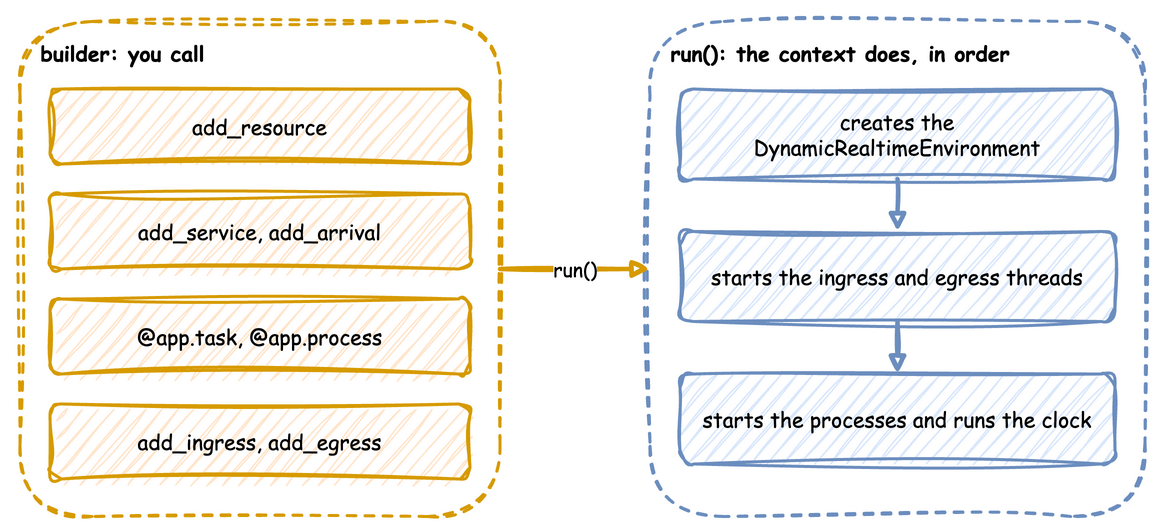
Until run() builds the environment, the runtime helpers context.spawn, context.call, context.signal, context.get_resource, context.get_store, context.get_container and context.env raise RuntimeError. Loops, tasks and processes run only after that, so the helpers belong inside them.
How to Use It
Create the Context
The context names the simulation and sets its clock: factor for the pacing, random_seed for the draws, logical_start_time for the timestamps. It also takes go_live_at and warmup, which Time and Pacing describes.
| docs/snippets/pages/builder.py:clock | |
|---|---|
Declare Resources, Stores and Containers
A task holds a resource while it works. A container holds an amount and a store holds items, and tasks take from and add to both. add_variable registers any other live value. Resources and Stores and Containers describe each.
Add Distributions
Each service is a distribution, given its parameters by keyword. Each arrival is a distribution too, and Start Them from Arrivals adds it with the task it starts. A parameter out of range, or one the family does not take, raises ValueError here, before the run. Arrivals and Services lists the ten families.
| docs/snippets/pages/builder.py:distributions | |
|---|---|
Write the Tasks
@app.task turns a function into a task: it publishes queued, waits for its resource and its get, publishes started, waits the service time, adds its put, and publishes what the function returns as the finished event. next names the task that follows, and the function receives upstream, entity or item when it declares them. Task Flow covers rules and weights.
Start Them from Arrivals
add_arrival with spawn= is the builder form of YAML's spawn: each arrival starts the named task for its entity, keyed orders-1, orders-2 and so on. The record's instance comes from the task's one counter, which next and other arrivals share, so no two runs of the task share an id. A spawn that names a task never added is refused when run() checks the model.
| docs/snippets/pages/builder.py:arrivals | |
|---|---|
@app.arrival_loop runs a generator of your own that waits with context.wait_for_arrival and starts tasks with context.spawn. A loop is needed only when it does more than start one task, such as choosing the task from the entity's attributes. Tasks and Processes shows a loop that does what spawn= does, written by hand.
Measure the Run
with_stats switches on the built-in statistics, published as telemetry. Statistics lists the levels.
| docs/snippets/pages/builder.py:stats | |
|---|---|
Add a Process
add_process is for anything that is not a task. It calls a generator with the context when the run starts. Here the process is a speed that drifts.
Attach the Connectors
add_ingress brings parameter changes in, and add_egress writes records out, each with its own batching if it needs it. Ingress and Egress list the connectors.
| docs/snippets/pages/builder.py:connectors | |
|---|---|
LocalIngress counts its delays in wall-clock seconds, so the change to 3 packers is due 5 seconds after the run starts. This unpaced run ends in under a second, so the change never lands. At factor=1.0, it lands 5 seconds into the run. For a change at an exact simulation time, use a scenario step, add_step(at, path=..., value=...) or add_scenario(steps), which Live Parameters describes. A process that waits and then updates the registry, as speed_drift above does, also works.
compile_parameters() returns the SimParameter that run() will register. Call it to check the registry paths before a run:
| docs/snippets/pages/builder.py:compile | |
|---|---|
Run It
| docs/snippets/pages/builder.py:run | |
|---|---|
ConsoleEgress writes each batch of records in one INFO log call, one line per record, so the script switches logging on before it runs. Only the first line of a batch carries the logging format's prefix, such as the time and the level. The other lines are bare. The first events of the run:
How It Works
run() takes the steps a low-level script writes by hand, in the same order, which What run() Does lists. It adds these:
- A seed for every run. It makes
Sampler(seed=random_seed), and draws and logs a seed when there is none. - Resources, stores and containers. One for each
add_resource,add_storeandadd_container, whichcontext.get_resource,get_storeandget_containerreturn.add_resourcetakes atype, a subclass ofResourceBaseto build the resource from (Custom Resource Types).add_storeandadd_containertake atypetoo, a subclass ofStoreBaseorContainerBase(Custom Store and Container Types). A store or container with nocurrent_capand nomax_caphas no limit. - Tasks.
@app.taskpublishesqueued,startedand the finished event with the entity key, task and instance, reports each step to the statistics, takes and adds stock, and routes to the next task with aRouter. - Entities.
context.wait_for_arrivalreturns anEntitywith its key and attributes. - Names with the
sim_id.context.publish(name, value)puts thesim_idin front of the name. The low-levelenv.publish_telemetryuses the name as given.
Stability and Limits
A mistake stops the script before the clock starts. A method raises ValueError when it is called with a value it cannot take:
- an
environmentthat is not a subclass ofDynamicRealtimeEnvironment; - a
fireaction withurgentorafteron a signal that is notonce=True(raised atstart()); - a negative
after; - a distribution parameter out of range, or one its family does not take;
- an unknown queue order;
- a
current_capormax_capthat is not a whole number or infinity, or amax_capbelow 1 given with nocurrent_cap; - a
typethat is not a subclass ofResourceBase; - a negative
queue_limit, or one on atypewith aPutQueueof its own; - a task with a resource but no service, or a priority without a resource;
- an unknown
on_interrupt; - a second task with the same name;
- a
spawnwith anafterof 0 or less; - a
fireaction given bothvalueandfrom.
run() then checks what each task names, before the clock or any connector starts. It raises ValueError for:
- a resource, service, store, container, signal or task that was not added;
- a priority on a resource that does not queue by priority;
- two tasks that acquire resources in opposite orders;
- a spawned task that shares an arrival's name;
- a
fireaction'sfromthat names both a signal and a task, or neither; - a
level.<name>,users.<name>,queue.<name>,signal.<name>,wait.<branch>orregistry["..."]that an expression reads but that does not exist.
The builder's limits are those of its tasks and its resources:
- Resources are fixed when the run starts.
run()creates every resource, store and container before the clock starts, and has no call to add one later. A process can add one throughcontext.env, as Add Resources Mid-run shows. advance()needs a started run. It raisesRuntimeErrorbeforestart(), afterclose()and after the run's own end, andValueErrorfor a time that is not afternow. Run in Segments shows it.strictdefaults to False here. Strict Pacing gives what it does and its default in each API.environment=takes a subclass ofDynamicRealtimeEnvironment. The context builds it instart()with the same arguments it would give its own environment, so its__init__takes**kwargsand passes them on.- A subscribe refuses a processed event.
context.subscribe(event)raisesRuntimeErrorwhen the event has already happened, or when it is called outside a process.
Example
Full script
The complete file, which the documentation tests run:
Low-level API writes the same kind of model by hand. A blueprint makes the same builder calls from a file, as YAML Blueprints describes.