Getting Started
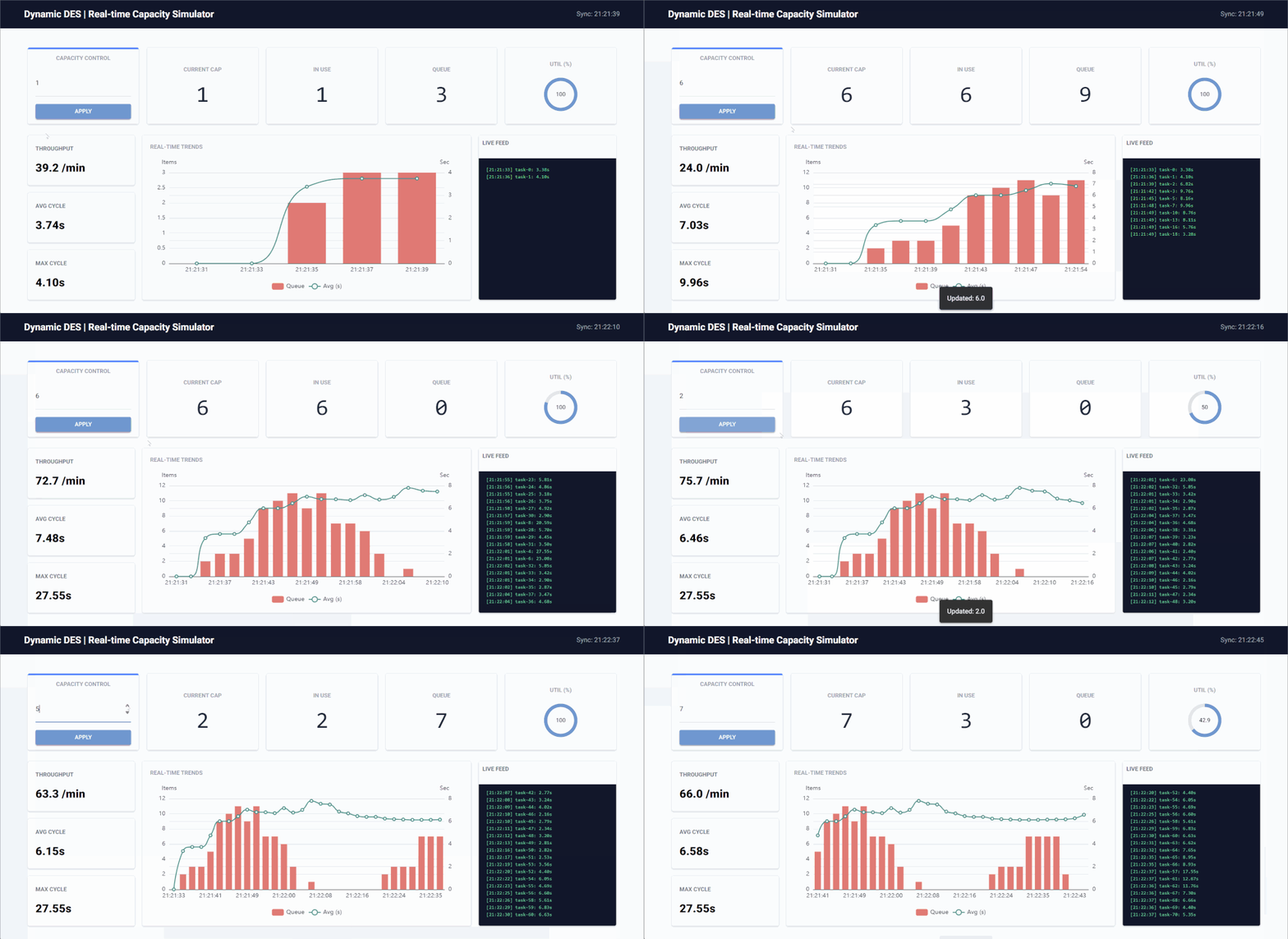
This guide illustrates how to install Dynamic DES, run the built-in examples, and build your own real-time simulation. You can see the live control dashboard from the built-in Kafka example below.
Installation
Install the core library:
To include specific backends:
# For Kafka support
pip install "dynamic-des[kafka]"

# For Kafka and Dashboard support
pip install "dynamic-des[kafka,dashboard]"

# For all backends (Kafka, Redis, Postgres, Dashboard)
pip install "dynamic-des[all]"
Quick Start: Zero-Setup Demos
Dynamic DES comes with built-in examples and infrastructure orchestration so you can see it in action immediately.
Run the local, dependency-free simulation:
Run the full Real-Time Digital Twin stack with Kafka and a live UI:
# Start the background Kafka cluster (requires Docker)
ddes-kafka-infra-up

# Open a new terminal and run the simulation
# Ctrl + C to stop
ddes-kafka-example

# Open a new terminal and start the monitoring dashboard (opens in browser)
# Visit http://localhost:8080
# Ctrl + C to stop
ddes-kafka-dashboard

# Clean up the infrastructure when finished
ddes-kafka-infra-down
Building Your Own Simulation (Local Example)
The following snippet demonstrates a simple example. It initializes a production line, schedules an external capacity update, and streams telemetry to the console.
import logging
import numpy as np
from dynamic_des import (
    CapacityConfig, ConsoleEgress, DistributionConfig,
    DynamicRealtimeEnvironment, DynamicResource, LocalIngress, SimParameter
)

logging.basicConfig(
    level=logging.INFO, format="%(levelname)s [%(asctime)s] %(message)s"
)
logger = logging.getLogger("local_example")

# 1. Define initial system state
params = SimParameter(
    sim_id="Line_A",
    arrival={"standard": DistributionConfig(dist="exponential", rate=1)},
    resources={"lathe": CapacityConfig(current_cap=1, max_cap=5)},
)

# 2. Setup Environment with Local Connectors
# Schedule capacity to jump from 1 to 3 at t=5s
ingress = LocalIngress([(5.0, "Line_A.resources.lathe.current_cap", 3)])
egress = ConsoleEgress()

env = DynamicRealtimeEnvironment(factor=1.0)
env.registry.register_sim_parameter(params)
env.setup_ingress([ingress])
env.setup_egress([egress])

# 3. Create Resource
res = DynamicResource(env, "Line_A", "lathe")

def telemetry_monitor(env: DynamicRealtimeEnvironment, res: DynamicResource):
    """Streams system health metrics every 2 seconds."""
    while True:
        env.publish_telemetry("Line_A.resources.lathe.capacity", res.capacity)
        yield env.timeout(2.0)


env.process(telemetry_monitor(env, res))

# 4. Run
print("Simulation started. Watch capacity change at t=5s...")
try:
    env.run(until=10.1)
finally:
    env.teardown()
What this does
- Registry Initialization: The
SimParameterdefines the initial state. The Registry flattens this into addressable paths (e.g.,Line_A.resources.lathe.current_cap). - Live Ingress: The
LocalIngresssimulates an external event (like a Kafka message) arriving 5 seconds into the run. - Zero-Polling Update: The
DynamicResourcelistens to the Registry. The moment the ingress updates the value, the resource automatically expands its internal token pool without any manual checking. - Telemetry Egress: The
ConsoleEgressprints system vitals to your terminal, mimicking a live dashboard feed.
Data Egress JSON Schemas
To ensure strict data contracts with external consumers (like Kafka, Redis, or PostgreSQL), dynamic-des uses Pydantic to validate all outbound payloads. Users can expect two distinct JSON structures depending on the stream type:
Telemetry Stream
Used for scalar metrics like resource utilization, queue lengths, or simulation lag.
{
  "stream_type": "telemetry",
  "path_id": "Line_A.resources.lathe.utilization",
  "value": 85.5,
  "sim_ts": 120.5,
  "timestamp": "2023-10-25T14:30:00.000Z"
}
Event Stream
Used for discrete task lifecycle events (e.g., a part arriving, entering a queue, or finishing processing).
{
  "stream_type": "event",
  "key": "task-001",
  "value": {
    "status": "finished",
    "duration": 45.2,
    "path_id": "Line_A.service.lathe"
  },
  "sim_ts": 125.0,
  "timestamp": "2023-10-25T14:30:04.500Z"
}
More Examples
For more examples, including implementations using Kafka providers, please explore the examples folder.