Getting Started
Ready to build real-time digital twins? This guide will walk you through installing Dynamic DES, running the example scripts, and exploring the core infrastructure.
Installation
Install the core library:
To include specific backends:
# For Kafka support
pip install "dynamic-des[kafka]"

# For Confluent Schema Registry (Avro)
pip install "dynamic-des[kafka,confluent]"

# For AWS Glue Schema Registry (Avro)
pip install "dynamic-des[kafka,glue]"

# For Redis support
pip install "dynamic-des[redis]"

# For PostgreSQL support
pip install "dynamic-des[postgres]"

# For Parquet support (required for data lake integration)
pip install "dynamic-des[parquet]"

# For Lakehouse Storage (Apache Iceberg)
pip install "dynamic-des[iceberg]"

# For all backends (Kafka, Redis, Postgres, Avro, Parquet, Iceberg)
pip install "dynamic-des[all]"
Example Infrastructure
Every example that needs a broker, a database or an object store gets it from odctl, a separate CLI that manages curated Docker Compose stacks. Install it once:
odctl list -d shows every profile and the ports it publishes. The examples here use five of them: kafka-lite, postgres, valkey, storage and catalog.
Starting infrastructure
Each example needs one odctl profile, started before you run it and torn down after:
| Example | Start | Stop |
|---|---|---|
| local | nothing needed | |
| kafka, backfill-live, dashboard | odctl up kafka-lite |
odctl down kafka-lite --volumes |
| postgres | odctl up postgres |
odctl down postgres --volumes |
| redis | odctl up valkey |
odctl down valkey --volumes |
parquet with USE_S3=true |
odctl up storage |
odctl down storage --volumes |
| iceberg | odctl up catalog |
odctl down catalog --volumes |
The YAML blueprints in examples/yaml/ need the same profile as their declarative twin.
Kafka and Redis are the two whose profile names are not what you would guess, because odctl ships a one-broker Kafka as kafka-lite and uses Valkey rather than Redis.
Endpoints these profiles publish
The Postgres database is odctl. The object store bucket is odctl-dev. Valkey requires the user / password credentials, so the connection URL is redis://user:password@localhost:6379/0.
Quick Start: Running an Example
Dynamic DES ships runnable examples in the examples/ folder of the repository. Download the ones you want, then run them.
curl -O https://raw.githubusercontent.com/jaehyeon-kim/dynamic-des/main/examples/declarative/local_example.py
curl -O https://raw.githubusercontent.com/jaehyeon-kim/dynamic-des/main/examples/declarative/kafka_example.py
curl -O https://raw.githubusercontent.com/jaehyeon-kim/dynamic-des/main/examples/kafka_dashboard.py
curl -O https://raw.githubusercontent.com/jaehyeon-kim/dynamic-des/main/examples/declarative/backfill_live_example.py
With uv
# 1. Install odctl, which runs the containers
uv tool install "odctl>=0.5.1"

# 2. Local, dependency-free simulation
uv run --no-project --with dynamic-des local_example.py

# 3. Start the Kafka broker and schema registry (requires Docker)
odctl up kafka-lite

# 4. Run the real-time digital twin (Ctrl + C to stop)
uv run --no-project --with "dynamic-des[kafka]" kafka_example.py

# 5. In a second terminal, watch and steer the run from the dashboard. It serves
#    http://localhost:8080 rather than opening a browser. Ctrl + C to stop.
uv run --no-project --with "dynamic-des[kafka]" --with nicegui kafka_dashboard.py

# 6. Backfill ten minutes of history to Parquet, generated instantly rather than
#    waited for, then tail live to Kafka for sixty seconds
uv run --no-project --with "dynamic-des[kafka,parquet]" backfill_live_example.py

# 7. Clean up the infrastructure when finished
odctl down kafka-lite --volumes
With pip
# 1. Install the package with both extras, odctl for the containers and
#    nicegui for the dashboard
pip install "dynamic-des[kafka,parquet]" "odctl>=0.5.1" nicegui

# 2. Local, dependency-free simulation
python local_example.py

# 3. Start the Kafka broker and schema registry (requires Docker)
odctl up kafka-lite

# 4. Run the real-time digital twin (Ctrl + C to stop)
python kafka_example.py

# 5. In a second terminal, watch and steer the run from the dashboard. It serves
#    http://localhost:8080 rather than opening a browser. Ctrl + C to stop.
python kafka_dashboard.py

# 6. Backfill ten minutes of history to Parquet, generated instantly rather than
#    waited for, then tail live to Kafka for sixty seconds
python backfill_live_example.py

# 7. Clean up the infrastructure when finished
odctl down kafka-lite --volumes
Examples that need a broker, a database or an object store get their container from odctl. Starting infrastructure above lists the profile each one needs.
Guide: Backfill then live.
A YAML blueprint
The same local simulation is also a YAML file, run with the ddes command that the package installs. It needs no Python:
curl -O https://raw.githubusercontent.com/jaehyeon-kim/dynamic-des/main/examples/yaml/local.yaml

# With uv
uv run --no-project --with dynamic-des ddes run local.yaml

# Or with pip, after `pip install dynamic-des`
ddes run local.yaml
Every declarative example has a YAML twin, in the YAML tab of its example page. YAML Blueprints, from First File to Connectors shows how to write one.
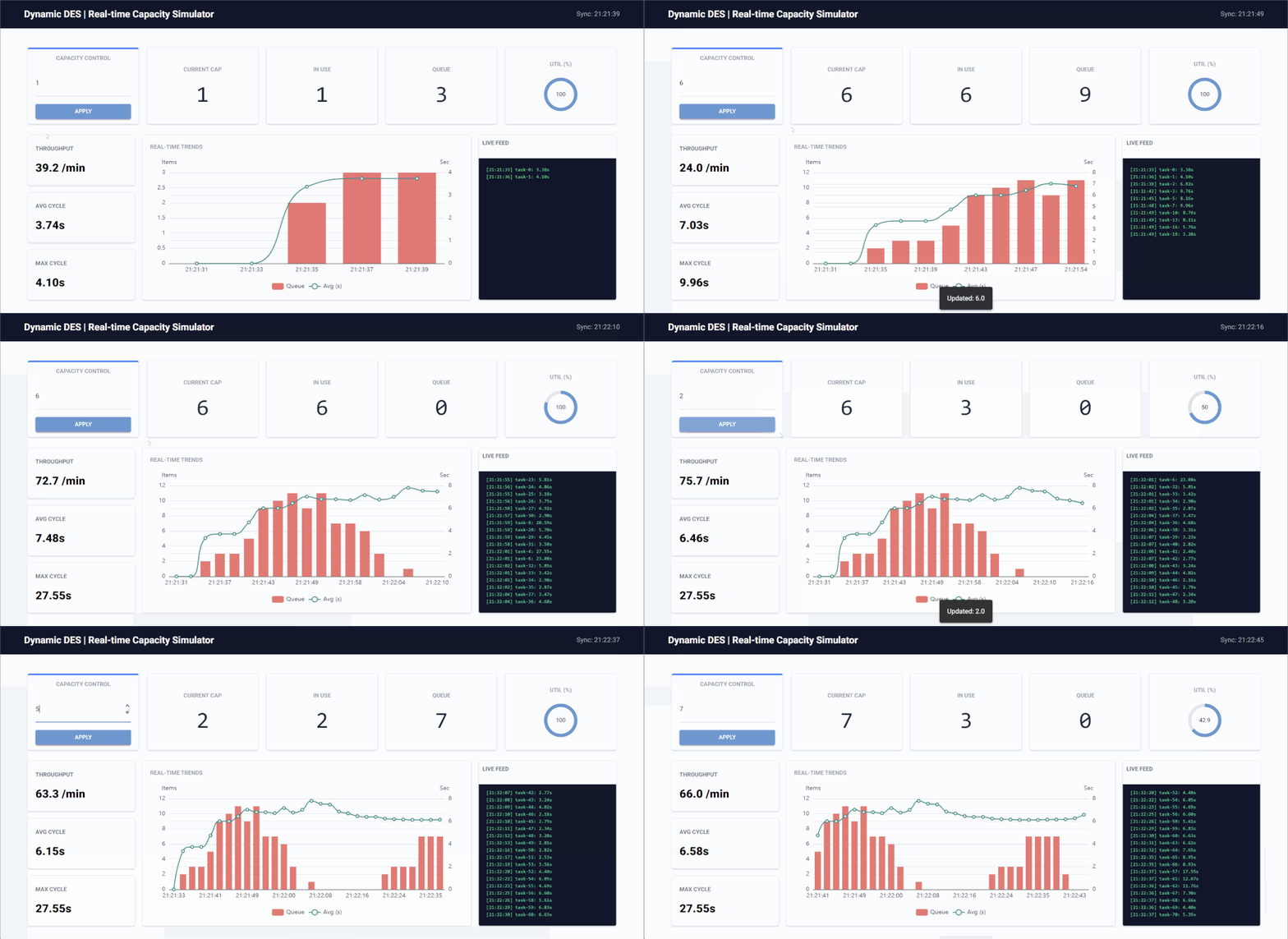
The control dashboard lets you update simulation parameters live and watch the telemetry react without restarting the run:
Build Your Own
Each example is written three ways: with the low-level API, with the declarative API and as a YAML blueprint. Its page shows the versions in tabs. Backfill Then Go Live has no low-level version, and the advanced orders example exists only as YAML.
| Example | What it shows | Low-level | Declarative | YAML |
|---|---|---|---|---|
| Local Simulation | prints events and telemetry, with no container | local_example.py |
local_example.py |
local.yaml |
| Kafka Digital Twin | takes updates from Kafka and publishes events and telemetry to Kafka | kafka_example.py |
kafka_example.py |
kafka.yaml |
| Fast-Forward to Parquet | a week generated at factor=0.0, written to Parquet |
parquet_example.py |
parquet_example.py |
parquet.yaml |
| Fast-Forward to Iceberg | a day generated at factor=0.0, appended to an Iceberg table |
iceberg_example.py |
iceberg_example.py |
iceberg.yaml |
| Relational DB (Postgres) | writes orders to PostgreSQL and takes updates from a table | postgres_example.py |
postgres_example.py |
postgres.yaml |
| In-Memory Store (Redis) | writes to a Redis Stream and takes updates from Pub/Sub | redis_example.py |
redis_example.py |
redis.yaml |
| Backfill Then Go Live | backdated history to Parquet, then live to Kafka | no | backfill_live_example.py |
backfill_live.yaml |
| Orders with Line Items (Advanced YAML) | orders with line items, from a blueprint with one Python function | no | no | postgres_orders.yaml |