Tasks and Processes: SimulationContext
A task is what one entity does: a part being milled, an order being packed. A process is anything else that runs over time: a machine that breaks down every hour, a speed that drifts, a shift plan. Both are SimPy generators, functions that yield to wait. The builder and YAML write the common ones for you, and the low-level API writes them by hand.
A Task's Life
A task with a service and a resource goes through five steps and publishes three events, all with the key task-<task id>:
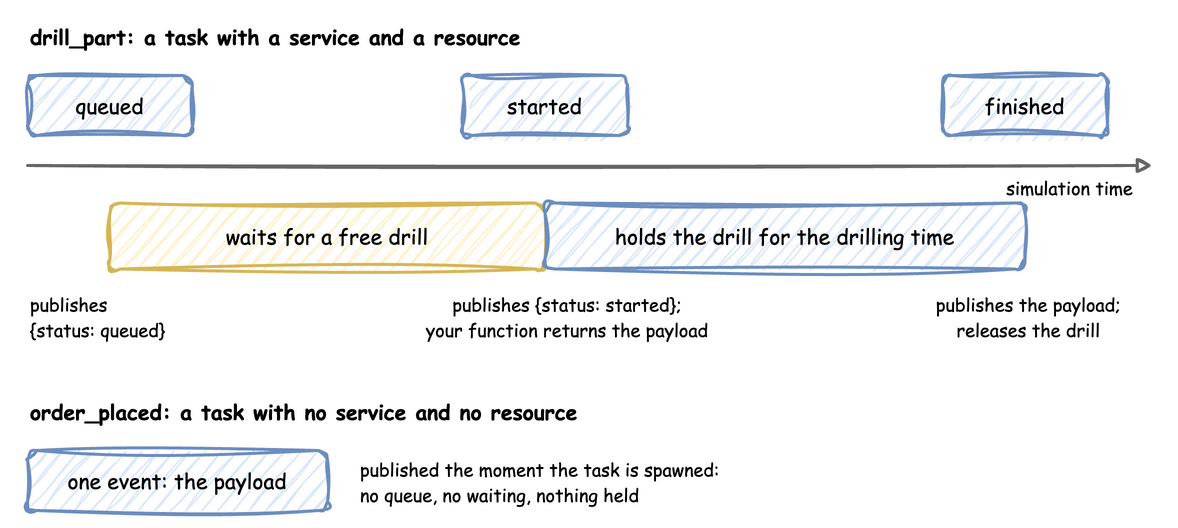
The payload, the finished event's value, is computed after started and before the service time, so it can use the state of the simulation at that moment. A task with neither a service nor a resource takes no time and holds nothing: it publishes its payload at once, as its only event, which suits an entity that only records that it happened, such as an order placed.
tasks:
  drill_part:
    service: drilling  # how long the work takes
    resource: drill  # what it holds while it works
    payload: {status: finished}  # the finished event's value
    id_field: part_id  # adds the task id to the payload
  order_placed:
    # No service and no resource: publishes its payload at once
    payload: {status: placed}
    id_field: order_id
@app.task(service_id="drilling", resource_id="drill")
def drill_part(part_id: int):
    # Runs when the part gets the drill, before the drilling time.
    # The returned dict is the finished event's value.
    return {"status": "finished", "part_id": part_id}


@app.task()  # no service and no resource: publishes at once
def order_placed(order_id: int):
    return {"status": "placed", "order_id": order_id}
def drill_part_process(env, sampler, drill, part_id):
    """What @app.task does, by hand."""
    key, path_id = f"task-{part_id}", "Workshop.service.drilling"
    env.publish_event(key, {"path_id": path_id, "status": "queued"})
    with drill.request() as request:
        yield request
        env.publish_event(key, {"path_id": path_id, "status": "started"})
        yield env.timeout(sampler.sample(env.registry.get_config(path_id)))
        env.publish_event(key, {"status": "finished", "part_id": part_id})
In YAML, payload is a fixed mapping, and id_field adds the task id to it. A payload that changes per entity is a Python function, called as function(task_id, context):
# also under tasks: a payload computed by a Python function
graded_part:
  service: drilling
  resource: drill
  # Called as grade_part(task_id, context) when the part is finished
  payload: !python workshop_logic.grade_part
Arrivals Start Tasks
An arrival stream starts one task per arrival. The loop draws a gap from the arrival's distribution, waits it, starts a task, and repeats; the task runs on its own while the loop waits for the next arrival:
def parts_process(env, sampler, drill):
    """What @app.arrival_loop does, by hand."""
    gap = env.registry.get_config("Workshop.arrival.parts")
    part_id = 0
    while True:
        yield env.timeout(sampler.sample(gap))
        env.process(drill_part_process(env, sampler, drill, part_id))
        part_id += 1
In the low-level API every loop is started once, before the run:
env.process(parts_process(env, sampler, drill))  # start each loop once
env.process(drill_stats_process(env, drill))
env.process(maintenance_process(env, "drill", every=50, duration=5))
Processes
A process is a generator that runs alongside the tasks. It can wait (yield env.timeout(...)), change any value in the registry, publish records, or start tasks. This one takes a machine out of service for 5 seconds every 50:
def maintenance(
    context: SimulationContext, resource: str, every: float, duration: float
):
    """Takes the machine out of service for `duration` seconds every `every` seconds."""
    path = f"{context.sim_id}.resources.{resource}.current_cap"
    registry = context.env.registry
    while True:
        yield context.env.timeout(every)
        normal = registry.get(path).value
        registry.update(path, 0)
        yield context.env.timeout(duration)
        registry.update(path, normal)


app.add_process(maintenance, resource="drill", every=50, duration=5)
def maintenance_process(env, resource: str, every: float, duration: float):
    """What add_process starts, by hand: a plain SimPy generator."""
    path = f"Workshop.resources.{resource}.current_cap"
    while True:
        yield env.timeout(every)
        normal = env.registry.get(path).value
        env.registry.update(path, 0)
        yield env.timeout(duration)
        env.registry.update(path, normal)
In the low-level API it is started with env.process, before the run, as low-level-start above shows. Setting current_cap to 0 stops new work but not the work in progress: Resources explains what happens to busy units when a capacity drops.
Telemetry
Telemetry reports a value at a fixed interval of simulation time. YAML publishes resource statistics by name; the builder and the low-level API publish anything you compute:
@app.telemetry_loop(interval=10.0)
def drill_stats(context: SimulationContext):
    drill = context.get_resource("drill")
    context.publish("drill_busy", drill.in_use)  # as Workshop.drill_busy
    context.publish("drill_waiting", len(drill.queue.items))  # requests waiting
SimPy and Dynamic DES
In SimPy a task is a process you write: request the resource with with resource.request() as request: yield request, wait with yield env.timeout(...), and leave the with block to release it. The Low-level tabs above are exactly that SimPy code, with one addition: env.publish_event at each step, so the run produces records.
The builder's @app.task and a YAML task generate the same SimPy process from a description: which service, which resource, and what payload. @app.arrival_loop and a YAML spawn generate the loop that starts them. A process started with add_process or listed under processes is a plain SimPy generator, given the context so it can reach the registry and the clock.
Limits and Common Mistakes
- A task holds one resource. A part that needs a crane and a machine at once, or a handover between them, is a process: Multi-Resource Handoffs shows how.
- A task cannot be interrupted. Breakdowns that stop work in progress need a process that catches SimPy's
Interrupt: Preemptive Machine Breakdowns. - A finished event is exactly the payload. It has no
statusorpath_idunless the payload includes them. - Runtime helpers need a running simulation.
context.spawn,context.get_resourceandcontext.envraiseRuntimeErrorbeforerun(); call them inside a loop, task or process.