Stores and Containers: DynamicStore and DynamicContainer
A resource is held and given back. Stores and containers hold things that tasks take away and add: items, or an amount. This page shows how to declare them, how tasks put and get, and what a live change does.
What It Is
- A store holds items, each one a value of its own: parcels on a shelf waiting for a courier, orders in a buffer. A task puts an item in, and another takes the oldest out.
- A container holds an amount: boxes in a bin, fuel in a tank, a stock level. A task takes some, and another adds some.
Both have a capacity, or no limit. A task that takes waits while there is not enough, and a task that adds waits while there is no room. Stock uses a container in the shop.
How to Use It
Declare Them
A container has three settings. current_cap is its capacity, the largest amount it holds. max_cap is the largest capacity a live change can set. level is the amount it holds when the run starts, 0 when left out. A store has a current_cap and a max_cap, in whole items, and starts empty unless it lists items (Start With Items and Serve by Priority). run() builds a DynamicContainer and a DynamicStore for each one the context declares. A store and a container cannot share a name.
| docs/snippets/yaml/stores_containers.yaml:container | |
|---|---|
| docs/snippets/pages/stores_containers.py:builder-container | |
|---|---|
A DynamicContainer built with no init starts at the level its ContainerConfig gives. init= sets another.
A store or container with no current_cap has no capacity limit, as simpy.Store(env) and simpy.Container(env) have: a put never waits for room. current_cap: .inf in YAML, or float("inf") in code, says the same. A max_cap alone gives the current_cap, and a current_cap alone gives the max_cap. A live update can give a store with no limit a capacity. A store's capacity is a whole number of items, so a fractional capacity is rounded down. .inf or the text "inf" sets no limit again. A store or container with no limit publishes capacity as null.
Take and Add
A task takes with get and adds with put. For a container, each names the container and an amount. The amount can be a number, or an expression such as payload.boxes for a field of the previous task's payload. In the builder, it can also be a function of the task id and the previous task's payload. The amount is 1 when left out. For a store, each names the store. A put adds the task's finished payload as the item, and a get takes the oldest item and passes it to the task's function as item.
| docs/snippets/yaml/stores_containers.yaml:take | |
|---|---|
get(amount), put(amount), put(item) and get() are SimPy events: yielding one waits until it succeeds, and a store's get() succeeds with the item.
A task with a resource gets its unit first and then takes its get, so it waits for stock while holding the unit. A task adds its put after its service time, then publishes the finished event. Tasks and Processes lists every step.
A put or get makes the task wait until it is granted. With wait: false ("wait": False in the builder), the task makes the request and goes on at once, as a SimPy put that is not yielded does. It publishes finished without waiting, and the request stays in the queue until it can be granted. Such a request follows these rules:
- It is granted first in, first out, together with the requests that are waited for.
- An interrupt,
on_interrupt: abandonandpatiencenever cancel it. - A run can end while it still waits, and a
draindoes not wait for it. - A
gettakes its item later and drops it. So it cannot useitem_fieldor a function that declaresitem, and itsitem.<field>can be read only in its ownfilter. - It is refused in a branch of a
wait.
The pump task of Example: Fuel Dock puts fuel into a tank this way. The third pump finds room for only 20 units of fuel, so its put stays queued.
Start With Items and Serve by Priority
A store can hold items when the run starts, such as parcels left from yesterday. items lists them in the order a get returns them. A store cannot start with more items than its current_cap: the blueprint or add_store is refused with the reason.
A store with priority returns the item with the lowest priority value first, as SimPy's PriorityStore does. Its items are [priority, item] pairs, and a task's put gives each new item its priority. Items of equal priority come out in the order they went in. A priority can be:
- a number, or an expression such as
attr.prioritythat gives one; - a list such as
[1, 2], ordered element by element, as a tuple is; - any other value that can be ordered against the others, such as a text.
A priority keeps the value it is given, so the text '10' sorts as text, before '9'. In YAML a string is an expression, so a text priority such as 'P1' comes from attr.grade or payload.grade. Priorities that cannot be compared, such as a number and a text, raise TypeError at the put, as in SimPy.
| docs/snippets/yaml/parcel_store.yaml:store | |
|---|---|
A task's put takes the priority the same way: put={"store": "parcels", "priority": "attr.priority"}.
A low-level priority store holds simpy.PriorityItems. wrap(item, priority) makes one, ranked by the priority and then by a rising number. The builder and YAML use it to keep equal priorities in order. A plain PriorityItem(priority, item) also works, but keeps no order among equal priorities.
A get on a priority store takes no priority of its own and is refused with one: the item's priority decides the order. Priorities compares priority storage with a resource's priority queue.
Pick an Item, or Give Up Waiting
A store get can take a filter, a condition that picks which item it takes, as SimPy's FilterStore does. The filter reads the item on offer as item.<field>, and every name that other conditions read, such as attr.area for the entity's own attribute. The get takes the oldest item that matches, and waits while none does. A waiting get that matches nothing does not stop a later get from taking an item that matches it.
A priority store takes no filter, because SimPy has no store that both ranks and filters. The blueprint or run() refuses a filter on one, and names the task.
A task's patience covers its whole wait: for its wait, then its resource, then its get. When it runs out, the task publishes reneged and its get is cancelled, so it takes nothing later. In the low-level API, cancel() on a put or get event that has not succeeded takes it out of its queue, as in SimPy: a cancelled get takes nothing, and a cancelled put adds nothing. In YAML, item_field adds the item that the task's get took to its payload. A builder function receives the item as item:
A filter can also be a function of the item: "filter": lambda parcel: parcel["area"] == "north".
item.<field> can also be read in the task's put and next, after its get. Filtered Inventory uses a filter and patience on a shelf of shirts.
Custom Store and Container Types
A store or container of your own class changes how items or amounts go in and out. Subclass desflow.StoreBase (a simpy.Store) or desflow.ContainerBase (a simpy.Container) and override _do_put or _do_get, set PutQueue or GetQueue, or bind put and get to event classes of your own, as in SimPy. The constructor is SimPy's, (env, capacity=inf) for a store and (env, capacity=inf, init=0) for a container. Name the class with type: !python module.Class in a blueprint, type= in add_store and add_container, or type= in DynamicStore and DynamicContainer.
The class is in examples/yaml/advanced/fuel_dock_types.py, next to the blueprint, which !python finds first.
A container type is written the same way, from ContainerBase. This bin counts the puts it grants, and a Transfer gives a task its get as an object, the form the dictionaries above are read into:
type names the class in a module beside the file, here a copy of the bin in shop_logic.py:
A low-level model builds an instance of the class itself, as the Low-level tab above builds the lane and the tank.
The statistics and the conditions follow every change to a store's items or a container's level made by _do_put or _do_get, whether the override calls super() or not, and each change is reported to them once. ContainerBase compares the level before and after, so an override that returns True without changing the level reports nothing. A change to the length of put_queue or get_queue is reported to the conditions that read putters. or getters.. A queue class must support len() and remove(). A cancel() is reported from the event classes, so it works with a queue class of your own.
A task's put stores its payload as the item, and its get passes the item on, unwrapped, whatever the type. A type cannot be given with priority: a type sets its own order, so subclass StoreBase and simpy.PriorityStore for a ranked store. A get with a filter needs a type that subclasses simpy.FilterStore, and a blueprint or run() without such a type is refused, naming the task. A live capacity update reaches a type of your own as it does the default.
Registry Paths, Readings and Conditions
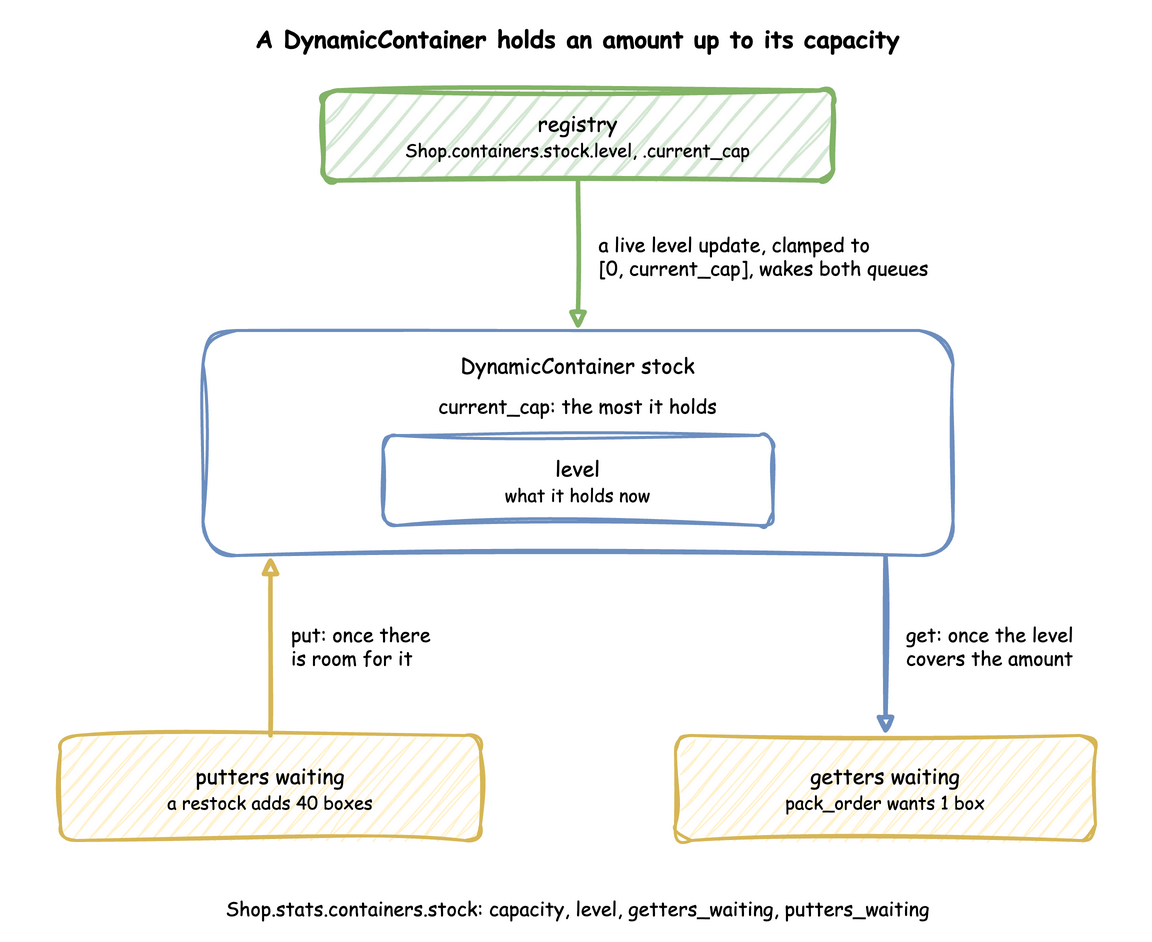
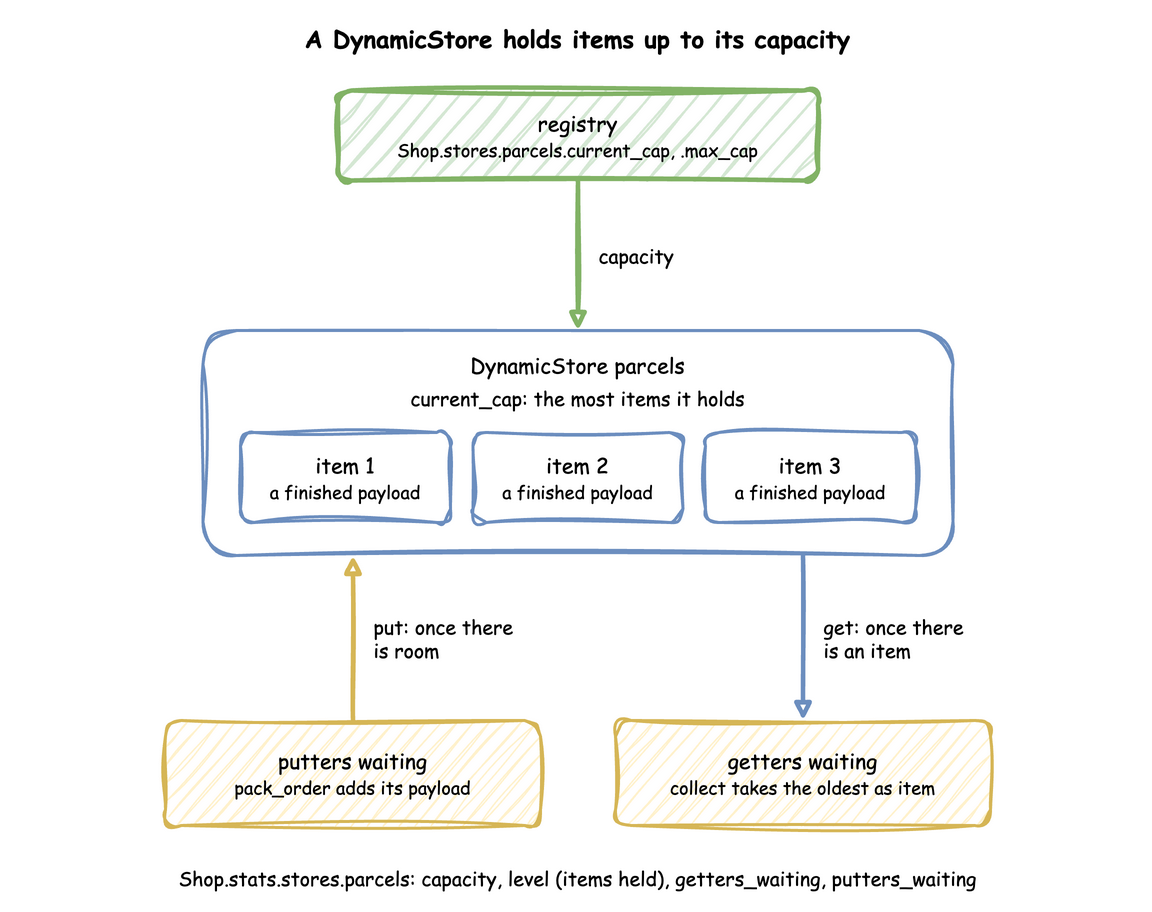
A container has three registry paths, <sim_id>.containers.<name>.current_cap, .max_cap and .level. A store has <sim_id>.stores.<name>.current_cap and .max_cap. With statistics at the minimal level or above, each publishes four readings, such as Shop.stats.containers.stock.level:
| Reading | Store | Container |
|---|---|---|
capacity |
items it can hold | largest amount |
level |
items held | amount held |
getters_waiting |
tasks waiting to get an item | tasks waiting to take an amount |
putters_waiting |
tasks waiting to put an item | tasks waiting to add an amount |
basic adds level_avg, the level averaged over time. Statistics describes it. Below are the readings of stores_containers.yaml, the blueprint whose parts this page shows. They are taken at 30 and 40 simulation seconds, before and after the stock count that Under Live Changes shows:
At 30 seconds the bin is empty and two orders wait for boxes. At 40 seconds the stock count has put 50 boxes in, those two have taken theirs, and the shelf of parcels is full, with two packed orders waiting for room.
A condition in a task's next reads a level as level.<name>, so an order can go to backorder when level.stock == 0, as Task Flow shows.
A condition can also read how many tasks wait at a store or container, and what a store holds:
| Name | Reads |
|---|---|
putters.<name>, getters.<name> |
the number of puts or gets waiting, not counting one that is granted at once, as the putters_waiting and getters_waiting readings; len(put_queue) and len(get_queue) in the low-level API |
count(<store>) |
the number of items the store holds, as level.<store> |
count(<store>, <condition>) |
how many items meet the condition, which reads item.<field> of each |
items(<store>), items(<store>, item.<field>) |
the list of items, or that field of each; a priority store gives its items unwrapped |
in and not in read an items(...) list, as in payload.sku in items(shelf, item.sku), which is true while the shelf holds that sku. The store is a bare name, and count and items cannot be nested inside each other. The names are checked at load: each must name a store, and putters. and getters. may also name a container.
A condition that reads one of these names is checked again when a put or get joins or leaves a queue. A condition that reads none of them, such as level.stock == 0, is not checked again for a queue change. A queue change is not a change of level, so level_avg does not move. The marshal task of Example: Fuel Dock waits on putters.lane >= 1.
How It Works
A container keeps a level between 0 and its capacity, with a queue of getters and a queue of putters. A get succeeds as soon as the level covers its amount, and a put as soon as there is room for all of it. Until then, each waits in its queue, in the order it arrived:
A store keeps a list of items, up to its capacity. A put adds an item at the end, and a get takes the first, so items leave in the order they came. A get with a filter takes the first item its filter accepts:
SimPy and desflow. desflow builds on three SimPy classes. A container is SimPy's Container. A store is a FilterStore, which serves its gets as Store does while no waiting get has a filter. A priority store is a PriorityStore, which hands out the lowest item first. A full put that waits for room and an empty get that waits for an item or an amount are checked against plain SimPy in all three APIs. SimPy Compatibility lists the checks. SimPy's capacities are fixed when they are created, and desflow's follow the registry. desflow also keeps the registry's level in step with every put and get, and reports each change to the statistics. SimPy and desflow compares the two.
Under Live Changes
- Capacity follows
current_cap, clamped to between 0 andmax_cap. A higher capacity wakes waiting putters. A capacity below what is held destroys nothing: puts wait until enough has been taken. - A container's level is set by an update to its
levelpath, as a stock count or a restock from outside would. The new level is clamped to between 0 andcurrent_cap, with a warning, and it wakes both queues: a higher level serves waiting getters, and a lower one can make room for putters. - A store or container with no limit can be given a number as
current_capduring a run, and.infor the text"inf"sets no limit again. Lowering it destroys nothing, as the Capacity item above says. current_capis the capacity, not a level. A model that used a container'scurrent_capas a level, such as the wear of a roll, moves it tolevel.
The stock count in stores_containers.yaml, in each way of writing:
| docs/snippets/pages/stores_containers.py:builder-level | |
|---|---|
Stability and Limits
- A container that never refills blocks its getters for good, and a task that waits for stock while holding a resource blocks the resource too. Supply has to keep up with demand, as Stock shows.
- Whole items. A store's capacity is a whole number or no limit, and it holds items, not amounts.
- A put or get with
wait: falseis never cancelled, so a supply that outpaces its consumers grows the queue without end. A run drops what is still waiting when it ends. - A filter checks every waiting get on each put. For a store with many waiting gets and a filter that rarely matches, the work grows in proportion to both, as SimPy's
FilterStoredoes. - One store or container per get or put. A task has at most one
getand oneput.
Example: Stock, Parcels and Express Orders
The stock example combines a container and a store. Packing takes a box from a container and puts the parcel in a store, which starts with two parcels from yesterday. A courier collects the parcels. Express orders go first at the packers, and also at the courier, because the parcels store is a priority store. The stock runs out, so packing waits until a restock at 40 seconds sets the level to 30 boxes. It needs no Docker service and ends on its own.
The tutorial page Stock teaches these features step by step.
Quick Start
desflow examples get downloads the example at the release you install, into a folder of its own. Pick uv or pip:
The whole file is examples/yaml/stock.yaml.
Quick Start
desflow examples get downloads the example at the release you install, into a folder of its own. Pick uv or pip:
The whole file is examples/builder/stock_example.py.
Quick Start
desflow examples get downloads the example at the release you install, into a folder of its own. Pick uv or pip:
The whole file is examples/low-level/stock_example.py.
Example: Filtered Inventory
The filtered-inventory example combines a filter and patience. Packed orders go on one shelf as parcels for the north or the south. Each courier takes the oldest parcel for its own area, or leaves without one after 20 seconds. It needs no Docker service and ends on its own after 120 simulation seconds.
The tutorial page Filtered Inventory teaches these features step by step.
Quick Start
desflow examples get downloads the example at the release you install, into a folder of its own. Pick uv or pip:
The whole file is examples/yaml/filtered_inventory.yaml.
Quick Start
desflow examples get downloads the example at the release you install, into a folder of its own. Pick uv or pip:
The whole file is examples/builder/filtered_inventory_example.py.
Quick Start
desflow examples get downloads the example at the release you install, into a folder of its own. Pick uv or pip:
The whole file is examples/low-level/filtered_inventory_example.py.
Example: Fuel Dock
The fuel-dock example combines the parts of this page:
- Fuel trucks wait in a lane of your own type, which gives back the newest truck first.
- A crew unloads one truck every 7 seconds.
- A tank truck puts fuel into a tank that holds 100 units, without waiting for the put. Once the tank is nearly full, the put waits in the tank's queue.
- A marshal calls the overflow bay once a truck waits outside the full lane.
It needs no Docker service and ends on its own after 40 simulation seconds.
Quick Start
desflow examples get downloads the example at the release you install, into a folder of its own. Pick uv or pip:
The whole files are examples/yaml/advanced/fuel_dock.yaml and examples/yaml/advanced/fuel_dock_types.py.
Quick Start
desflow examples get downloads the example at the release you install, into a folder of its own. Pick uv or pip:
The whole file is examples/builder/fuel_dock_example.py.
Quick Start
desflow examples get downloads the example at the release you install, into a folder of its own. Pick uv or pip:
The whole file is examples/low-level/fuel_dock_example.py.