Skip to content

First Simulation

This tutorial models a shop that receives and packs customer orders: one packer, an order every 2 seconds on average, and 1.5 seconds of packing per order. It answers one question: how long does an order wait with one packer?

  • Decision: how many packers the shop needs, which later pages decide.
  • Measures: the wait of each order, from the moment it joins the queue to the moment packing starts.
  • Runs: one run of the first 20 seconds, with the seed 42.
  • Assumptions: orders arrive at random, and every order takes exactly the same time to pack.

What You Will Learn

This page shows how to:

  • describe a model as an arrival, a resource and a service time, in YAML, the builder or the low-level API;
  • run it and read the event records it prints;
  • read an order's wait from its queued and started events.

What You Add

This page builds the first model of the shop: a simulation called Shop with an orders arrival, a packers resource with one unit, a packing service and a pack_order task, and a sink that prints each record. The following pages extend the same model, one idea per page.

Each step shows the code three ways, in tabs: a YAML blueprint, the Builder (SimulationContext) and the Low-level API (DynamicRealtimeEnvironment and SimPy processes). Choose the tab for your preferred API; all code tabs on the site switch to that API. The three build the same simulation and print the same records. Writing a Model explains how they relate.

Look at the order of the parts: orders arrive, wait in the packer queue and take the packer for 1.5 seconds. The simulation prints a record of each step to the console. The arrival loop and the task read their values from the registry. The steps below explain each of these parts.
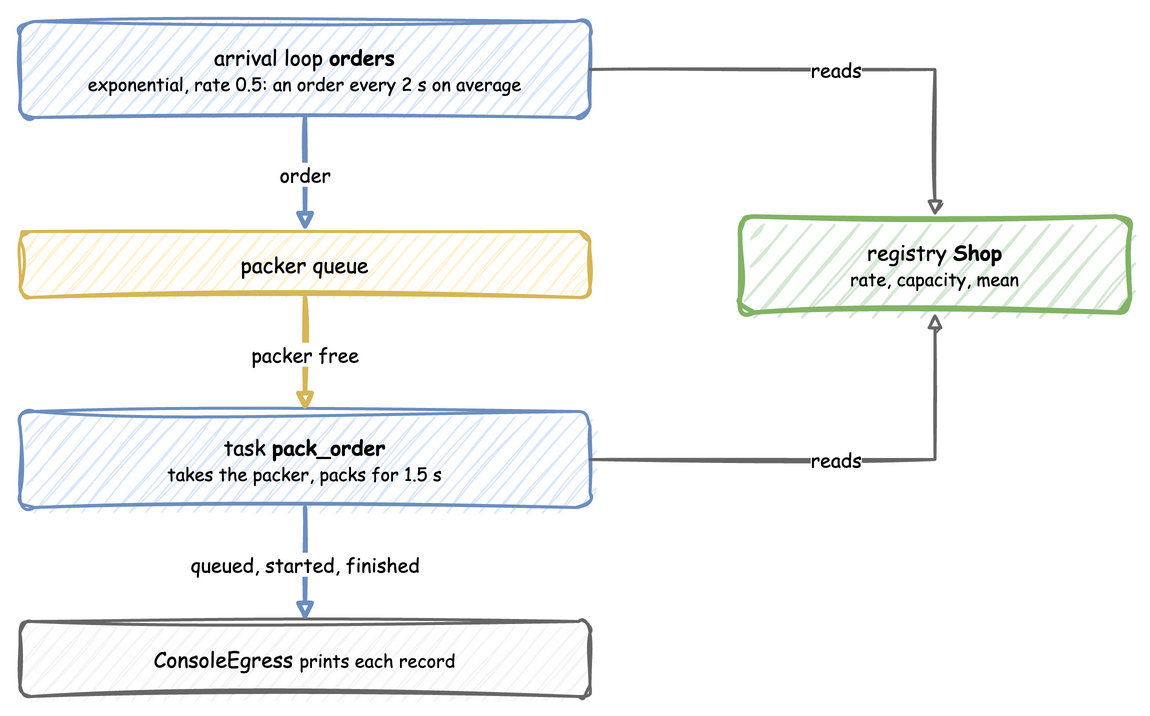
Orders arrive about every 2 seconds, wait in the packer queue, take the packer for 1.5 seconds of packing, and their records go to the console; the arrival loop and the task read their values from the registry


Install

Install the core package, which includes the desflow command, as Installation shows.

A blueprint needs only the desflow command. Install it with one of these forms, then run the file:

1
2
3
4
5
6
7
8
# With uv, the command alone
uv tool install desflow

# Or with pip
pip install desflow

# Run the blueprint
desflow run first_shop.yaml

A builder model is a Python file, so the Python that runs it must be able to import desflow. uv tool install desflow installs the command only. Run the file with one of these forms:

1
2
3
4
5
6
7
8
# With uv, outside a project
uv run --with desflow python first_shop.py

# In a uv project, after `uv add desflow`
uv run python first_shop.py

# After `pip install desflow`
python first_shop.py

The pages that follow show the plain python <file>.py form. Run it with whichever form above you use.

A low-level model is a Python file, so the Python that runs it must be able to import desflow. uv tool install desflow installs the command only. Run the file with one of these forms:

1
2
3
4
5
6
7
8
# With uv, outside a project
uv run --with desflow python first_shop_low_level.py

# In a uv project, after `uv add desflow`
uv run python first_shop_low_level.py

# After `pip install desflow`
python first_shop_low_level.py

The pages that follow show the plain python <file>.py form. Run it with whichever form above you use.


Describe the Shop

In discrete-event simulation (DES), an entity is a thing that moves through the model, here an order. A resource is what an entity needs and may have to wait for, here the packer. A service time is how long an entity holds the resource, and an arrival process sets when entities appear.

In desflow, these are parameters of one simulation. Its name, the sim_id, is Shop here. The shop has a resource called packers with one unit, a service called packing, and an arrival stream called orders.

docs/snippets/yaml/first_shop.yaml:shop
simulation:
  sim_id: Shop
  factor: 1.0  # 1 simulated second takes 1 real second
  random_seed: 42  # the same arrival times on every run

resources:
  packers: {current_cap: 1, max_cap: 1}

services:
  # Every order takes exactly 1.5 seconds to pack
  packing: {dist: constant, value: 1.5}

arrivals:
  # One order every 2 seconds on average; each arrival spawns pack_order
  orders: {dist: exponential, rate: 0.5, spawn: pack_order}
docs/snippets/tutorials/first_shop.py:shop
1
2
3
4
5
6
7
8
9
app = (
    # 1 simulated second = 1 real second; a seed gives the same arrivals every run
    SimulationContext(sim_id="Shop", factor=1.0, random_seed=42)
    .add_resource("packers", current_cap=1, max_cap=1)
    # Every order takes exactly 1.5 seconds to pack
    .add_service("packing", dist="constant", value=1.5)
    # One order every 2 seconds on average
    .add_arrival("orders", dist="exponential", rate=0.5)
)
docs/snippets/tutorials/first_shop_low_level.py:shop
1
2
3
4
5
6
7
PARAMS = SimParameter(
    sim_id="Shop",
    arrival={"orders": DistributionConfig(dist="exponential", rate=0.5)},
    service={"packing": DistributionConfig(dist="constant", value=1.5)},
    resources={"packers": CapacityConfig(current_cap=1, max_cap=1)},
)
SEED = 42  # the same arrival times on every run

Packing is constant, so every order takes 1.5 seconds and only the arrivals are random. The gaps between orders are drawn from an exponential distribution with a mean of 2 seconds (30 orders a minute on average), rate: 0.5. The seed makes those draws the same on every run, so your trace matches the one below; Randomness and Seeds explains it.

The registry holds the model's live values: the settings that can change while the simulation runs. Each value has a path, such as Shop.arrival.orders.rate or Shop.resources.packers.current_cap. A scenario, or a message from outside the simulation, changes a value through its path, and the run goes on with the new value. Live Changes does it on the shop, and Live Parameters explains how.


Say What an Order Does

In DES terms an order queues for the packer, seizes it when it is free, is delayed for the service time, and releases the packer. desflow calls this a task. A task publishes three events: queued when the order joins the queue for the packer, started when the packer starts on it, and a finished event when packing ends. The value of the finished event is the task's payload.

docs/snippets/yaml/first_shop.yaml:order
1
2
3
4
5
6
tasks:
  pack_order:
    service: packing
    resource: packers
    # The value of the finished event
    payload: {event_type: order_packed}

spawn: pack_order on the arrival, in the step above, starts the task for every order.

docs/snippets/tutorials/first_shop.py:order
@app.task(service_id="packing", resource_id="packers")
def pack_order(task_id: int):
    # Requests a packer, waits the packing time, releases the packer.
    # The returned dictionary is the value of the finished event.
    return {"event_type": "order_packed"}


@app.arrival_loop("orders")
def order_generator(context: SimulationContext):
    task_id = 0
    while True:
        # Waits for the next arrival and returns the new order, keyed orders-1, ...
        order = yield context.wait_for_arrival("orders")
        context.spawn(pack_order(task_id, entity=order))
        task_id += 1

@app.task publishes the three events and handles the packer for you. The arrival loop waits for each arrival and starts one pack_order for the order it returns.

docs/snippets/tutorials/first_shop_low_level.py:order
def pack_order(env, sampler, packers, key, task_id):
    """One order: wait for a packer, pack it, release the packer."""
    path_id = "Shop.service.packing"

    def publish(value):
        env.publish_event(key, value, task="pack_order", instance=task_id)

    publish({"path_id": path_id, "status": "queued"})
    with packers.request() as request:
        yield request
        publish({"path_id": path_id, "status": "started"})
        service = env.registry.get_config(path_id)
        yield env.timeout(sampler.sample(service))
        publish({"event_type": "order_packed"})


def order_generator(env, sampler, packers):
    """Starts one pack_order for every arrival, keyed orders-1, orders-2, ..."""
    arrival = env.registry.get_config("Shop.arrival.orders")
    task_id = 0
    while True:
        yield env.timeout(sampler.sample(arrival))
        key = f"orders-{task_id + 1}"
        env.process(pack_order(env, sampler, packers, key, task_id))
        task_id += 1

These are SimPy constructs. pack_order is a process: a generator function that the environment runs, pausing at each yield until the event it yielded happens. env.timeout(...) is an event that happens after a delay. packers.request() is an event that happens when a packer is free, and leaving the with block releases the packer. env.process(...) starts a process. SimPy and desflow describes what desflow adds to them.


A sink, called an egress, receives every record the simulation publishes. ConsoleEgress prints them; Egress lists the others.

docs/snippets/yaml/first_shop.yaml:records
egress:
  - type: Console
docs/snippets/tutorials/first_shop.py:records
app.add_egress(ConsoleEgress())
docs/snippets/tutorials/first_shop_low_level.py:records
SINKS = [ConsoleEgress()]  # passed to env.setup_egress in run below

Every event record carries the order's key, orders-1 for the first order, so all the events of one order can be found together. task names the task, and instance counts the task's runs from 0. Records and Telemetry describes every field.


Run It

docs/snippets/yaml/first_shop.yaml:run
run:
  until: 20
docs/snippets/tutorials/first_shop.py:run
if __name__ == "__main__":
    app.run(until=20)
docs/snippets/tutorials/first_shop_low_level.py:run
def run(until=20, factor=1.0):
    env = DynamicRealtimeEnvironment(factor=factor, strict=False)
    env.registry.register_sim_parameter(PARAMS)
    env.setup_egress(SINKS)

    packers = DynamicResource(env, "Shop", "packers")
    sampler = Sampler(seed=SEED)

    env.process(order_generator(env, sampler, packers))
    try:
        env.run(until=until)
    finally:
        env.teardown()
    return env


if __name__ == "__main__":
    run()

Save the files from Full Files in one folder and run the commands there. desflow examples downloads separate examples, not the files of these tutorial pages.

Start it from a terminal:

desflow run first_shop.yaml
python first_shop.py
python first_shop_low_level.py

At factor: 1.0 one simulated second takes one real second. The run stops at simulation time 20 (until: 20), so it takes 20 real seconds. Each record is one line: [EVT] lines are events, and [TEL] lines are telemetry. The only telemetry here is system.simulation.lag_seconds, published once per simulation second, which says how far the run is behind the wall clock. These are the events of the first 6 seconds:

1
2
3
4
5
6
7
8
9
[EVT] {'sim_ts': 2.552, 'timestamp': '...', 'key': 'orders-1', 'task': 'pack_order', 'instance': 0, 'value': {'path_id': 'Shop.service.packing', 'status': 'queued'}}
[EVT] {'sim_ts': 2.552, 'timestamp': '...', 'key': 'orders-1', 'task': 'pack_order', 'instance': 0, 'value': {'path_id': 'Shop.service.packing', 'status': 'started'}}
[EVT] {'sim_ts': 2.696, 'timestamp': '...', 'key': 'orders-2', 'task': 'pack_order', 'instance': 1, 'value': {'path_id': 'Shop.service.packing', 'status': 'queued'}}
[EVT] {'sim_ts': 3.737, 'timestamp': '...', 'key': 'orders-3', 'task': 'pack_order', 'instance': 2, 'value': {'path_id': 'Shop.service.packing', 'status': 'queued'}}
[EVT] {'sim_ts': 4.02, 'timestamp': '...', 'key': 'orders-4', 'task': 'pack_order', 'instance': 3, 'value': {'path_id': 'Shop.service.packing', 'status': 'queued'}}
[EVT] {'sim_ts': 4.052, 'timestamp': '...', 'key': 'orders-1', 'task': 'pack_order', 'instance': 0, 'value': {'event_type': 'order_packed'}}
[EVT] {'sim_ts': 4.052, 'timestamp': '...', 'key': 'orders-2', 'task': 'pack_order', 'instance': 1, 'value': {'path_id': 'Shop.service.packing', 'status': 'started'}}
[EVT] {'sim_ts': 5.552, 'timestamp': '...', 'key': 'orders-2', 'task': 'pack_order', 'instance': 1, 'value': {'event_type': 'order_packed'}}
[EVT] {'sim_ts': 5.552, 'timestamp': '...', 'key': 'orders-3', 'task': 'pack_order', 'instance': 2, 'value': {'path_id': 'Shop.service.packing', 'status': 'started'}}

Read sim_ts, the simulation time of each record. It does not count up in small steps: it jumps from 2.552 to 2.696, then to 3.737, 4.02 and 4.052. The simulation clock moves straight to the time of the next event, because nothing changes between two events. At factor: 0 the same run takes a fraction of a second, with the same records.

--sample 5 shows the first records without waiting and without changing the file. It runs the blueprint unpaced, as fast as it can, prints its first 5 events to stdout as JSON lines (one record per line), and stops:

desflow run first_shop.yaml --sample 5
1
2
3
4
5
{"stream_type":"event","sim_ts":2.552,"timestamp":"...","key":"orders-1","task":"pack_order","instance":0,"value":{"path_id":"Shop.service.packing","status":"queued"}}
{"stream_type":"event","sim_ts":2.552,"timestamp":"...","key":"orders-1","task":"pack_order","instance":0,"value":{"path_id":"Shop.service.packing","status":"started"}}
{"stream_type":"event","sim_ts":2.696,"timestamp":"...","key":"orders-2","task":"pack_order","instance":1,"value":{"path_id":"Shop.service.packing","status":"queued"}}
{"stream_type":"event","sim_ts":3.737,"timestamp":"...","key":"orders-3","task":"pack_order","instance":2,"value":{"path_id":"Shop.service.packing","status":"queued"}}
{"stream_type":"event","sim_ts":4.02,"timestamp":"...","key":"orders-4","task":"pack_order","instance":3,"value":{"path_id":"Shop.service.packing","status":"queued"}}

They are the first five events above, each printed as the whole record, with its stream_type. The run's log stays on stderr, so a pipe such as | jq .key reads only the records. YAML Blueprints lists the other ways to run a blueprint.

desflow on its own lists every command, grouped by what it does, with examples. desflow run --help lists the options of run, also with examples. Command Line uses every command on one shop.


What You Get and Why

How long does an order wait with one packer? It depends on how many orders are ahead of it, as the same records on a timeline show: each order waits (yellow) until the packer is free, then holds it for 1.5 seconds of packing (blue).
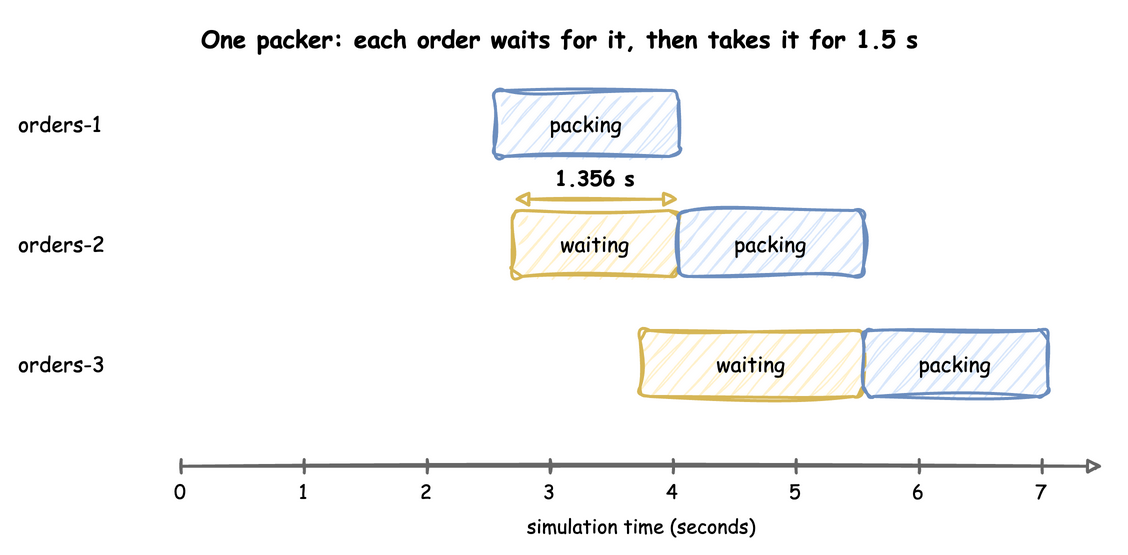
orders-1 arrives at 2.552 and is packed at once; orders-2 arrives at 2.696 and waits 1.356 seconds until orders-1 finishes at 4.052; orders-3 arrives at 3.737 and waits until 5.552

These records come from one run of the first 20 seconds, with the seed 42. orders-1 finds the packer free, so its queued and started events have the same time. orders-2 is the first order that has to wait: it is queued at 2.696 and started at 4.052, when orders-1 finishes. It waits 1.356 seconds. orders-3 arrives while orders-2 is waiting and waits longer, 1.815 seconds, because two orders are ahead of it.

So with one packer, an order that arrives while the packer is busy waits until every order ahead of it has been packed. The wait depends on when orders happen to arrive, which is why the next pages measure it over many orders.

A discrete-event simulation keeps a list of future events, ordered by time. It takes the earliest one, moves the clock to its time, and runs what it triggers, which may add new events to the list: an arrival schedules the next arrival, and a start of packing schedules its end 1.5 seconds later. The trace above is that list, read in order. What Is DES? explains the event list in more detail.

Key Takeaways

  • A model has entities that arrive, resources they wait for, and service times that hold them. desflow calls the work an entity does a task.
  • A task publishes queued, started and a finished event, and an order's wait is its started time minus its queued time.
  • The simulation clock jumps from one event to the next, so a run gives the same records at any pace.

Busy Hour Figures

The later pages of this tutorial and the concept pages run the busy hour with 3 packers in different ways, so they give different figures for its mean wait. A figure changes with the number of runs, the packing times, the warm-up, the run length and the seeds. The table lists each figure, the pages that give it and how it was run. Every run is one hour at 1.8 orders a second unless the row says otherwise. Two terms in the table need a definition:

  • "Measured times" are the 40 packing times measured at the bench, drawn as an empirical distribution.
  • "Replications" have seeds spawned from 42. A run of 5, 10 or 20 replications uses the first 5, 10 or 20 of the 40 seeds.
Mean wait (s) Pages How it was run
1.27 Queues and Capacity, Choosing Inputs, Queueing Basics, Common Mistakes one run, seed 42, constant packing, no warm-up
1.28 Choosing Inputs, Queueing Basics one run, seed 42, the expert's triangular packing (1 to 2.25 s, mode 1.25), no warm-up
1.35 Choosing Inputs, Queueing Basics, Randomness and Seeds one run, seed 42, measured times in a service named empirical, no warm-up
1.38 Measuring a Run, Trusting Results, Output Analysis, Randomness and Seeds one run, seed 42, measured times in a service named packing, without a warm-up (1.382) or with a 2-minute warm-up (1.381)
2.37 Choosing Inputs, Queueing Basics, Common Mistakes one run, seed 42, exponential packing, no warm-up
2.11 Common Mistakes 10 replications, constant packing, no warm-up
1.99 Common Mistakes 20 replications with seeds spawned from 1, constant packing, no warm-up
2.05 ± 0.13 Queueing Basics 10 replications of 20,000 seconds, constant packing, the first 2,000 seconds left out
2.20 to 2.23 Trusting Results 5 replications, measured times, warm-ups of 1, 2 and 4 minutes
2.25 ± 0.25 Trusting Results, Checking a Model 10 replications, measured times, 2-minute warm-up
2.48 ± 0.32 Trusting Results, Comparing Designs, Parameter Sweeps, Checking a Model, Checking and Validating, Queueing Basics 20 replications, measured times, 2-minute warm-up
2.32 ± 0.20 Trusting Results, Fitting the Inputs, Comparing Designs, Output Analysis, A Simulation Study 40 replications, measured times, 2-minute warm-up
2.33 ± 0.19 Fitting the Inputs 40 replications, the gamma fitted to the measured times, 2-minute warm-up
2.93 ± 0.25 Fitting the Inputs 40 replications, the triangular fitted to the measured times, 2-minute warm-up

The 1.35 and 1.38 seconds come from the same measured times. The two services draw the times in a different order, because each distribution draws from a random number stream named after its registry path, service.empirical or service.packing (Randomness and Seeds explains the streams).


Full Files

Full files

The complete first shop, which the documentation tests run:

docs/snippets/yaml/first_shop.yaml
# The First Simulation tutorial: the shop as a blueprint.
# Run it with: desflow run first_shop.yaml
simulation:
  sim_id: Shop
  factor: 1.0  # 1 simulated second takes 1 real second
  random_seed: 42  # the same arrival times on every run

resources:
  packers: {current_cap: 1, max_cap: 1}

services:
  # Every order takes exactly 1.5 seconds to pack
  packing: {dist: constant, value: 1.5}

arrivals:
  # One order every 2 seconds on average; each arrival spawns pack_order
  orders: {dist: exponential, rate: 0.5, spawn: pack_order}

tasks:
  pack_order:
    service: packing
    resource: packers
    # The value of the finished event
    payload: {event_type: order_packed}

egress:
  - type: Console

run:
  until: 20
docs/snippets/tutorials/first_shop.py
"""The First Simulation tutorial: the shop, with the SimulationContext builder.

One packer, orders arriving about every 2 seconds, and 1.5 seconds of packing per
order. Every record is printed to the terminal.
"""

import logging

from desflow import ConsoleEgress, SimulationContext

logging.basicConfig(
    level=logging.INFO, format="%(levelname)s [%(asctime)s] %(message)s"
)

app = (
    # 1 simulated second = 1 real second; a seed gives the same arrivals every run
    SimulationContext(sim_id="Shop", factor=1.0, random_seed=42)
    .add_resource("packers", current_cap=1, max_cap=1)
    # Every order takes exactly 1.5 seconds to pack
    .add_service("packing", dist="constant", value=1.5)
    # One order every 2 seconds on average
    .add_arrival("orders", dist="exponential", rate=0.5)
)


@app.task(service_id="packing", resource_id="packers")
def pack_order(task_id: int):
    # Requests a packer, waits the packing time, releases the packer.
    # The returned dictionary is the value of the finished event.
    return {"event_type": "order_packed"}


@app.arrival_loop("orders")
def order_generator(context: SimulationContext):
    task_id = 0
    while True:
        # Waits for the next arrival and returns the new order, keyed orders-1, ...
        order = yield context.wait_for_arrival("orders")
        context.spawn(pack_order(task_id, entity=order))
        task_id += 1


app.add_egress(ConsoleEgress())

if __name__ == "__main__":
    app.run(until=20)
docs/snippets/tutorials/first_shop_low_level.py
"""The First Simulation tutorial: the shop, on the low-level API.

One packer, orders arriving about every 2 seconds, and 1.5 seconds of packing per
order. Every record is printed to the terminal.
"""

import logging

from desflow import (
    CapacityConfig,
    ConsoleEgress,
    DistributionConfig,
    DynamicRealtimeEnvironment,
    DynamicResource,
    Sampler,
    SimParameter,
)

logging.basicConfig(
    level=logging.INFO, format="%(levelname)s [%(asctime)s] %(message)s"
)

PARAMS = SimParameter(
    sim_id="Shop",
    arrival={"orders": DistributionConfig(dist="exponential", rate=0.5)},
    service={"packing": DistributionConfig(dist="constant", value=1.5)},
    resources={"packers": CapacityConfig(current_cap=1, max_cap=1)},
)
SEED = 42  # the same arrival times on every run


def pack_order(env, sampler, packers, key, task_id):
    """One order: wait for a packer, pack it, release the packer."""
    path_id = "Shop.service.packing"

    def publish(value):
        env.publish_event(key, value, task="pack_order", instance=task_id)

    publish({"path_id": path_id, "status": "queued"})
    with packers.request() as request:
        yield request
        publish({"path_id": path_id, "status": "started"})
        service = env.registry.get_config(path_id)
        yield env.timeout(sampler.sample(service))
        publish({"event_type": "order_packed"})


def order_generator(env, sampler, packers):
    """Starts one pack_order for every arrival, keyed orders-1, orders-2, ..."""
    arrival = env.registry.get_config("Shop.arrival.orders")
    task_id = 0
    while True:
        yield env.timeout(sampler.sample(arrival))
        key = f"orders-{task_id + 1}"
        env.process(pack_order(env, sampler, packers, key, task_id))
        task_id += 1


SINKS = [ConsoleEgress()]  # passed to env.setup_egress in run below


def run(until=20, factor=1.0):
    env = DynamicRealtimeEnvironment(factor=factor, strict=False)
    env.registry.register_sim_parameter(PARAMS)
    env.setup_egress(SINKS)

    packers = DynamicResource(env, "Shop", "packers")
    sampler = Sampler(seed=SEED)

    env.process(order_generator(env, sampler, packers))
    try:
        env.run(until=until)
    finally:
        env.teardown()
    return env


if __name__ == "__main__":
    run()