What Is Discrete-Event Simulation?
If you have never used simulation, start here. No maths is needed. A simulation plays out "what would happen if" on a computer, one step at a time, instead of guessing from averages.
Think of a packing shop. Orders arrive about every 2 seconds, and a packer takes 1.5 seconds to pack one. Will orders queue in the busy hour? What if a second packer starts at 9:30, or a delivery brings twenty orders at once?
You could answer by watching the shop with a notebook. You would not write something down every second, because most seconds nothing changes. You would write only the moments when something happens: an order arrives, a packer starts on it, the order is packed. Each of those moments is an event, and the notebook is enough to tell you who waited and for how long.
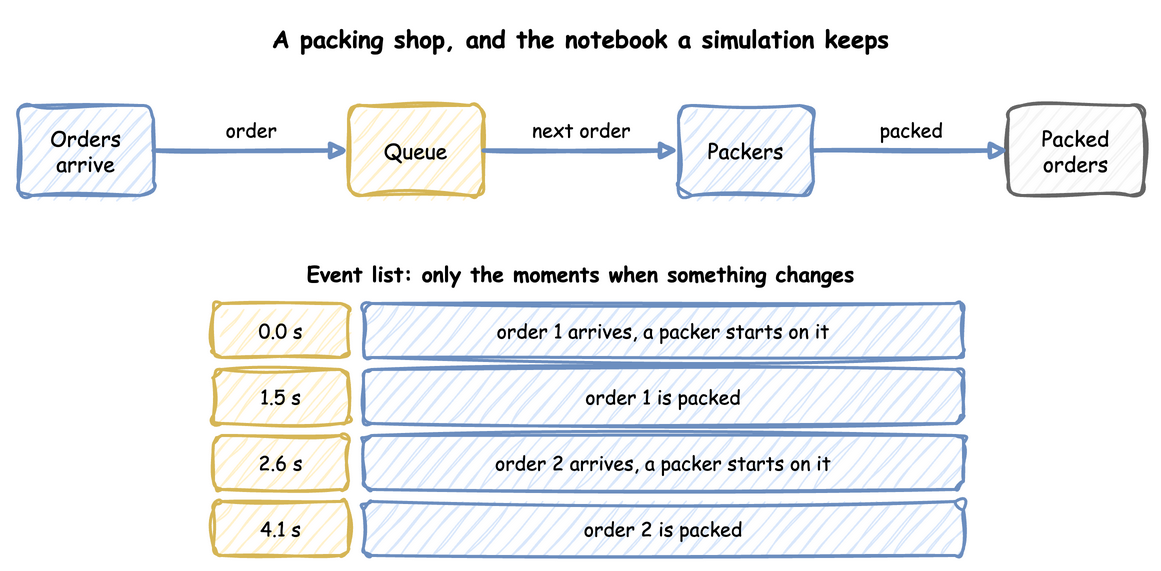
A discrete-event simulation (DES) is that notebook, written by a computer. You describe the shop: how often orders come, how long packing takes, how many packers there are. The computer then plays out the events one after another, with random variation as in real life, and writes down what happens. Because it skips the moments when nothing changes, it plays out a day, or a year, in seconds. Change the description, add a packer or double the orders, and run it again to see the difference.
desflow does this for any system with arrivals, work and limited capacity: a factory, a warehouse, a shop, a support desk, a network. It also sends every event out as a record, to Kafka, a database or files, so the simulation becomes a source of realistic data. The tutorial builds the packing shop step by step, and this page explains the ideas it rests on.
Events and the Event List
In the Tutorial
The shop of First Simulation has one packer, orders about every 2 seconds and 1.5 seconds of packing. Its first records show the events:
- At 2.552 seconds order 1 arrives, finds the packer free and starts at once.
- At 2.696 seconds order 2 arrives and joins the queue, because the packer is busy.
- At 4.052 seconds, 1.5 seconds after it started, order 1 is packed, and order 2 starts in the same instant.
Order 2 waited 4.052 − 2.696 = 1.356 seconds. Nothing in the model says so: the wait comes from when the events fell.
Why It Matters
A discrete-event simulation models a system as a series of events. Each event happens at an instant, and between two events nothing changes. The simulation therefore visits only the instants when events happen. It keeps a list of the events to come, in time order. It takes the earliest, moves its clock straight to that instant, and carries the event out. Carrying out an event usually schedules more: when a packer starts on an order, the simulation schedules the end of packing 1.5 seconds later.
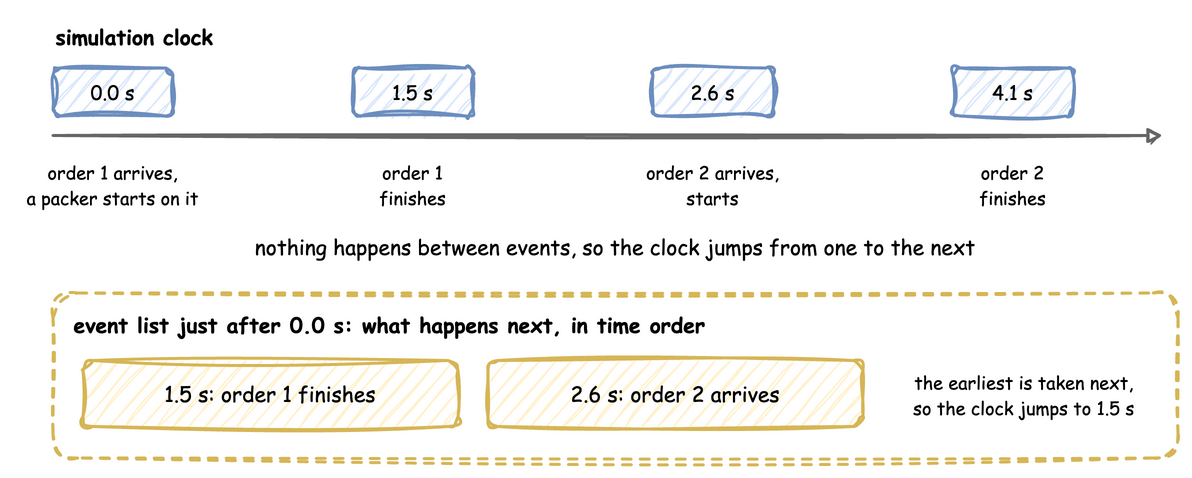
Because the clock jumps, a simulated week with a few thousand events takes only the time needed to compute those events, not a week. Two events can fall at the same instant, as order 1 finishing and order 2 starting do. They run by priority and then in the order they were scheduled, as Run Length shows.
How to Use It
You do not write the event list. desflow runs on SimPy, which keeps the event list and the clock. You describe the arrivals, the work and the resources, and desflow adds the parts of a simulation study that you would otherwise write yourself:
- Statistics. Waits, queue lengths and utilisation are collected for you, with a warm-up period left out. Statistics explains them.
- Replications.
desflow run --replicationsrepeats a run with different seeds and gives each statistic with a 95% interval. Replications explains it. - Experiments.
desflow experimentcompares designs with the same random numbers, checks them against bounds and observed values, and writes a report. Experiments explains it. - Checks against queueing theory.
desflow explainworks out each resource's utilisation and waits from the model alone, and--verifycompares those figures with runs. Command Line shows it. - Inputs from data.
desflow fitfits measured times to distributions, anddesflow distconverts a distribution's parameters. Input Fitting explains it.
To see these events yourself, follow First Simulation. It gives the shop's file in three forms, a YAML blueprint, a builder script and a low-level script, and how to install desflow and run each one. All three forms print the same records.
What the Result Means
Read sim_ts, the simulation time of each record. It jumps from 2.552 to 2.696, then to 3.737, 4.02 and 4.052, because nothing happens in between. A run unpaced, with factor: 0, gives the same records in a fraction of a second. A run paced to the wall clock gives them in real time, which is how desflow feeds live data to a system that reads it.
Entities, Resources and Queues
In the Tutorial
The orders are the entities: the things that flow through the model. Each order arrives, needs a packer, holds the packer while it is packed, and leaves. The packers are a resource: something limited that an entity holds while it is served. When every packer is busy, the next order waits in the resource's queue.
An entity can carry attributes: facts about it that stay with it as it moves. A Flow of Tasks marks each order as express or not when it arrives, and marks it as backordered when it was picked from an empty shelf. A rule reads an attribute as attr.express.
Why It Matters
The time an entity spends in a model is of two kinds. An activity is a period of set length, such as the 1.5 seconds of packing. A delay is time spent waiting for something, such as a free packer, and the model does not set its length: it comes from the state of the shop. You describe the activities, and the simulation produces the delays. The wait in the queue is a delay, which is why it is a result and not an input.
Two models with the same average times can have very different waits, because a run of quick arrivals or one slow order holds everyone up. A simulation shows that directly, where an average cannot.
How to Use It
A desflow model is built from these parts. An arrival starts entities, a service gives the length of an activity, a resource limits how many are served at once, and a task says what an entity does. Model Parts covers each one, Arrivals and Services shows how to set an activity's length, and Task Flow shows how to set and read attributes.
What the Result Means
The waits and queue lengths a run reports are delays, so they change when anything about the shop changes: the arrival rate, the packing times, their spread or the number of packers. Queueing Basics explains how, and which results of queueing theory a model can be checked against.
From Model to Records
In the Tutorial
Each order in First Simulation publishes a queued event when it joins the queue, a started event when a packer takes it, and an order_packed event when it is packed. Measuring a Run adds telemetry: the queue length, the utilisation and the waits, published every 10 seconds.
Why It Matters
A model on its own only moves its clock. What makes it useful here is what it publishes. A sink writes each record to a destination, such as a Kafka topic, a database table or an Iceberg table, so the simulation becomes a source of realistic data for whatever reads it.
Whether that data looks real depends on the model being stable. If work arrives faster than the resources can finish it, the queue grows without limit and every later event is delayed more. The records then show waits that grow all day, which no real shop would allow.
How to Use It
Add a sink for each destination. Streaming Out writes the shop's events to files, and Egress lists every sink. Before a long run, check that every resource's utilisation is below 1, as Queues and Capacity shows.
What the Result Means
Each record carries the simulation time, the entity's key and what happened. A reader can rebuild every order's path from them, as Checking and Validating does to check a model.
Terminating or Steady-State
In the Tutorial
The shop opens empty in the morning and closes at the end of the day. A question about one day, such as how many orders are still waiting at closing time, has a natural end: the day. A question about the busy hour, such as the mean wait when the shop is running at 1.8 orders a second, is about the shop after its empty start has stopped mattering.
Why It Matters
Banks et al.'s lecture notes on output analysis separate two kinds of study:
- A terminating run has a natural end, and its results over that period are the answer.
- A steady-state study asks how the shop behaves in the long run. The start of each run is left out as a warm-up, because an empty shop has shorter waits than a busy one.
The kind of study decides how long to run, whether to leave out the start, and how many runs to make.
How to Use It
The same model can be run either way. A terminating run ends at the end of the day, and End Conditions shows how to close the doors and let the last orders finish. A steady-state study sets a warm-up, as Trusting Results does with its 2 minutes. Run Length shows how to set the end of a run.
What the Result Means
A terminating result describes that period, with its empty start included. A steady-state result describes the shop once it is busy, and does not say what happens in the first minutes. Output Analysis explains how to get an interval for either.
Sources
- Banks et al., Discrete-Event System Simulation, chapter 3, General Principles, read through lecture notes on that chapter.
- Ingalls, "Introduction to Simulation" (Winter Simulation Conference, 2001), read through its published text.
- Banks et al.'s lecture notes on output analysis.
- The explanations are our own.