YAML Blueprints
A YAML blueprint is a simulation written as a file. This page shows how to run one, how a file is read and checked, how to change settings per environment, and where an error points. YAML Keys lists every key a blueprint accepts.
What It Is
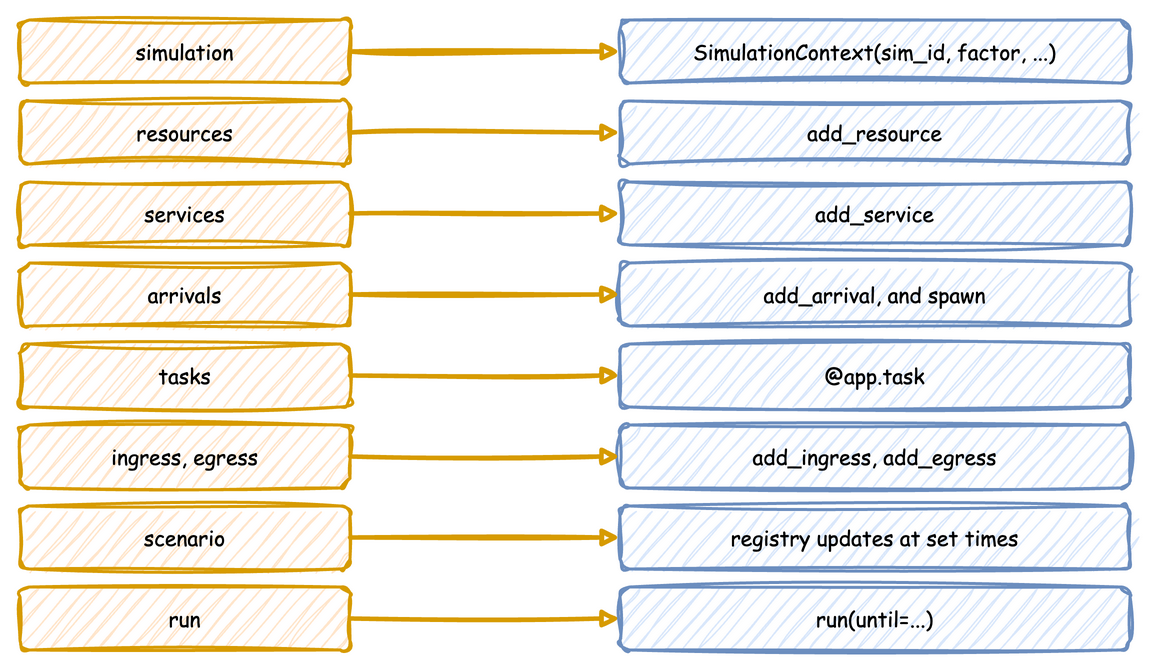
A blueprint holds, as data, the builder calls that a Python script would make. Each section becomes the builder call of the same name: resources is add_resource, tasks is @app.task, stats is with_stats, and so on. There is no second way of building: SimulationContext.from_yaml makes those calls, in the order a script would, and returns an ordinary SimulationContext. A blueprint and a script that make the same calls produce the same simulation, and the tests check that the YAML, builder and low-level versions of every example publish the same records.
Use Python for logic that YAML cannot express. Reference it with !python, as Call Python from YAML shows.
How to Use It
Run a Blueprint
Run it from a shell with the desflow command, which the package installs. These lines use the local example:
--until takes seconds or a duration such as 10 min, 2 hours or 1 week. The command logs at INFO level. ConsoleEgress, in its default log format, writes each batch at that level, so its output is visible. A run with no seed logs the seed it drew, with the command that repeats it. An invalid file prints its errors and exits with code 1.
Or run it from Python:
| docs/snippets/pages/yaml_loading.py:from-yaml | |
|---|---|
run() calls the blueprint's run.before functions first, and uses run.until when no until is passed. The builder methods and decorators still work on the context from_yaml returns.
load_context loads a blueprint or a builder Python file by the same path, so a script that takes either kind of file needs no check of its own:
| docs/snippets/pages/yaml_loading.py:load-context | |
|---|---|
Preview the Records
desflow run FILE builds the blueprint and runs it with its own sinks until --until, run.until or Ctrl+C. It takes a YAML file only. A Python builder file runs with python FILE. Two options print the records instead of sending them to the file's sinks:
| Command | Behaviour |
|---|---|
desflow run FILE --sample N |
Prints the first N events, then stops. N is 1 or more. The run is unpaced: factor is set to 0 and go_live_at is cleared. logical_start_time and random_seed are kept, so timestamps and values look as they would in the real run. Ingress entries and run.before are skipped. Telemetry records print between the events but are not counted, and system.simulation.lag_seconds is not printed. |
desflow run FILE --stdout |
Prints every record of a normal run except the system.simulation.lag_seconds readings, which describe the wall clock, not the model. factor, go_live_at, logical_start_time and ingress are kept; run.before is skipped. |
Both replace every egress entry with one Console of format: json, and a second one for labels when the file has a when: labels entry. A JSON console writes each record as one JSON line on stdout. The run's log stays on stderr, so desflow run FILE --sample 10 | jq .value reads only the records.
A preview checks the whole file, but not the connectors it leaves out:
- The structure, keys and names of the whole file are validated.
run.beforeis skipped, because its functions prepare the real sinks, such as creating topics. A warning on stderr says so when the file has any.- The connectors a preview replaces or skips are not built, so only their
typeis checked. Theirconfigis checked only by a run that builds them, such asdesflow run FILEwithout these options.
| Combination | Result |
|---|---|
--sample with --stdout |
Allowed. --stdout adds nothing. |
--sample with --until, or a file with run.until |
The run ends at whichever comes first. When until comes first, stderr says sample ended at until with k of N events. |
--sample on a file with go_live_at |
A backfill-then-live file prints its first history events. when: history and when: live have no effect, because their entries are replaced. |
--sample on a file that publishes no events |
It runs until until or Ctrl+C, printing telemetry. |
--stdout on a file with several egress entries |
One console prints each record once. Per-entry batch_size and flush_interval are dropped with the entries, and the batching section applies. |
--sample or --stdout with --replications |
Usage error, exit code 2: both print one run. |
--sample 0 |
Usage error, exit code 2. |
Command Line lists every command and option.
Times and Durations
A time in a blueprint is a number of seconds or a duration such as 90 s, 10 min, 2 hours or 1 week: run.until, a scenario step's at, simulation.warmup, a stats interval, and every time-valued distribution parameter. rate is the exception: it is a number per second.
logical_start_time and go_live_at are instants: now, a signed duration from now such as -1d or -10m, or an ISO datetime such as 2026-01-01T00:00:00. Both are read against one moment, when the file is loaded, so -10m and now are exactly ten minutes apart. now, the relative forms and an ISO datetime without an offset are read in simulation.timezone, UTC by default, as Clocks and Pacing describes.
Settings per Environment
${VAR} in a value is replaced with the environment variable, so one file can serve several environments. ${VAR:-default} uses the default when the variable is unset or empty, as in a shell, and $${ writes a literal ${. An unquoted value is read as YAML reads it after the replacement, so factor: ${SIM_FACTOR:-0} is the number 0. A quoted value stays a string. An unset variable with no default stops the load, and the error names its line.
The Parquet example switches from the local disk to S3 with five variables, and Queues and Capacity runs one file with several numbers of packers.
Include a File
!include path puts a mapping from another YAML file in place, such as the settings desflow fit writes: packing: !include fitted/packing.yaml. The path is relative to the file that names it. !include {file: path, spawn: pack} adds keys to the file's mapping, such as the task an arrival spawns. The file is read with the same loader, so ${VAR}, !python and !include work in it. A file that includes itself, directly or through another file, is refused. Input Fitting shows it.
Run on Your Own Environment
simulation.environment runs the model on your own subclass of DynamicRealtimeEnvironment, named with !python, as SimulationContext(environment=...) does in Python, for example environment: !python my_model.TracingEnvironment.
A subclass that overrides __init__ takes **kwargs and passes them on, because desflow builds it with the arguments it builds its own environment with. One that overrides schedule or step calls super(). When a script steps outside run(), step runs once per model event. Inside run(), it runs once per event, desflow's own events included.
In a blueprint, the class is named under simulation. CountingEnvironment in endings_logic.py counts the events the run processes:
| docs/snippets/yaml/task_endings.yaml:environment | |
|---|---|
Check as You Type
desflow schema prints the JSON Schema of a blueprint, and the same file is published on this site, so an editor can complete keys and mark a misspelt key or a value of the wrong kind as you type. Set Up Your Editor shows the setting, and YAML Keys lists every key.
How It Works
from_yaml makes the builder calls for you, so a blueprint gets everything the builder does, and it checks the whole file before anything runs. A file is read and checked in five steps, and any step that fails stops the load with a BlueprintError before anything runs:
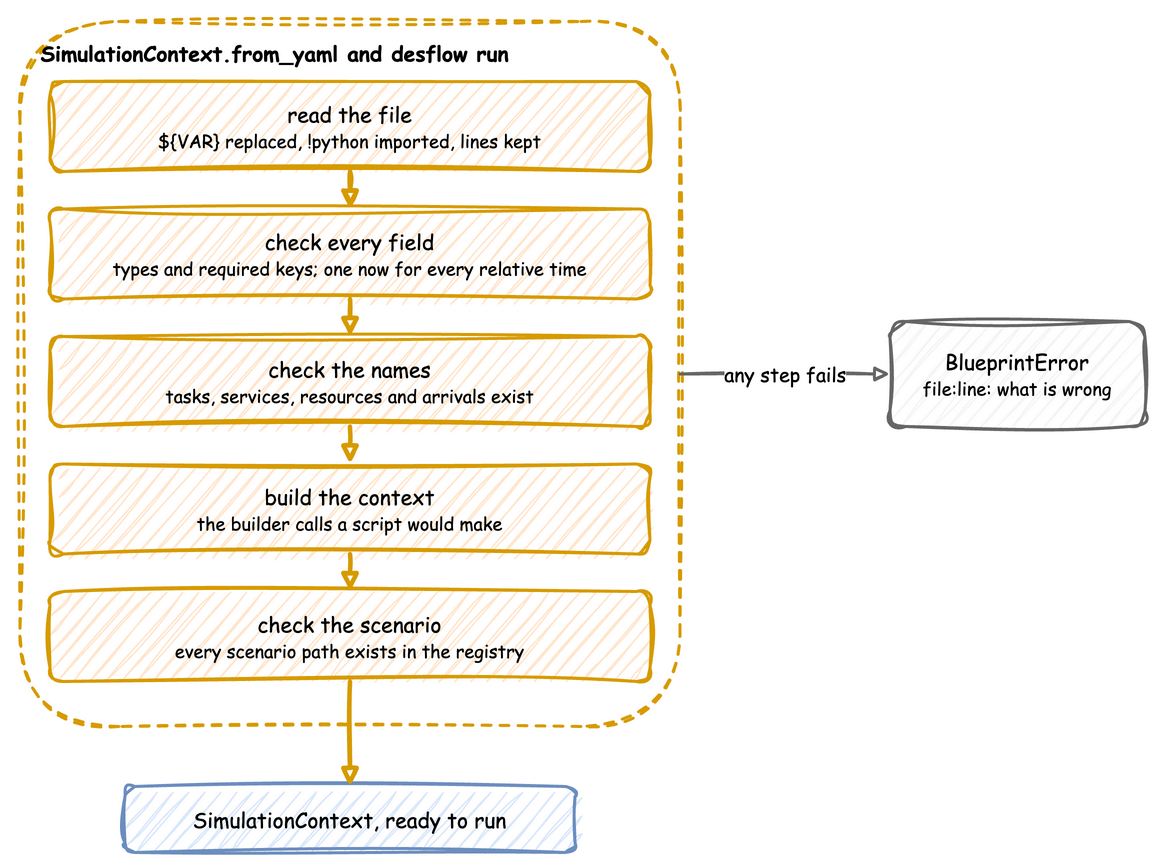
- Read the file.
read_documentreads it with a subclass ofyaml.SafeLoader.${VAR}is replaced while each scalar is read,!python module.attributeimports the module and returns the attribute,!include pathreads a mapping from another YAML file relative to this one, and every key's line is kept in a source map. Every other node is built asyaml.safe_loadwould build it. - Check every field. The document is validated against the
Blueprintmodel. Unknown keys are refused, so a misspelt key is reported rather than ignored. Every distribution is built as the builder would build it, so a parameter out of range, or one the family does not take, is refused here. Every relative time is read against onenow. Aspawnafterand afireaftermust be above 0.simulation.environmentmust be a subclass ofDynamicRealtimeEnvironment. All validation errors are reported at once. - Check the names. Each name in the file must exist and fit where it is used:
- Every service, resource, store, container and next task that a task names exists.
- Every task's
spawnandon:spawn names a task that does not share an arrival's name. - A
subscribenames a task or a signal. - An
on:fire names a signal, and anon:interrupt names a task. - An
on:fire ... fromnames a signal or a task. The task must run on the same entity as theon:list. For a task's list, that is the entity of the task that holds the list. For a signal's list, it is the entity of a task that fires the signal. - Every
level.<name>in an expression names a store or a container, and everyusers.<name>andqueue.<name>names a resource. - A store and a container do not share a name.
- A task's
priorityneeds a resource withqueue: priority. - Resources and stores have whole-number capacities.
- An
on:fire withurgentorafternames a signal withonce: true. simulation.environmentnames a subclass ofDynamicRealtimeEnvironment.
- Build the context. The builder calls are made in the order a script would make them: the simulation, ingress, egress, batching, stats, resources, stores, containers, variables, services, arrivals, tasks, arrival loops, processes, telemetry and the scenario.
- Check the paths. The parameters are registered into a scratch registry, with the code that the run uses. Every scenario
path, and everyregistry["..."]that an expression reads, is then checked against the paths the run will have. Every scenariovaluemust convert to the type its path holds.
Stability and Limits
An error at any step is mapped back to its line through the source map:
| docs/snippets/pages/blueprint_errors.py:load | |
|---|---|
A blueprint covers configuration, including several resources per task (resource: [picker, bench] and keep), preemption (preempt: true) and breakdowns (breakdown:). These stay in Python:
- Values computed per entity. A mapping payload is a constant, apart from three values added for each entity: the task id that
id_fieldadds, the attributes thatattributesadds, and the item agettook, whichitem_fieldadds. Random choices, derived fields and state carried between events are a Python payload or process, as Call Python from YAML shows. A task'spriorityand agetorputamount can be an expression.nextrules read attributes, payload fields, levels, registry values, the item agettook (item.<field>), the wait's branches (wait.<branch>.done) and signals (signal.<name>.count), as Task Flow describes. - Entity keys. A blueprint uses the default key,
<arrival>-<n>. A key function is builder only. - Batching. Collecting several entities into one is a process in Python.
- One simulation per file. A blueprint has one
sim_id.!includeputs a mapping from another file in place, such as fitted settings, but not a second simulation.
Security
A blueprint with no !python references is read entirely by yaml.SafeLoader, and loading it imports only the connector modules its type entries name. An !include reads another YAML file the same way and imports nothing itself. A file that references Python, directly or in a file it includes, runs the imports it names. Such a file needs the same trust as a Python script: run blueprints only from people whose scripts you would run. Call Python from YAML explains.