Low-level API
This page writes a simulation with SimPy and the environment directly: a packing team with a stock of boxes and a store of packed orders, every step written by hand. It builds on SimPy and desflow, which describes the SimPy constructs, and on Builder API, which writes the same kind of model for you.
What It Is
Use the low-level API when you need what the builder does not do: events and interactions of your own shape, such as a resource created while the run goes on in Add Resources Mid-run. A builder or blueprint model can also start a low-level process with add_process, as Tasks and Processes shows.
A low-level script takes these steps, in this order:
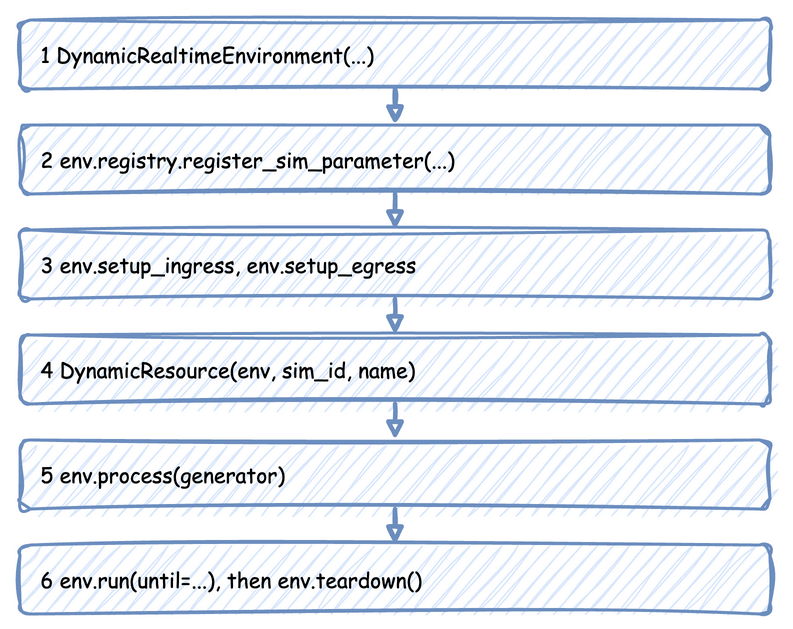
How to Use It
Create the Environment
| docs/snippets/pages/low_level.py:imports | |
|---|---|
| docs/snippets/pages/low_level.py:environment | |
|---|---|
factor sets the pacing: 1.0 follows the wall clock, and 0.0 runs as fast as possible. logical_start_time and go_live_at work as Time and Pacing describes.
Register the Parameters
One SimParameter holds every parameter of one simulation under its sim_id. Registering it gives each value a path, such as Shop.arrival.orders.rate, and only the registered paths exist. Live Parameters lists the paths.
Attach the Connectors
| docs/snippets/pages/low_level.py:connectors | |
|---|---|
setup_egress starts the egress thread, which writes every record the processes publish. setup_ingress starts the ingress thread for parameter changes from outside, and setup_stats switches on the built-in statistics. Egress lists the arguments of setup_egress, including a warm-up and labels sinks.
Create Resources, Containers and Stores
| docs/snippets/pages/low_level.py:resources | |
|---|---|
Each one reads its capacity from the registry when it is created, so the parameters must be registered first. Each one also adds itself to the statistics. Sampler(seed=42) gives each registered distribution a random stream of its own, so a run repeats exactly, as Arrivals and Services describes.
Write the Processes
A process is a SimPy generator: it yields to wait, and publishes records as it goes. This one does what @app.task does in the builder, with a box from stock and a store for the result. It publishes each event with the entity key, the task's name and its instance id, and reports each step to the statistics:
The service time is drawn once the order has a packer and a box, from the configuration the registry holds at that moment, so a change made while it waited still applies to it.
The arrival loop keeps the configuration object rather than a copy of the rate. The registry changes that object in place when a new rate arrives, so the next draw uses the current rate. It gives each order its key, orders-1, orders-2:
| docs/snippets/pages/low_level.py:arrivals | |
|---|---|
A reading of your own is a process that publishes at an interval. publish_telemetry uses the name exactly as given:
| docs/snippets/pages/low_level.py:telemetry | |
|---|---|
A process can also change the simulation itself, through the registry, as a connector or a scenario would:
Start the Processes and Run
| docs/snippets/pages/low_level.py:start | |
|---|---|
| docs/snippets/pages/low_level.py:run | |
|---|---|
ConsoleEgress writes each record as a log line at INFO level, so logging is switched on first. env.run is SimPy's, so until is a number of simulation seconds. time_to_seconds converts a duration such as "10 min". teardown in finally publishes the last statistics, flushes the last records and stops both threads, even when the run stops with Ctrl+C or an error.
A script can run the model in segments by calling env.run(until=...) again, as in SimPy. env.schedule(event, priority, delay) is SimPy's own: simpy.events.URGENT puts an event before the NORMAL ones at its time. Run Length covers segments, strict, sync() and env.resume_pacing().
An environment subclass is plain Python: class Traced(DynamicRealtimeEnvironment), whose __init__ takes **kwargs and passes them on, and whose step or schedule calls super(). Inside run(), step runs once per event, desflow's own events included.
Low-level Forms of the Keys
A script writes by hand what the keys of a blueprint do. These are the calls and attributes that match the arguments of the Builder API:
- Generated values.
ValueRuntime.value(spec, entity=None)evaluates a typed generator fromdesflow.values.generator, or any value that holds one, now. Call it on the same object each time: asequencecounts and auniquechoice refuses on it. Arowgenerator is read from the working directory at the call, and a missing or unusable file raisesValueErrornaming the generator's place and the file. Arowgives a mapping, so a place that needs a number or text takes it only inside another generator. - Resources and signals.
DynamicResourceRequest.preemptedis true once a request of a higher rank took the unit.Signal.fire(value, urgent, after, priority)andSignal.fail(reason, urgent, after, priority, defused)take apriority, andfailtakesdefused.Signal.processedis true once the latest firing's event has been processed. - Transfers.
Transfer(item=...)is the item a storeputadds. - Trace.
env.trace_events()switches the event trace on, andenv.trace_events(False)off. A trace record goes only to the sinks added as trace sinks.
Read a Value, an Expression and a Trace
env.registry.get(path) gives the registry's DynamicValue for a path. Its value is the value now, and name is the path:
| docs/snippets/pages/low_level_reads.py:value | |
|---|---|
This prints Shop.resources.packers.current_cap 2.
An Expression is parsed and checked when it is made, and evaluate reads its names from a Scope. A scope you make yourself holds only the parts you give it, here a payload and the time t:
| docs/snippets/pages/low_level_reads.py:expression | |
|---|---|
This prints True.
read_trace reads the arrivals of a trace, from a CSV or Parquet path or from a list of mappings, into a list of Row objects. Each has its time, its row number and the fields that become the entity's attributes:
| docs/snippets/pages/low_level_reads.py:trace | |
|---|---|
This prints 1 0.5 {'id': 'a'} and 2 2.0 {'id': 'b'}.
How It Works
The environment does little for you. It paces the clock, holds the registry, writes records on the egress thread and keeps the statistics that setup_stats switches on. Everything else is your code. Builder API lists what SimulationContext.run() writes for you on top of the same steps.
The threads, the queues and the processes the environment starts on the SimPy thread are in Threads and Queues. env.step() and env.peek() do not count those processes.
Stability and Limits
Nothing is checked before the run as a whole. Each call checks only what it reads, when it runs:
- An unregistered path raises
KeyErrorwhen a resource, a process or aregistry.getasks for it, so register the parameters before creating anything that reads them. - A record without egress is dropped. Until
setup_egressruns,publish_eventandpublish_telemetrydo nothing, without an error. - A
Sampler()with no seed draws nothing at random, as Arrivals and Services explains, so give it a seed. strictis left unset by default. It is true whenfactoris above 0 orgo_live_atis set, and false otherwise. Strict Pacing gives what it does in each API.- An unhandled failure stops the run under
stop.DynamicRealtimeEnvironment(on_unhandled_failure=...)isstopby default, as a plain SimPy environment is. Understop, a one-shotSignalfailure that nobody waits for raisesSignalFailed, and the run stops. Pass"continue"to defuse such a failure and let the run go on. A re-arming signal's failure is always defused, andSignal.fail(reason, defused=True)defuses one failure of a one-shot signal. A failure with an empty or 0 reason keeps that reason. An exception raised in a process stops the run under both settings. The keyword must bestoporcontinue.
Beyond those, a process can do anything SimPy can model.
The complete file, which the documentation tests run, is docs/snippets/pages/low_level.py. Builder API writes the same kind of model with less code.