Complex Routing (Kafka)
Records often belong in different Kafka topics: task events in one, telemetry in another, and alarms in a topic that someone watches. KafkaEgress takes a topic_router function that picks the topic for each record, instead of one event topic and one telemetry topic.
With a router, KafkaEgress does not create topics at start, because only the router knows which ones it uses, so create them first. The snippets below publish to Kafka, so start a broker first with odctl up kafka-lite. See Getting Started for the one-time odctl install. Tear it down with odctl down kafka-lite --volumes.
Writing a Custom Router
A topic router is a Python function that receives one record, as a dictionary with its stream_type, key or path_id, and value, and returns the topic name as a string. KafkaEgress sends every record it receives, so the router must always return a topic. To drop records, give the provider a when predicate on add_egress, which filters them before they reach the router.
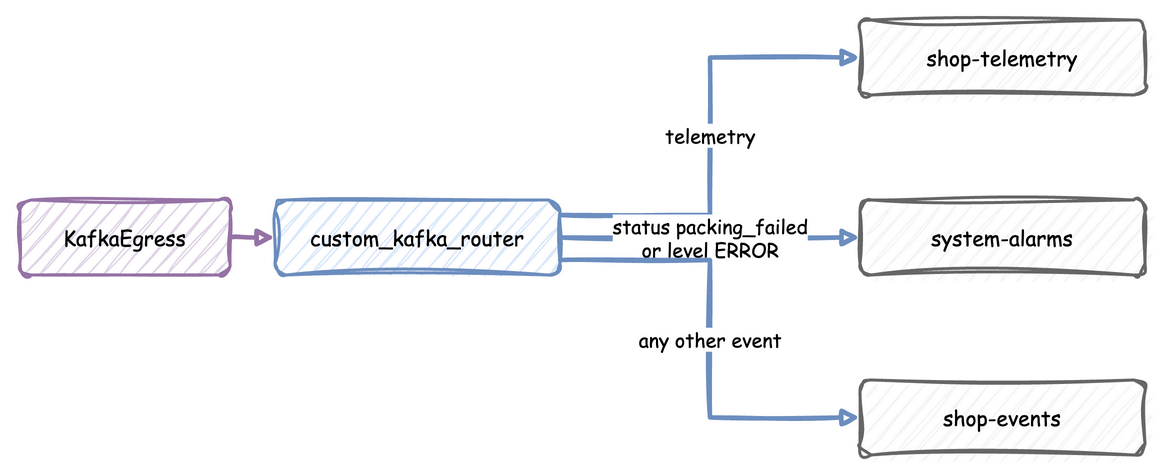
This router sends telemetry, alarms and other events to three topics:
def custom_kafka_router(data: Dict[str, Any]) -> str:
    """Picks a topic for each record by its kind and its value."""
    if data.get("stream_type") == "telemetry":
        return "shop-telemetry"

    value = data.get("value")
    if isinstance(value, dict) and (
        value.get("status") == "packing_failed" or value.get("level") == "ERROR"
    ):
        return "system-alarms"

    # Every other event, including a payload that is not a dict.
    return "shop-events"
Attaching the Router
Pass the router as topic_router to KafkaEgress: