How It Works
This page explains how odctl chooses, starts and reaches its services, where their data lives and how to change them. It builds on Getting Started.
Profiles
A profile is a named group of services that start together, such as kafka-lite or airflow. odctl uses Docker Compose profiles: each service in a compose file lists the profiles it belongs to. registry.yml lists every profile, the compose file it lives in and the profiles it depends on. A tool with a small and a clustered form has two profiles, -lite and -full, such as kafka-lite with one broker and kafka-full with three. odctl list prints every profile, and Profiles has a page for each one.
What odctl up Does
Take odctl up flink-lite as an example. Flink keeps its tables in Iceberg, so it needs the Iceberg REST catalog. The catalog keeps its metadata in PostgreSQL and its files in SeaweedFS, an object store with an S3 API. All of them need the shared jars in deps.
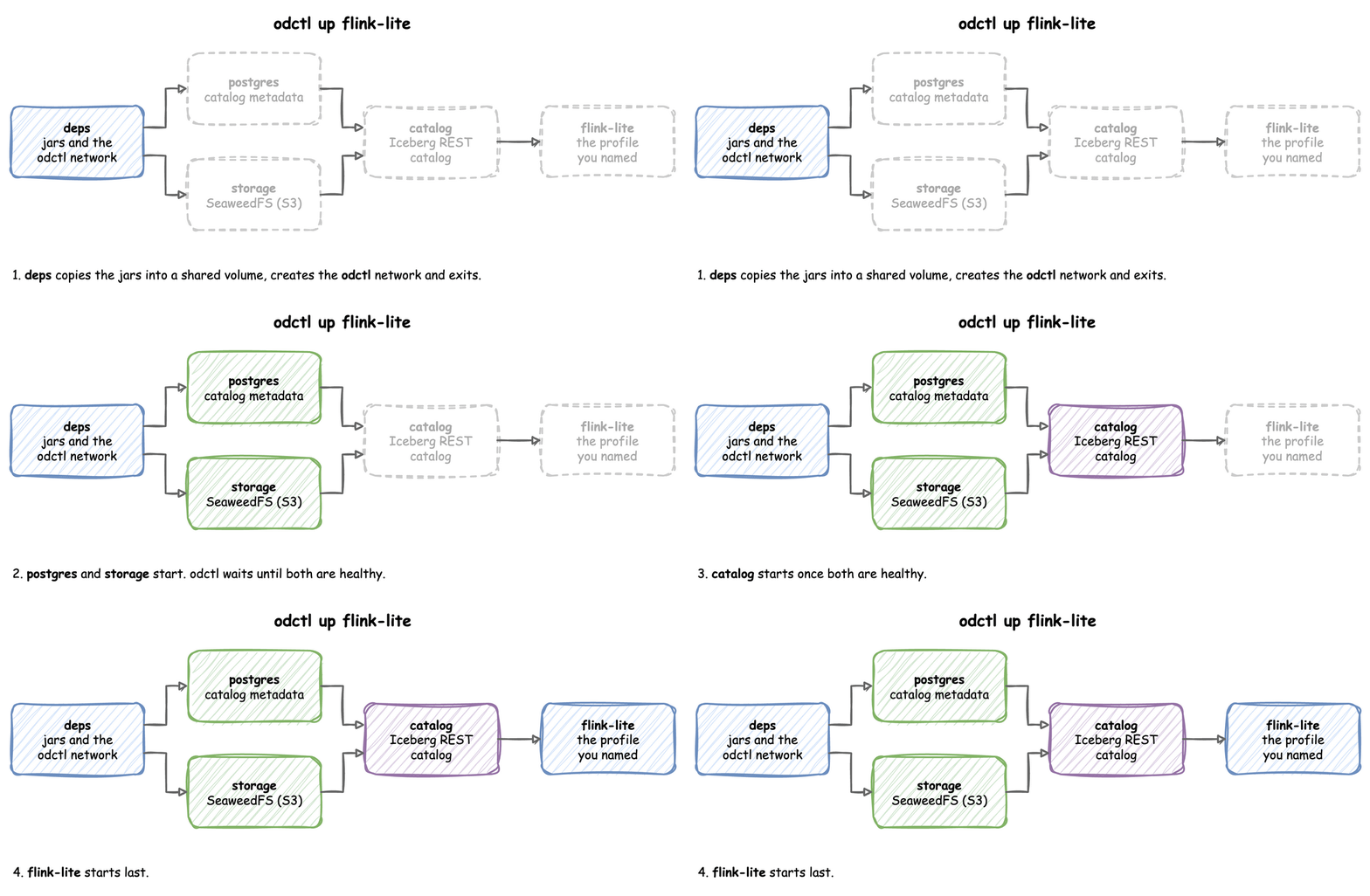
odctl reads these links from registry.yml and starts the profiles from left to right:
depscopies connectors and jars into a shared Docker volume, creates theodctlnetwork, and exits.postgresandstoragestart, and odctl waits until they are healthy.catalogstarts once both are healthy.flink-litestarts last.
This command prints the plan without starting anything:
| docs/snippets/how-it-works/commands.sh:dry-run | |
|---|---|
It lists each compose file with its profiles, from compose-deps.yml with deps to compose-flink.yml with flink-lite. Each profile page lists what its profile also starts.
Dependencies and the Start Order
Each profile lists the profiles it needs under depends_on in registry.yml. odctl follows those lists from the profiles you name, one level at a time, until no new profile appears. It then sorts the result: deps first, postgres and storage next, catalog after them, and every other profile last, in alphabetical order.
The profiles are then grouped by compose file, in that order, and each file is started with one docker compose up --wait. That call returns once every service it started is running, and healthy where it has a health check, so a file starts only after the files before it are ready. deps is the exception: it starts attached, because its init container copies the jars and exits, and --wait treats an exiting container as a failure.
Before Anything Starts
odctl up checks four things before it starts a container. The diagram shows them in order, and the list below explains each one:
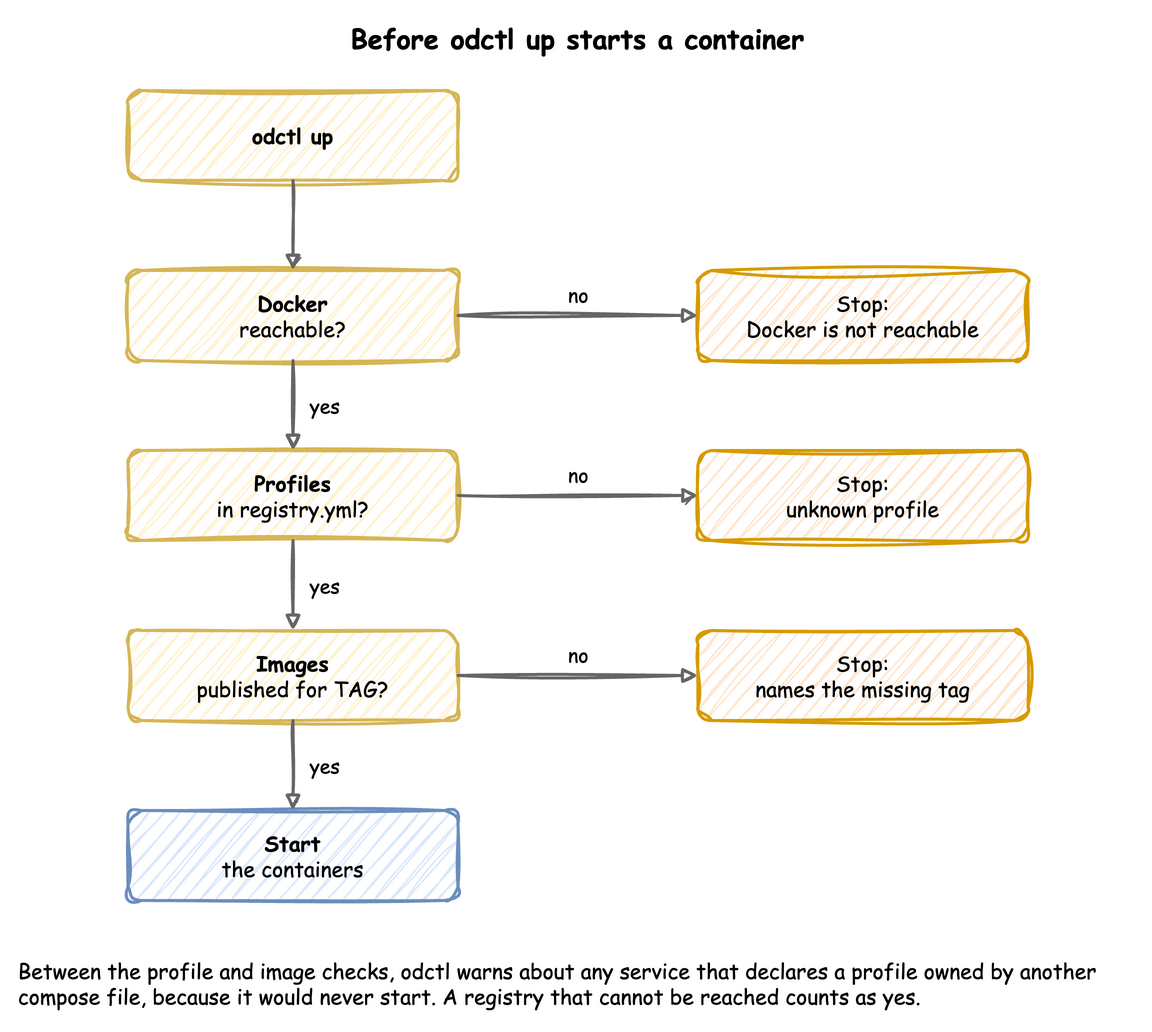
- Docker is reachable. If not, it stops.
- Every profile you name is in
registry.yml. An unknown name stops it, with the name in the error. - Every service can be started. A service that declares a profile owned by another compose file would never start, so odctl warns about it and carries on.
- odctl's own images exist for the tag. It resolves
TAGas compose does and asks the registry for each odctl image that is not already on your machine. If the registry says one is missing, odctl stops and names the tag, rather than leaving Docker to fail on one service. If the registry cannot be reached, it starts anyway, so a machine with no network can run images it pulled before.
Which Containers a Command Touches
down, ps, logs, restart and recreate act only on the profiles you name, not on their dependencies. odctl down flink-lite stops Flink and leaves PostgreSQL, SeaweedFS and the catalog running for other profiles. odctl finds the containers by their compose labels: the project name starts with odctl-, and the service belongs to one of the named profiles.
There is one exception. When a profile depends on another profile in the same compose file, both are included, because compose refuses a command on a service whose dependency is left out. odctl down --volumes removes the shared deps volume and the odctl network only when no other profile has a container left.
How You Reach a Service
Every service publishes its ports on the host at 127.0.0.1 only, so a browser or client on your machine uses http://127.0.0.1:<port>, and other machines on your network cannot reach them. This works the same on macOS, Linux and WSL2: Docker Desktop forwards the port to the host's 127.0.0.1, and WSL2 forwards it to Windows' localhost. To open a port to your network, remove 127.0.0.1: from its line in .odctl/compose-*.yml and run odctl recreate <profile>. Each profile page lists the ports.
Inside Docker, services reach each other by name on the odctl network, for example http://catalog:8181 or broker-1:19092 for Kafka. A container of your own reaches them the same way when it joins that network:
| docs/snippets/how-it-works/commands.sh:reach | |
|---|---|
With the catalog profile running, it prints the catalog's configuration as JSON, which starts with {"defaults":.
Where Data Lives
Most services keep their data inside their containers. PostgreSQL, SeaweedFS, ClickHouse and Fluss's ZooKeeper are the exception: their images declare a data volume, so Docker gives each of these containers an unnamed volume, which a recreate passes on to the new container.
| Command | Containers | Your data |
|---|---|---|
odctl restart |
kept | kept |
odctl recreate |
replaced | lost, except in PostgreSQL, SeaweedFS, ClickHouse and ZooKeeper, which keep their volumes |
odctl down |
removed | lost; the unnamed volumes stay on disk, unused |
odctl down --volumes |
removed, with the unnamed volumes and the odctl-shared-deps volume |
lost |
A database, a bucket, a topic or an Iceberg table therefore lasts until its profile is stopped, and every odctl up is a clean start. odctl down --volumes also frees the disk the unnamed volumes hold. The odctl-shared-deps volume holds only jars, so keeping it makes the next start faster.
Which Images Run
Most services run their project's official image, pinned to an exact version. odctl builds five images of its own and publishes them to ghcr.io/jaehyeon-kim/odctl/:
| Image | Contents |
|---|---|
deps |
Connectors, jars and the Prometheus JMX agent, including the Iceberg REST catalog and the Kafka Connect Iceberg sink |
postgres |
PostgreSQL 18 with pgvector, pg_textsearch and PostGIS |
airflow |
Airflow with the MLflow and Feast clients and the model runtimes |
mlflow |
The MLflow server and model server with the model runtimes |
spark |
Spark with the Python clients jobs use |
These five are tagged with the CLI version through TAG. Workspace explains how TAG is set with and without odctl init.
odctl up downloads the images it does not have. To download them first, for example before you go offline, pull a profile and the profiles it depends on:
| docs/snippets/how-it-works/commands.sh:pull | |
|---|---|
It prints Fetching images for each compose file, a Pulled line for each image and All images pulled successfully!. odctl pull --all pulls the images of every profile, which is many GB. To fetch newer images of the same tags as you start a profile, add --pull:
| docs/snippets/how-it-works/commands.sh:up-pull | |
|---|---|
Workspace
odctl runs from one of two places: the files bundled with the CLI, or a workspace that odctl init copies them into.
With and Without odctl init
| Without a workspace | With a workspace | |
|---|---|---|
| Files odctl reads | the compose files and registry.yml inside the installed package |
the copies in .odctl in the current directory |
| Image tag of odctl's own images | the CLI version | the CLI version, written to .odctl/.env as TAG |
| Your changes | none; the package is replaced on every upgrade | any file in .odctl |
| After a CLI upgrade | new files and images at once | the old files and images, with a warning on every command until odctl init --force |
A TAG set in the shell overrides both. This shows the image the postgres profile would run with another tag, without changing the workspace:
| docs/snippets/how-it-works/commands.sh:tag-override | |
|---|---|
It prints the panel's line for the postgres container, with the image ghcr.io/jaehyeon-kim/odctl/postgres:1.1.0.
odctl looks for .odctl in the current directory. --workspace PATH uses the workspace folder at PATH instead, such as ../shared/.odctl, so one workspace can serve several projects. It goes before the command:
| docs/snippets/how-it-works/commands.sh:workspace-flag | |
|---|---|
Customise It
odctl init copies everything odctl runs into .odctl. It copies only files that are missing, so running it again keeps your edits.
| File | What to change |
|---|---|
compose-*.yml |
Host ports, memory limits and environment variables of each service |
registry.yml |
The profiles, their compose files and their dependencies |
.env |
TAG, the time zone of the services that read it (TZ, UTC by default), extra Python packages for Airflow (_AIRFLOW_PIP_DEPS) and the MLflow services (_MLOPS_PIP_DEPS), and the model the MLflow model server serves (MODEL_URI) |
grafana/dashboards/ |
The Grafana dashboard for each service |
trino/rules.json |
Trino's file-based access control |
evidently/config.yaml |
The Evidently server's settings |
Apply a Change
A restart keeps the container, so it does not apply an edited compose file or .env. Run odctl recreate <profile> to replace the profile's containers from their current definition. Add --pull to fetch the images again first:
| docs/snippets/how-it-works/commands.sh:recreate-pull | |
|---|---|
Recreating discards the data inside those containers, with the exceptions that Where Data Lives lists. odctl restart <profile> is enough for files a service reads when it starts, such as trino/rules.json and the Grafana dashboards.
Examples
Each example edits the workspace, then applies the change. sed -i.bak works with both GNU and macOS sed, and keeps the original as a .bak file.
Give SeaweedFS 2 GB instead of 512 MB, for example when several projects share it. SeaweedFS is a Go program, and GOMEMLIMIT is a soft memory limit: as the memory the Go runtime manages nears it, the garbage collector runs more often and returns memory to the system sooner. It is three quarters of mem_limit, so change both:
| docs/snippets/how-it-works/commands.sh:seaweed-memory | |
|---|---|
The last command prints 2147483648, which is 2 GB in bytes.
Publish Trino on port 8180 instead of 8080, when another program already uses 8080:
| docs/snippets/how-it-works/commands.sh:trino-port | |
|---|---|
The last command prints 8080/tcp -> 127.0.0.1:8180.
Install extra Python packages in the Airflow container, for DAGs that import them:
| docs/snippets/how-it-works/commands.sh:airflow-deps | |
|---|---|
The last command prints 1.4.3.
Install an extra Python package in the MLflow containers, for a model that imports it:
| docs/snippets/how-it-works/commands.sh:mlops-deps | |
|---|---|
The last command prints 0.9.0. _AIRFLOW_PIP_DEPS and _MLOPS_PIP_DEPS both install their packages from PyPI again in every new container: at the first odctl up, after odctl recreate, and after odctl down and odctl up. _AIRFLOW_PIP_DEPS is for the Airflow containers. _MLOPS_PIP_DEPS is for the mlflow and mlflow-serve containers, for example a library a served model needs to load. odctl restart keeps the container, so the packages stay. Each new container needs PyPI, and pinned versions (transformers==5.20.2) keep the installed packages the same.
Set the time zone of the services that read TZ, here the MLflow containers:
| docs/snippets/how-it-works/commands.sh:timezone | |
|---|---|
The last command prints AEDT from October to April and AEST for the rest of the year. PostgreSQL reads TZ only when it creates its data folder, and a recreate keeps that folder, so its time zone changes after odctl down postgres and odctl up postgres. MODEL_URI in .env sets the model mlflow-serve serves, as MLflow Tracking and Model Serving shows.
Create a bucket before its profile exists, for example for a project that has no profile. seaweed-init creates a fixed list of buckets, and .odctl/seaweed/s3.json gives the login user the Admin action, which creating a bucket needs. This runs boto3 in a container on the odctl network, where seaweed:8333 resolves, and prints the buckets, which now include desflow:
Two other ways exist. weed shell inside the seaweed container runs s3.bucket.create -name desflow, the command seaweed-init runs. Adding the name to BUCKETS in .odctl/compose-infra.yml creates it at every start of the storage profile. An upgrade needs odctl init --force, which removes that edit.
Trino Access Rules
The shipped trino/rules.json grants every identity full table privileges and denies analyst schema ownership. Add your own table rules there for row filtering and column masking, then restart Trino.
Start Again
odctl init --force deletes .odctl and copies the bundled files again, with TAG set to the current CLI version. Your edits are lost, so it asks for confirmation first. In a script, --yes answers the prompt:
| docs/snippets/how-it-works/commands.sh:init-force | |
|---|---|