Flink SQL: Kafka to PostgreSQL
The flink-lite profile runs a Flink JobManager, one TaskManager and the SQL Gateway. flink-full runs three TaskManagers. Flink's connector jars for Kafka, Avro with the schema registry, JDBC, Iceberg and HTTP come from the shared volume that the deps profile fills. The end-to-end tests run the commands below on every release.
This guide reads Avro records from Kafka through the Karapace schema registry and writes an aggregate to PostgreSQL over JDBC. It builds on Kafka, which starts kafka-lite and creates a topic. Ingest into Iceberg shows Flink writing an Iceberg table, Rolling Windows computes features over several window sizes, and Feast with Iceberg sends rows to Feast over HTTP.
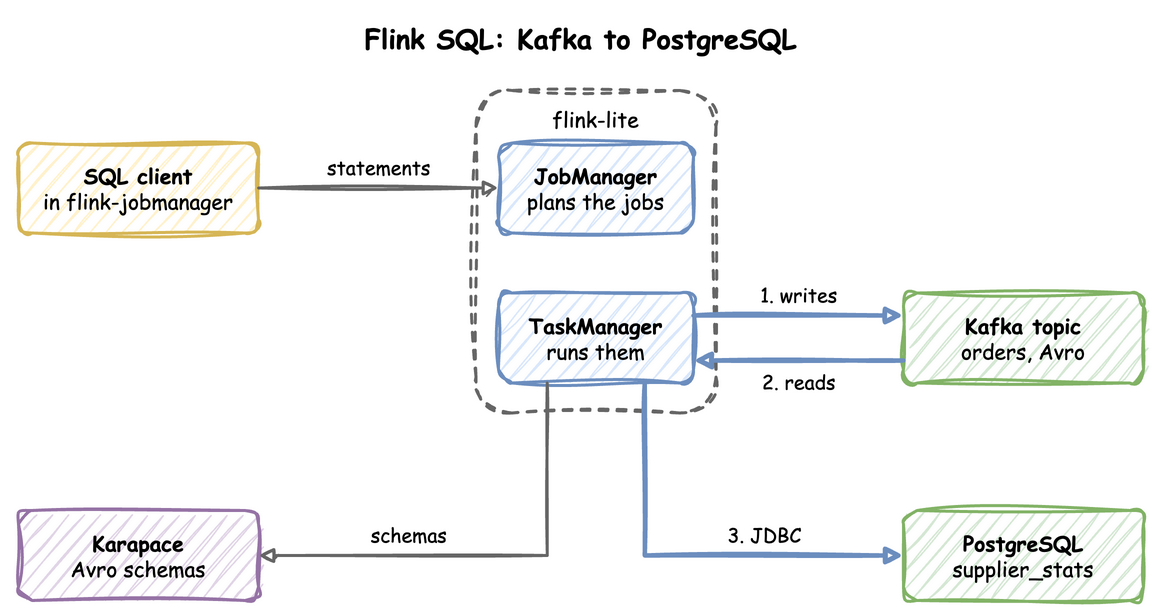
Follow the arrows from the TaskManager: it writes Avro records to the orders topic, reads them back and writes the totals to PostgreSQL.
Start both profiles:
| docs/snippets/flink-sql/commands.sh:up | |
|---|---|
flink-lite starts PostgreSQL itself, because it depends on the Iceberg catalog, which keeps its metadata there.
| Endpoint | Address |
|---|---|
| Flink UI and REST API from the host | http://127.0.0.1:8082 |
| SQL Gateway REST API from the host | http://127.0.0.1:8084 |
Flink REST API inside the odctl network |
http://jobmanager:8081 |
SQL Gateway inside the odctl network |
http://flink-sql-gateway:8083 |
Create the Topic and the Target Table
This creates the Kafka topic orders and the PostgreSQL table supplier_stats that the job writes to:
The commands print Created topic orders. and CREATE TABLE.
Run the SQL
Open the SQL client in the JobManager container:
| docs/snippets/flink-sql/commands.sh:sql-client | |
|---|---|
Run these statements in the client. They declare the topic and the PostgreSQL table as Flink tables, write three orders and sum them by supplier:
Each statement prints [INFO] Execute statement succeeded. or, for an INSERT, [INFO] Complete execution of the SQL update statement. The first INSERT writes three Avro records to Kafka and registers their schema in Karapace. The second reads them back, groups them by supplier and writes the result to PostgreSQL. scan.bounded.mode set to latest-offset makes the Kafka source stop at the end of the topic, so the batch job finishes. Leave it out and set execution.runtime-mode to streaming for a job that keeps running.
Right after Kafka starts, Karapace can answer its health check and still time out on a schema write for a short while. If the first INSERT fails on the schema registry, run it again.
Check the Result
This reads the table the job wrote:
| docs/snippets/flink-sql/commands.sh:check | |
|---|---|
Supplier a has 2 orders totalling 15, and supplier b has 1 order totalling 7.5:
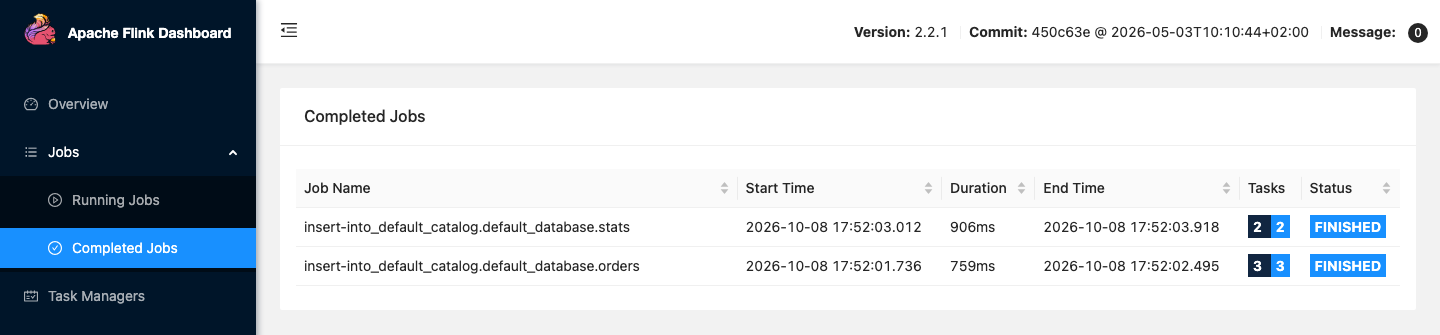
The Flink UI at http://127.0.0.1:8082 shows the jobs the SQL client submitted.
The two INSERT statements run as two batch jobs, listed under Completed Jobs.
From Another Container
Inside the odctl network, Flink's REST API is http://jobmanager:8081 and the SQL Gateway is http://flink-sql-gateway:8083. In Flink SQL, Kafka is broker-1:19092, Karapace is http://karapace:8081 and PostgreSQL is jdbc:postgresql://postgres:5432/odctl.
Runnable Example
Save this file as example.sh and run it with bash example.sh in the folder that holds your .odctl workspace. It runs the steps above with a topic and a table of its own for each run, so it can run again:
It prints the same two rows as Check the Result: a with 2 orders totalling 15, and b with 1 order totalling 7.5.