Ingest into Iceberg
Kafka Connect, Flink and Spark all write Iceberg tables through the same REST catalog, http://catalog:8181, with the files on SeaweedFS under s3://warehouse. SeaweedFS is an object store with an S3 API, which odctl's storage profile runs. The end-to-end tests run the commands below on every release.
This guide builds on Kafka Connect, which registers a connector, and Flink SQL, which runs statements in the SQL client.
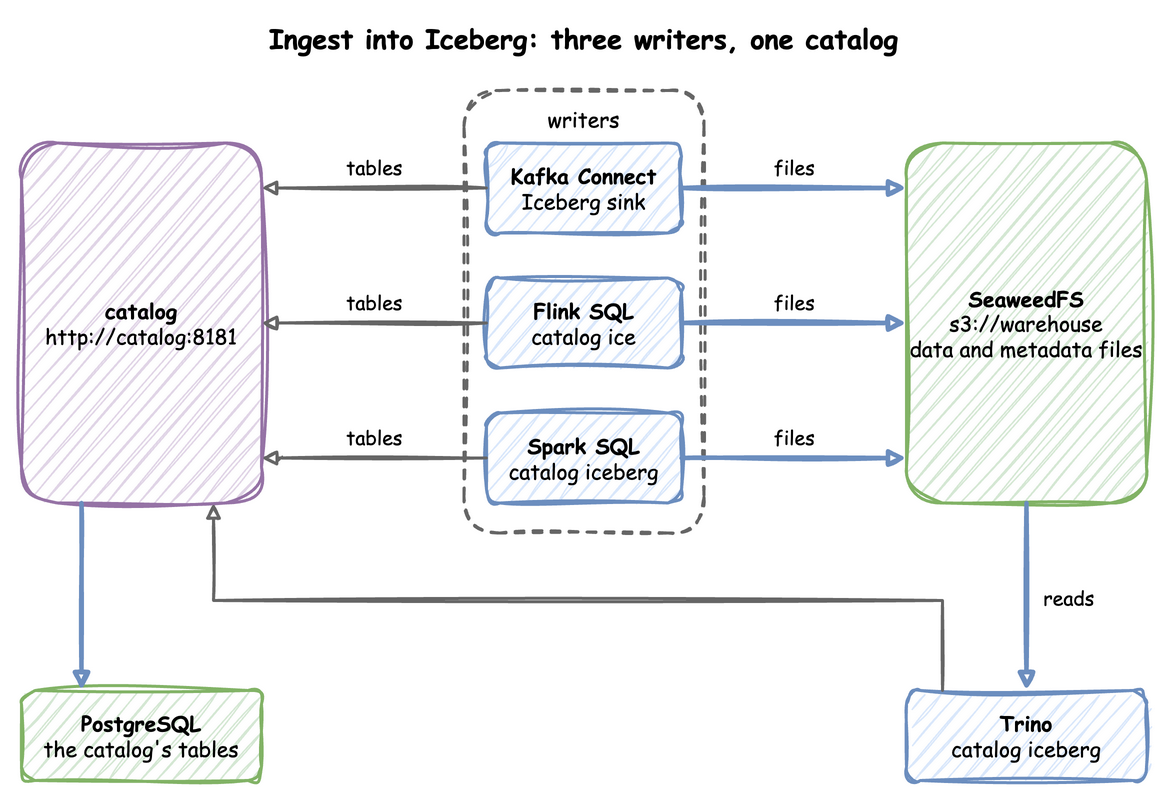
kafka-lite does not start the catalog, so start both:
| docs/snippets/iceberg-ingestion/commands.sh:up |
|---|
| odctl up kafka-lite catalog
|
Kafka Connect Sink
The Iceberg sink in Kafka Connect reads a topic and commits its records to an Iceberg table through the catalog. Look at the sink in the middle: it writes data files to SeaweedFS and commits each batch through the catalog, which keeps its tables in PostgreSQL.
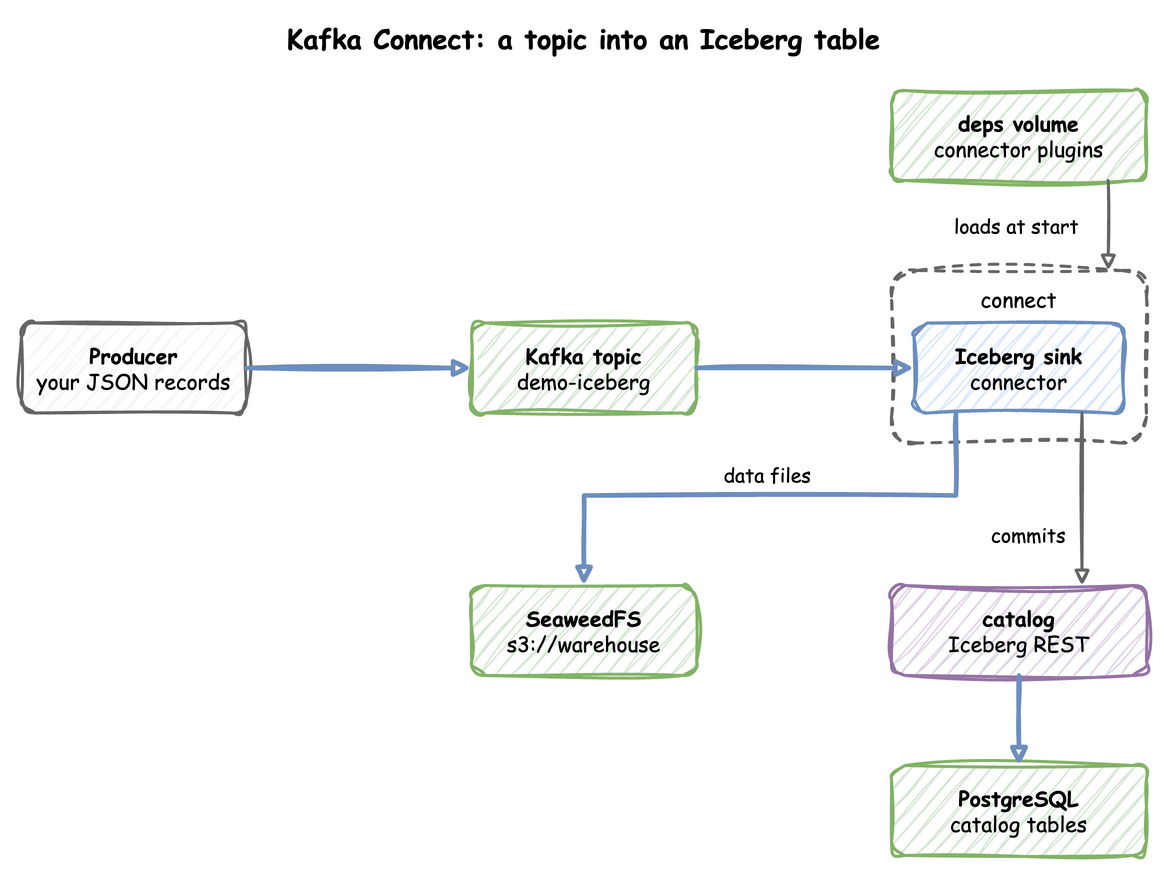
The sink writes to a table that exists. This creates the namespace demo and the table kc through the catalog's REST API:
| docs/snippets/iceberg-ingestion/commands.sh:create-table |
|---|
| api=http://127.0.0.1:8181/v1/namespaces
curl -X POST -H 'Content-Type: application/json' -d '{"namespace":["demo"]}' "$api"
curl -X POST -H 'Content-Type: application/json' \
-d '{"name":"kc","schema":{"type":"struct","schema-id":0,"fields":[{"id":1,"name":"id","required":false,"type":"long"},{"id":2,"name":"name","required":false,"type":"string"}]}}' \
"$api/demo/tables"
|
Each call answers with the namespace or the table's metadata as JSON. The sink also needs its topic and a control topic, where its tasks agree on each commit. This creates both and writes five JSON records:
| docs/snippets/iceberg-ingestion/commands.sh:topics-produce |
|---|
| for topic in demo-iceberg control-iceberg; do
docker exec kafka /opt/kafka/bin/kafka-topics.sh --bootstrap-server broker-1:19092 \
--create --if-not-exists --topic "$topic" --partitions 1 --replication-factor 1
done
for i in 1 2 3 4 5; do echo "{\"id\":$i,\"name\":\"n$i\"}"; done | docker exec -i kafka \
/opt/kafka/bin/kafka-console-producer.sh --bootstrap-server broker-1:19092 --topic demo-iceberg
|
Save the sink's configuration as demo-iceberg.json. It reads plain JSON, so it sets "value.converter.schemas.enable": "false" instead of the worker's default:
| docs/snippets/iceberg-ingestion/demo-iceberg.json |
|---|
| {
"name": "demo-iceberg",
"config": {
"connector.class": "org.apache.iceberg.connect.IcebergSinkConnector",
"tasks.max": "1",
"topics": "demo-iceberg",
"value.converter": "org.apache.kafka.connect.json.JsonConverter",
"value.converter.schemas.enable": "false",
"key.converter": "org.apache.kafka.connect.storage.StringConverter",
"iceberg.tables": "demo.kc",
"iceberg.control.commit.interval-ms": "10000",
"iceberg.kafka.session.timeout.ms": "300000",
"iceberg.kafka.heartbeat.interval.ms": "3000",
"iceberg.kafka.auto.offset.reset": "earliest",
"consumer.override.auto.offset.reset": "earliest",
"iceberg.catalog.type": "rest",
"iceberg.catalog.uri": "http://catalog:8181",
"iceberg.catalog.io-impl": "org.apache.iceberg.aws.s3.S3FileIO",
"iceberg.catalog.client.region": "us-east-1",
"iceberg.catalog.s3.endpoint": "http://seaweed:8333",
"iceberg.catalog.s3.path-style-access": "true",
"iceberg.catalog.s3.access-key-id": "user",
"iceberg.catalog.s3.secret-access-key": "password"
}
}
|
Register it with Kafka Connect from the folder that holds the file:
| docs/snippets/iceberg-ingestion/commands.sh:register |
|---|
| curl -X POST -H 'Content-Type: application/json' \
http://127.0.0.1:8083/connectors -d @demo-iceberg.json
|
The first commit can take a minute or more, because the sink waits for its control consumer to join a group. After that, the table's current snapshot counts the five records:
| docs/snippets/iceberg-ingestion/commands.sh:records |
|---|
| curl -s http://127.0.0.1:8181/v1/namespaces/demo/tables/kc | grep -o '"total-records":"[0-9]*"'
|
The command prints "total-records":"5". Then check the connector and remove it:
| docs/snippets/iceberg-ingestion/commands.sh:status-remove |
|---|
| curl -s http://127.0.0.1:8083/connectors/demo-iceberg/status
curl -X DELETE http://127.0.0.1:8083/connectors/demo-iceberg
|
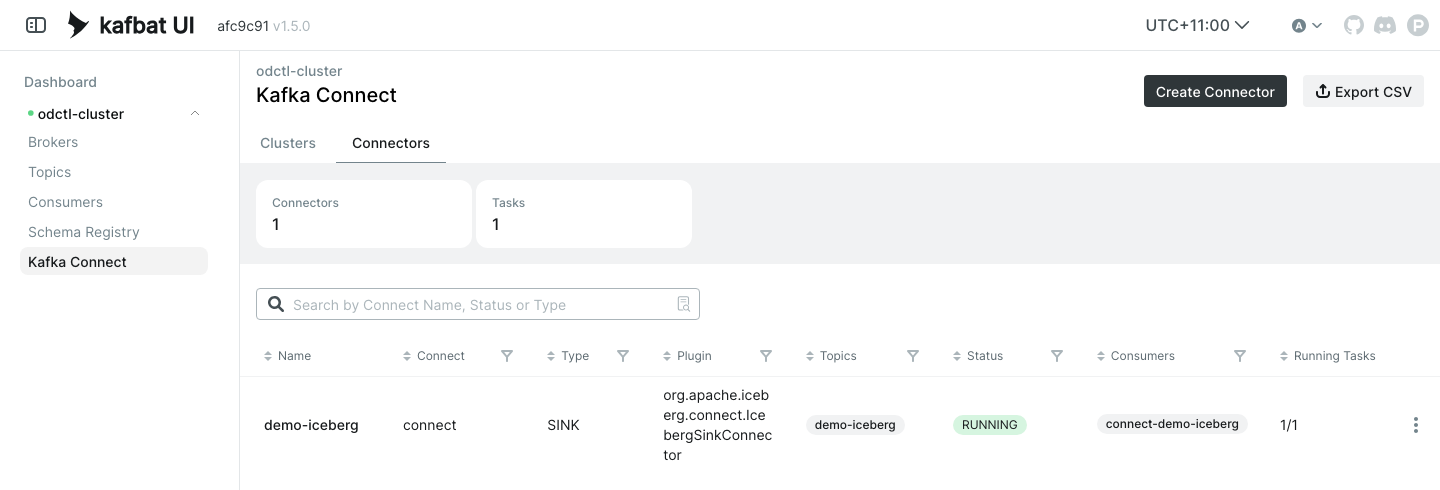
The status shows "state":"RUNNING" for the connector and its task. Kafka UI lists the sink under Kafka Connect, Connectors while it is registered:
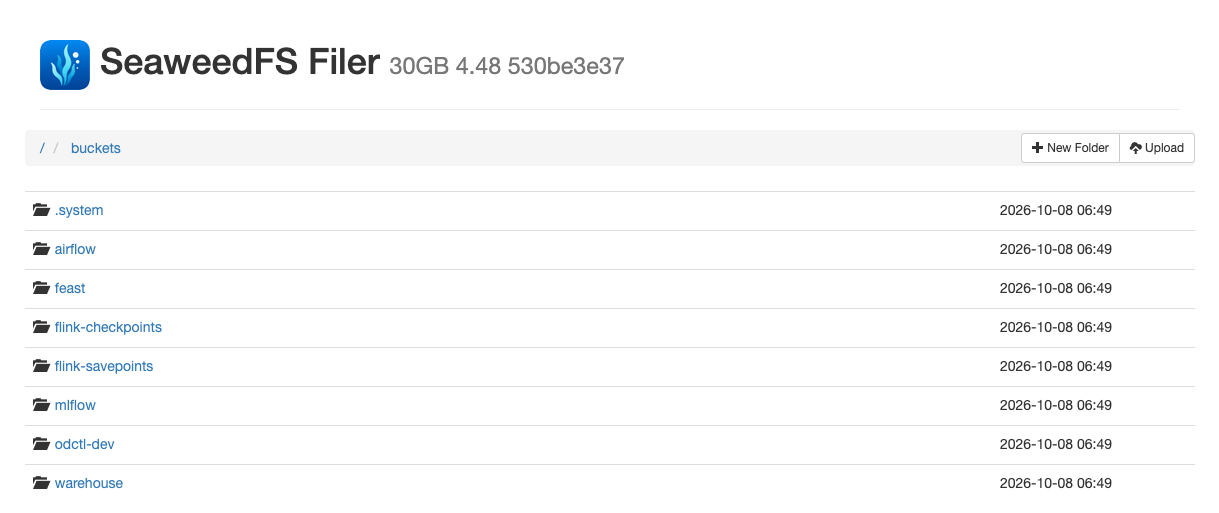
The table's data and metadata files are in SeaweedFS, whose browser at http://127.0.0.1:8889 lists the buckets, including warehouse.
Flink SQL
Start Flink and open its SQL client. flink-lite uses the catalog that is already running:
| docs/snippets/iceberg-ingestion/commands.sh:flink-client |
|---|
| odctl up flink-lite
docker exec -it flink-jobmanager /opt/flink/bin/sql-client.sh
|
These statements register the catalog as ice, create a table, insert three rows and count them:
| docs/snippets/iceberg-ingestion/steps.sql:flink |
|---|
| SET 'execution.runtime-mode' = 'batch';
SET 'table.dml-sync' = 'true';
SET 'sql-client.execution.result-mode' = 'tableau';
CREATE CATALOG ice WITH ('type'='iceberg','catalog-type'='rest','uri'='http://catalog:8181','warehouse'='s3://warehouse','s3.endpoint'='http://seaweed:8333','s3.path-style-access'='true','s3.access-key-id'='user','s3.secret-access-key'='password');
CREATE DATABASE IF NOT EXISTS ice.demo_flink;
CREATE TABLE ice.demo_flink.t (id BIGINT, name STRING);
INSERT INTO ice.demo_flink.t VALUES (1, 'a'), (2, 'b'), (3, 'c');
SELECT COUNT(*) FROM ice.demo_flink.t;
|
The SELECT prints 3.
Spark SQL
Spark's default catalog already points at the same REST catalog, as Spark shows when it creates and queries a table.
Every engine sees the same tables, so a table written by one can be read by the others, and by Trino through its iceberg catalog.
From Another Container
Inside the odctl network, an Iceberg client uses the catalog at http://catalog:8181, the warehouse s3://warehouse, and SeaweedFS at http://seaweed:8333 with the key user and the secret password.
Runnable Example
Save this file as example.sh and run it with bash example.sh in the folder that holds your .odctl workspace. It runs the Kafka Connect sink and the Flink SQL steps above with names of its own for each run, so it can run again:
| docs/snippets/iceberg-ingestion/example.sh |
|---|
| #!/usr/bin/env bash
# Starts kafka-lite and flink-lite, which starts the catalog, then writes five
# rows to an Iceberg table through the Kafka Connect sink and three rows to
# another through Flink SQL, and prints both counts. Each run uses its own
# topic, connector and table names, so the file can run again.
set -euo pipefail
odctl up kafka-lite flink-lite
run=$(date +%s)
api=http://127.0.0.1:8181/v1/namespaces
until curl -fs http://127.0.0.1:8083/connectors >/dev/null; do sleep 2; done
# A namespace, which may exist already, and an empty table for the sink.
curl -s -o /dev/null -X POST -H 'Content-Type: application/json' -d '{"namespace":["demo"]}' "$api"
curl -fs -o /dev/null -X POST -H 'Content-Type: application/json' \
-d "{\"name\":\"kc_$run\",\"schema\":{\"type\":\"struct\",\"schema-id\":0,\"fields\":[{\"id\":1,\"name\":\"id\",\"required\":false,\"type\":\"long\"},{\"id\":2,\"name\":\"name\",\"required\":false,\"type\":\"string\"}]}}" \
"$api/demo/tables"
# Create the topic and the sink's control topic, then write five JSON records.
for topic in "iceberg-$run" "control-$run"; do
docker exec kafka /opt/kafka/bin/kafka-topics.sh --bootstrap-server broker-1:19092 \
--create --topic "$topic" --partitions 1 --replication-factor 1
done
for i in 1 2 3 4 5; do echo "{\"id\":$i,\"name\":\"n$i\"}"; done | docker exec -i kafka \
/opt/kafka/bin/kafka-console-producer.sh --bootstrap-server broker-1:19092 --topic "iceberg-$run"
curl -fs -o /dev/null -X POST -H 'Content-Type: application/json' http://127.0.0.1:8083/connectors -d @- <<JSON
{
"name": "iceberg-$run",
"config": {
"connector.class": "org.apache.iceberg.connect.IcebergSinkConnector",
"tasks.max": "1",
"topics": "iceberg-$run",
"value.converter": "org.apache.kafka.connect.json.JsonConverter",
"value.converter.schemas.enable": "false",
"key.converter": "org.apache.kafka.connect.storage.StringConverter",
"iceberg.tables": "demo.kc_$run",
"iceberg.control.topic": "control-$run",
"iceberg.control.commit.interval-ms": "10000",
"iceberg.kafka.session.timeout.ms": "300000",
"iceberg.kafka.heartbeat.interval.ms": "3000",
"iceberg.kafka.auto.offset.reset": "earliest",
"consumer.override.auto.offset.reset": "earliest",
"iceberg.catalog.type": "rest",
"iceberg.catalog.uri": "http://catalog:8181",
"iceberg.catalog.io-impl": "org.apache.iceberg.aws.s3.S3FileIO",
"iceberg.catalog.client.region": "us-east-1",
"iceberg.catalog.s3.endpoint": "http://seaweed:8333",
"iceberg.catalog.s3.path-style-access": "true",
"iceberg.catalog.s3.access-key-id": "user",
"iceberg.catalog.s3.secret-access-key": "password"
}
}
JSON
# The first commit can take a minute or more.
until curl -s "$api/demo/tables/kc_$run" | grep '"total-records":"5"' >/dev/null; do sleep 5; done
echo "demo.kc_$run: 5 records written by the Kafka Connect sink"
curl -s -o /dev/null -X DELETE "http://127.0.0.1:8083/connectors/iceberg-$run"
docker exec -i flink-jobmanager /opt/flink/bin/sql-client.sh <<SQL | grep -E '^[|+]'
SET 'execution.runtime-mode' = 'batch';
SET 'table.dml-sync' = 'true';
SET 'sql-client.execution.result-mode' = 'tableau';
CREATE CATALOG ice WITH ('type'='iceberg','catalog-type'='rest','uri'='http://catalog:8181','warehouse'='s3://warehouse','s3.endpoint'='http://seaweed:8333','s3.path-style-access'='true','s3.access-key-id'='user','s3.secret-access-key'='password');
CREATE DATABASE IF NOT EXISTS ice.demo_flink;
CREATE TABLE ice.demo_flink.t_$run (id BIGINT, name STRING);
INSERT INTO ice.demo_flink.t_$run VALUES (1, 'a'), (2, 'b'), (3, 'c');
SELECT COUNT(*) AS flink_rows FROM ice.demo_flink.t_$run;
SQL
|
It prints 5 records written by the Kafka Connect sink with the table's name, then a table with flink_rows equal to 3. The SQL client also prints warnings about the JVM and the terminal on its error output, which do not affect the result.