Valkey
The valkey profile runs the Valkey Bundle image as one container named valkey. Valkey is an in-memory key-value store that speaks the Redis protocol. The Bundle image adds modules for JSON documents, Bloom filters and vector search. The end-to-end tests run the commands below on every release.
This guide builds on Getting Started.
Start the profile:
| docs/snippets/valkey/commands.sh:up | |
|---|---|
| Setting | Value |
|---|---|
| Address from the host | 127.0.0.1:6379 |
Address inside the odctl network |
valkey:6379 |
| User | user, password password |
| Memory limit | 512 MB |
The memory limit is set today by mem_limit in the valkey service of .odctl/compose-store.yml, where an edit can change it.
Users and Permissions
The unauthenticated default user is turned off, so every client logs in as user. That user has every command, every key pattern and every Pub/Sub channel. Channels are a separate permission in Valkey, and the profile grants them explicitly, so PUBLISH and SUBSCRIBE work as well as key commands.
Write and Read Keys
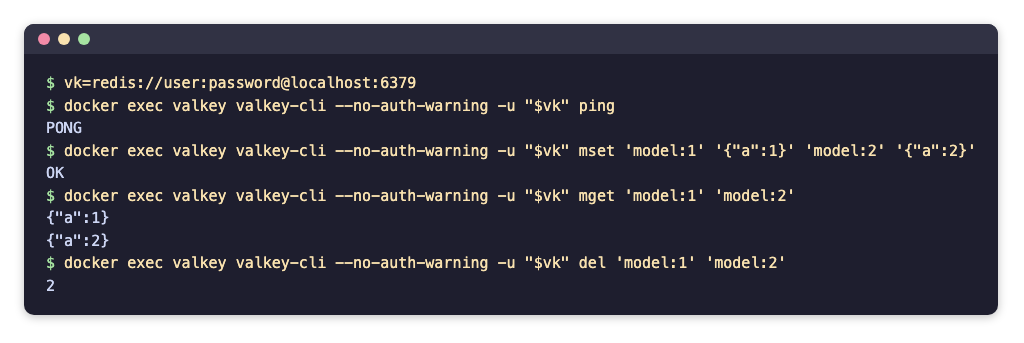
valkey-cli is in the container. Log in with a URL that carries the user and password:
--no-auth-warning stops valkey-cli printing a warning about the password on the command line. ping answers PONG. mset writes both keys in one command and prints OK. mget reads them back in one round trip and prints {"a":1} and {"a":2}. del prints 2, the number of keys it removed.
Persistence
Valkey writes an append-only file and saves a snapshot every 60 seconds when at least one key has changed. Both settings are in the command of the valkey service in .odctl/compose-store.yml (--appendonly yes and --save 60 1). Both files are inside the container, so a restart keeps the data and odctl down removes it.
From Another Container
Inside the odctl network, connect to valkey:6379 with the same user and password, for example redis://user:password@valkey:6379 for a Redis client. Feast's online store uses this address, as Feast with Iceberg shows.
Runnable Example
Save this file as example.sh and run it with bash example.sh in the folder that holds your .odctl workspace. It also stores a JSON document with the JSON module and reads one field of it:
It prints PONG, OK, the two values, OK, [5] for the stars field and 3 for the three deleted keys.