Temporal Workers
Temporal runs long-running code that survives failures: a workflow is a function whose progress the server records, and an activity is a step of it that can fail and be retried. The temporal profile runs the Temporal development server: the server, the Web UI and a SQLite database in one container. odctl runs only the server. Your own process runs the worker that executes workflows and activities. The end-to-end tests run the code below on every release.
This guide builds on Getting Started. Start the profile and install the Python SDK at the version the tests use:
| docs/snippets/temporal-workers/commands.sh:install |
|---|
| odctl up temporal
pip install temporalio==1.34.0
|
| Endpoint |
Address |
gRPC from the host, namespace default |
127.0.0.1:7233 |
gRPC inside the odctl network |
temporal:7233 |
| Web UI |
http://127.0.0.1:8233 |
A Worker and a Workflow
Save this code as greet.py and run it with python greet.py. It starts a worker, runs the workflow Greet on it and prints the result. The activity fails on its first attempt, so the result shows that the retry policy ran it again:
| docs/snippets/temporal-workers/steps.py:worker |
|---|
| import asyncio
from datetime import timedelta
from temporalio import activity, workflow
from temporalio.client import Client
from temporalio.common import RetryPolicy
from temporalio.worker import Worker
@activity.defn
async def greet(name: str) -> str:
if activity.info().attempt < 2:
raise RuntimeError("first attempt fails on purpose")
return f"hello {name}"
@workflow.defn
class Greet:
@workflow.run
async def run(self, name: str) -> str:
return await workflow.execute_activity(
greet, name,
start_to_close_timeout=timedelta(seconds=30),
retry_policy=RetryPolicy(initial_interval=timedelta(seconds=1), maximum_attempts=3),
)
async def main() -> None:
client = await Client.connect("127.0.0.1:7233")
async with Worker(client, task_queue="demo", workflows=[Greet], activities=[greet]):
print(await client.execute_workflow(Greet.run, "odctl", id="greet-1", task_queue="demo"))
# The workflow sandbox imports this file again, so run main only as a script.
if __name__ == "__main__":
asyncio.run(main())
|
The worker logs the RuntimeError of the first attempt with its traceback, and then the script prints hello odctl.
Wait for an Approval
A workflow can wait for a signal, for example a person approving an agent's action. The workflow below waits until its approve signal arrives, and then returns who approved it:
| docs/snippets/temporal-workers/steps.py:approval-workflow |
|---|
| @workflow.defn
class Approval:
def __init__(self) -> None:
self.approver = None
@workflow.signal
def approve(self, approver: str) -> None:
self.approver = approver
@workflow.run
async def run(self) -> str:
await workflow.wait_condition(lambda: self.approver is not None)
return f"approved by {self.approver}"
|
Add the class to greet.py and replace main with this one, which registers both workflows with the worker, runs Greet, starts Approval and sends its signal:
| docs/snippets/temporal-workers/steps.py:approval-run |
|---|
| async def main() -> None:
client = await Client.connect("127.0.0.1:7233")
async with Worker(client, task_queue="demo", workflows=[Greet, Approval], activities=[greet]):
print(await client.execute_workflow(Greet.run, "odctl", id="greet-1", task_queue="demo"))
handle = await client.start_workflow(Approval.run, id="approval-1", task_queue="demo")
await handle.signal(Approval.approve, "alice")
print(await handle.result())
|
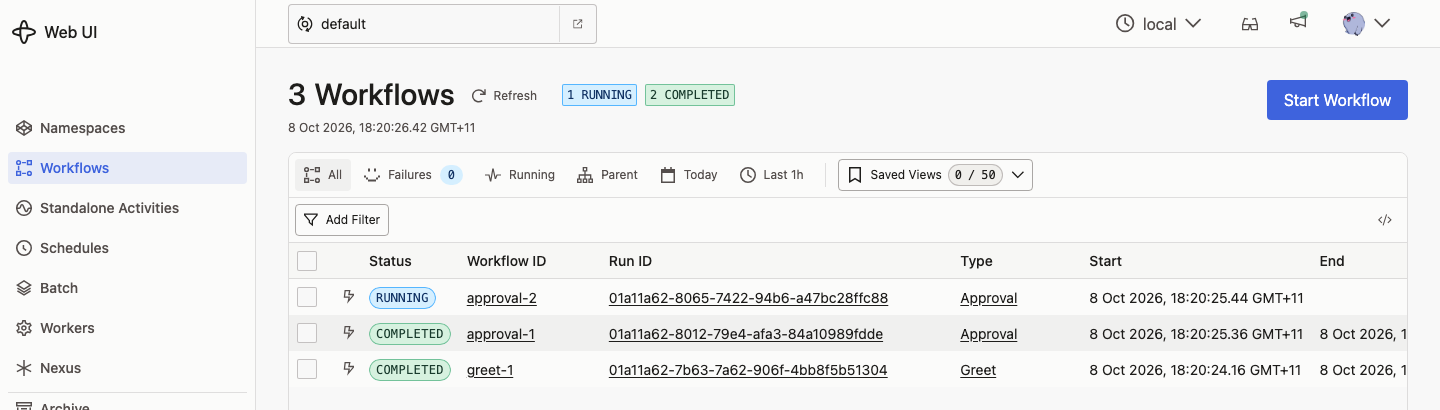
The script prints hello odctl and then approved by alice. The complete file is the runnable example below. Until the signal arrives, the Web UI lists the workflow as running.
The Web UI at http://127.0.0.1:8233 lists each workflow. Here approval-2 was started without a signal, so it is still running:
History
Workflow history is in the database file inside the container. It survives odctl restart temporal, and the tests check that a workflow left waiting for its signal resumes and completes afterwards. odctl down removes the history.
From Another Container
Inside the odctl network, a worker connects to temporal:7233 with the namespace default.
Runnable Example
Save this file as example.py and run it with python example.py while the temporal profile is up, in an environment with temporalio==1.34.0. It is greet.py with both steps above:
| docs/snippets/temporal-workers/example.py |
|---|
| """A Temporal worker with two workflows: one retries a failing activity, the other
waits for an approval signal. Run it with odctl's temporal profile up."""
import asyncio
from datetime import timedelta
from temporalio import activity, workflow
from temporalio.client import Client
from temporalio.common import RetryPolicy
from temporalio.worker import Worker
@activity.defn
async def greet(name: str) -> str:
if activity.info().attempt < 2:
raise RuntimeError("first attempt fails on purpose")
return f"hello {name}"
@workflow.defn
class Greet:
@workflow.run
async def run(self, name: str) -> str:
return await workflow.execute_activity(
greet, name,
start_to_close_timeout=timedelta(seconds=30),
retry_policy=RetryPolicy(initial_interval=timedelta(seconds=1), maximum_attempts=3),
)
@workflow.defn
class Approval:
    def __init__(self) -> None:
        self.approver = None

    @workflow.signal
    def approve(self, approver: str) -> None:
        self.approver = approver

    @workflow.run
    async def run(self) -> str:
        await workflow.wait_condition(lambda: self.approver is not None)
        return f"approved by {self.approver}"
async def main() -> None:
    client = await Client.connect("127.0.0.1:7233")
    async with Worker(client, task_queue="demo", workflows=[Greet, Approval], activities=[greet]):
        print(await client.execute_workflow(Greet.run, "odctl", id="greet-1", task_queue="demo"))
        handle = await client.start_workflow(Approval.run, id="approval-1", task_queue="demo")
        await handle.signal(Approval.approve, "alice")
        print(await handle.result())
# The workflow sandbox imports this file again, so run main only as a script.
if __name__ == "__main__":
asyncio.run(main())
|
It prints hello odctl and then approved by alice. It can run again, because Temporal accepts a new run of a workflow id whose last run has completed.