Hybrid Search in PostgreSQL
odctl's PostgreSQL image adds pgvector for vector search and pg_textsearch for BM25 keyword ranking. Vector search finds the rows whose embeddings are nearest to a query embedding. BM25 is a ranking function that scores a text by how often it holds the query's words, weighted by how rare each word is. Both extensions are created in the vector database. Hybrid search runs both queries and combines their rankings, which your application or a final SQL query does. The end-to-end tests run the SQL below on every release.
This guide builds on Getting Started.
| Endpoint | Address |
|---|---|
| PostgreSQL from the host | 127.0.0.1:5432, user user, password password |
PostgreSQL inside the odctl network |
postgres:5432 |
| Database with both extensions | vector |
Start the profile and open psql in the container:
| docs/snippets/hybrid-search/commands.sh:psql | |
|---|---|
Vector Similarity with pgvector
This creates a table of three-dimensional vectors with an HNSW index and returns the row nearest to [1,0,0]:
| docs/snippets/hybrid-search/steps.sql:vector | |
|---|---|
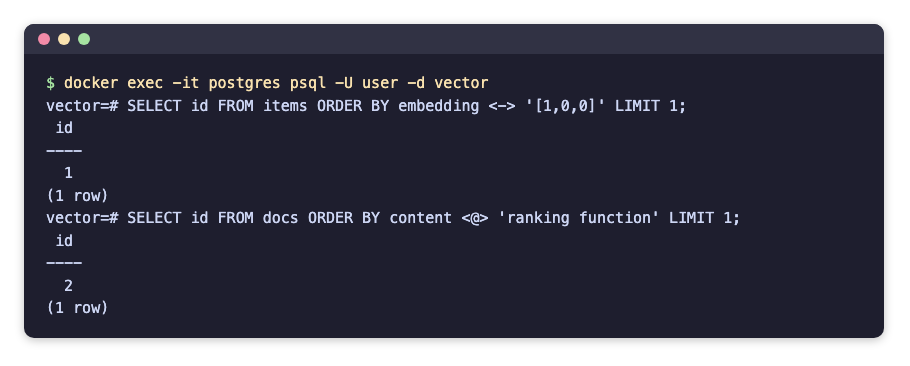
<-> is the Euclidean distance, so the nearest row comes first, and the query returns id 1. The index is an HNSW index: HNSW (hierarchical navigable small world) is a graph of the vectors in layers, which finds near neighbours without comparing the query with every row.
Keyword Ranking with pg_textsearch
This creates a table of three texts with a BM25 index and returns the best match for ranking function:
Ordering by content <@> 'query' puts the best BM25 match first, so the query returns id 2. pg_textsearch works only when PostgreSQL preloads it, and odctl's compose file sets shared_preload_libraries to do that.
psql shows each query's result:
To use the extensions in another database, run CREATE EXTENSION vector; or CREATE EXTENSION pg_textsearch; there.
From Another Container
Inside the odctl network, connect to postgres:5432 with the same user and password, for example postgresql://user:password@postgres:5432/vector.
Runnable Example
Save this file as example.sh and run it with bash example.sh in the folder that holds your .odctl workspace. It runs both queries on tables named demo_items and demo_docs, which it drops and creates again on every run:
It prints the statements' results, with id 1 from the vector query and id 2 from the BM25 query. The BM25 index build also prints NOTICE lines.