Fluss
Apache Fluss is a streaming storage for real-time analytics: it keeps tables that Flink writes and reads with low latency, either as logs or as tables with a primary key. The fluss profile runs a coordinator server, one tablet server and the ZooKeeper they register in. Flink reads and writes Fluss tables through the Fluss catalog, whose client jar comes from the shared volume that the deps profile fills. The end-to-end tests run the commands below on every release.
This guide builds on Flink SQL, which opens the SQL client. Start both profiles:
| docs/snippets/fluss/commands.sh:up | |
|---|---|
| Endpoint | Address |
|---|---|
Coordinator inside the odctl network |
fluss-coordinator:9123 |
Tablet server inside the odctl network |
fluss-tablet-1:9123 |
The coordinator is also published on 127.0.0.1:9123 and the tablet server on 127.0.0.1:9124. Both advertise their container names, which resolve only inside the odctl network, so run Fluss clients in a container, such as Flink.
Check the Cluster Formed
The servers register in ZooKeeper once they are up. This lists the tablet servers and reads the active coordinator:
| docs/snippets/fluss/commands.sh:registrations | |
|---|---|
Among the ZooKeeper client's log lines, the first command prints [0], the id of the one tablet server. The second prints a JSON object whose listeners include CLIENT://fluss-coordinator:9123.
Write and Read a Table with Flink SQL
Open the SQL client in the JobManager container:
| docs/snippets/fluss/commands.sh:sql-client | |
|---|---|
Run these statements in the client. They register the Fluss catalog, create a table with a primary key, write three rows and read them back:
The SELECT returns the three rows:
Fluss keeps its data inside its containers, so odctl down removes it.
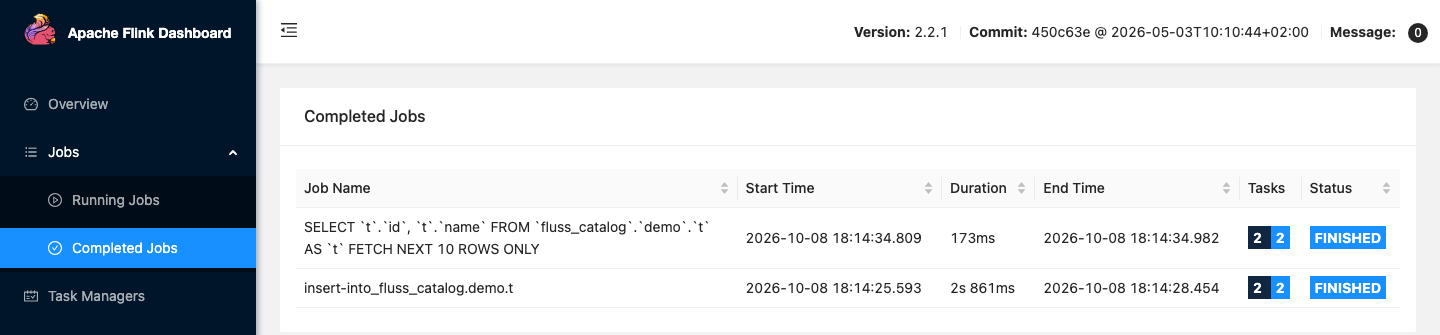
The Flink UI lists the two jobs:
From Another Container
Inside the odctl network, set a Fluss client's bootstrap servers to fluss-coordinator:9123.
Runnable Example
Save this file as example.sh and run it with bash example.sh in the folder that holds your .odctl workspace. It waits until the tablet server has registered, then runs the SQL above with a table of its own for each run:
It prints the same three rows as the SELECT above.