A data catalogue lists the databases, tables and columns of an organisation, so people can search them and see who owns each one. The metadata profile runs OpenMetadata, a data catalogue: the server with its UI and REST API, Elasticsearch for search, and an ingestion container. The ingestion container is an Airflow that runs the ingestion pipelines the server deploys. Its own tables are in the omt database on PostgreSQL. The end-to-end tests run the commands below on every release.
This guide builds on Getting Started. It uses the PostgreSQL that the profile starts as the database to catalogue.
Start the profile:
| docs/snippets/openmetadata/commands.sh:up |
|---|
| |
Log in as admin@open-data.local with the password admin. The domain is open-data.local, not the upstream default, and a wrong domain fails with an invalid password error.
Get a Token
The login API takes the password base64-encoded and returns a JWT, a signed token that later requests send in the Authorization header. This sets TOKEN and AUTH for the next steps, and prints nothing:
| docs/snippets/openmetadata/commands.sh:login |
|---|
| TOKEN=$(curl -s -H 'Content-Type: application/json' \
-d "{\"email\":\"admin@open-data.local\",\"password\":\"$(printf admin | base64)\"}" \
http://127.0.0.1:8585/api/v1/users/login \
| python3 -c 'import json,sys; print(json.load(sys.stdin)["accessToken"])')
AUTH="Authorization: Bearer $TOKEN"
|
Register PostgreSQL as a Database Service
PostgreSQL is already running, so it serves as the source. The server reaches it by its container name. This sets SVC to the id of the new service:
| docs/snippets/openmetadata/commands.sh:service |
|---|
| SVC=$(curl -s -X PUT -H "$AUTH" -H 'Content-Type: application/json' \
-d '{"name":"demo_pg","serviceType":"Postgres","connection":{"config":{"type":"Postgres","scheme":"postgresql+psycopg2","username":"user","authType":{"password":"password"},"hostPort":"postgres:5432","database":"omt"}}}' \
http://127.0.0.1:8585/api/v1/services/databaseServices \
| python3 -c 'import json,sys; print(json.load(sys.stdin)["id"])')
|
Create a pipeline, deploy it as a DAG into the ingestion Airflow, and trigger it:
| docs/snippets/openmetadata/commands.sh:pipeline |
|---|
| PIPE=$(curl -s -X POST -H "$AUTH" -H 'Content-Type: application/json' \
-d "{\"name\":\"demo_pg_metadata\",\"pipelineType\":\"metadata\",\"service\":{\"id\":\"$SVC\",\"type\":\"databaseService\"},\"sourceConfig\":{\"config\":{\"type\":\"DatabaseMetadata\"}},\"airflowConfig\":{\"startDate\":\"2026-01-01T00:00:00.000Z\"}}" \
http://127.0.0.1:8585/api/v1/services/ingestionPipelines \
| python3 -c 'import json,sys; print(json.load(sys.stdin)["id"])')
curl -s -X POST -H "$AUTH" http://127.0.0.1:8585/api/v1/services/ingestionPipelines/deploy/$PIPE
curl -s -X POST -H "$AUTH" http://127.0.0.1:8585/api/v1/services/ingestionPipelines/trigger/$PIPE
|
The deploy answers that the pipeline has been created. It works once the ingestion Airflow answers at http://127.0.0.1:8087/api/v2/monitor/health, which can be some time after odctl up metadata returns. Airflow has to parse the new DAG file before the trigger works, so repeat the trigger every few seconds until it answers that the pipeline has been triggered. Then read the run's state:
| docs/snippets/openmetadata/commands.sh:status |
|---|
| curl -s -H "$AUTH" \
"http://127.0.0.1:8585/api/v1/services/ingestionPipelines/name/demo_pg.demo_pg_metadata?fields=pipelineStatuses"
|
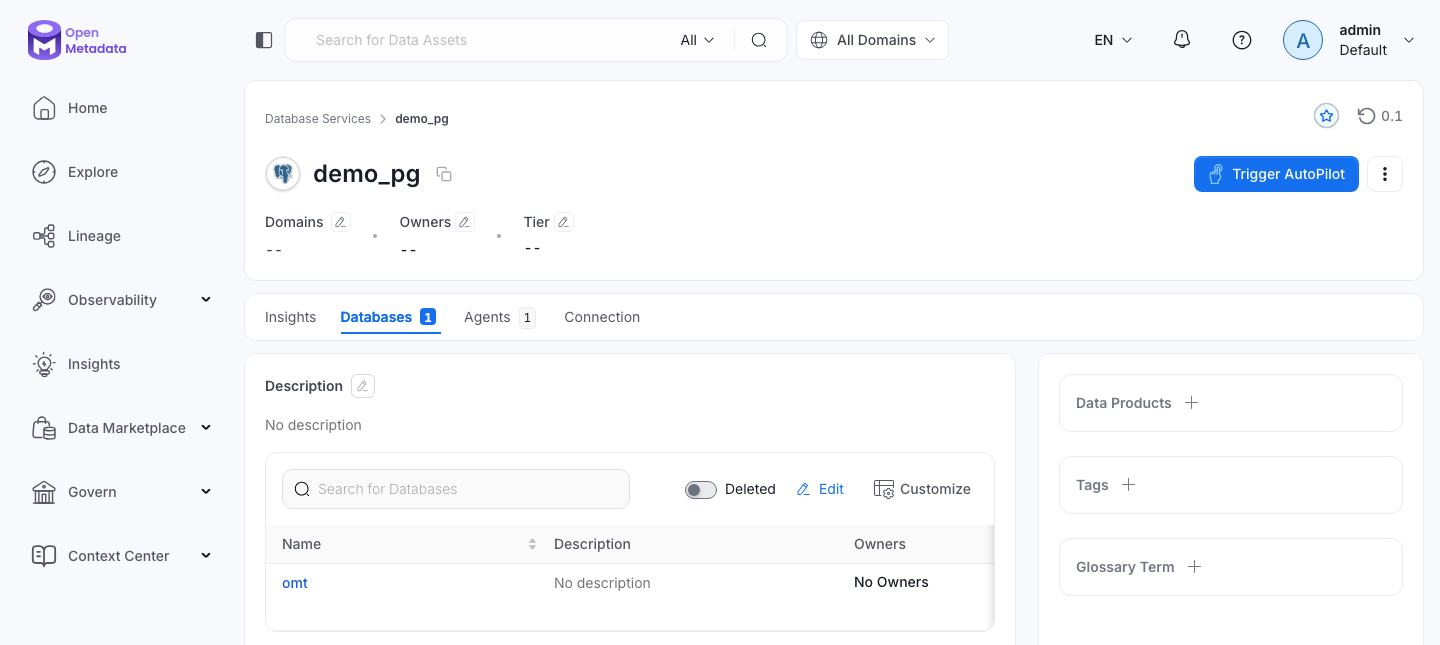
The reply is the pipeline as JSON. The pipelineState of the first entry of pipelineStatuses reaches success when the tables are catalogued. They then appear in the UI under the demo_pg service.
Search the Catalogue
Rebuild the search index, then query it:
| docs/snippets/openmetadata/commands.sh:search |
|---|
| curl -s -X POST -H "$AUTH" http://127.0.0.1:8585/api/v1/apps/trigger/SearchIndexingApplication
curl -s -H "$AUTH" "http://127.0.0.1:8585/api/v1/search/query?q=*&index=table_search_index&size=1"
|
The search reply is JSON, and hits.total.value counts the searchable tables. The index fills over a few minutes after the rebuild, and then holds more than 100 tables: OpenMetadata's own tables in the omt database.
From Another Container
Inside the odctl network, call the API at http://openmetadata-server:8585. The server also answers the Model Context Protocol at http://127.0.0.1:8585/mcp with the same token.
Remove the Example
This deletes the service with its pipeline and the tables it catalogued:
| docs/snippets/openmetadata/commands.sh:remove |
|---|
| curl -s -X DELETE -H "$AUTH" \
"http://127.0.0.1:8585/api/v1/services/databaseServices/name/demo_pg?hardDelete=true&recursive=true"
|
Runnable Example
Save this file as example.sh and run it with bash example.sh in the folder that holds your .odctl workspace. It runs every step above, waits where a step needs time, and removes the service at the end:
| docs/snippets/openmetadata/example.sh |
|---|
| #!/usr/bin/env bash
# Starts metadata, registers PostgreSQL as a database service, runs a metadata
# ingestion of the omt database, counts the searchable tables and removes the
# service again.
set -euo pipefail
odctl up metadata
om=http://127.0.0.1:8585/api/v1
json() { python3 -c "import json, sys; print($1)"; }
TOKEN=$(curl -s -H 'Content-Type: application/json' \
-d "{\"email\":\"admin@open-data.local\",\"password\":\"$(printf admin | base64)\"}" \
"$om/users/login" | json 'json.load(sys.stdin)["accessToken"]')
AUTH="Authorization: Bearer $TOKEN"
SVC=$(curl -s -X PUT -H "$AUTH" -H 'Content-Type: application/json' \
-d '{"name":"demo_pg","serviceType":"Postgres","connection":{"config":{"type":"Postgres","scheme":"postgresql+psycopg2","username":"user","authType":{"password":"password"},"hostPort":"postgres:5432","database":"omt"}}}' \
"$om/services/databaseServices" | json 'json.load(sys.stdin)["id"]')
PIPE=$(curl -s -X POST -H "$AUTH" -H 'Content-Type: application/json' \
-d "{\"name\":\"demo_pg_metadata\",\"pipelineType\":\"metadata\",\"service\":{\"id\":\"$SVC\",\"type\":\"databaseService\"},\"sourceConfig\":{\"config\":{\"type\":\"DatabaseMetadata\"}},\"airflowConfig\":{\"startDate\":\"2026-01-01T00:00:00.000Z\"}}" \
"$om/services/ingestionPipelines" | json 'json.load(sys.stdin)["id"]')
# The server deploys the pipeline into the ingestion Airflow, which answers a
# little after the server.
until curl -fs http://127.0.0.1:8087/api/v2/monitor/health >/dev/null; do sleep 5; done
until curl -s -X POST -H "$AUTH" "$om/services/ingestionPipelines/deploy/$PIPE" \
| grep 'has been created' >/dev/null; do sleep 5; done
# Airflow parses the new DAG file before the trigger works.
until curl -s -X POST -H "$AUTH" "$om/services/ingestionPipelines/trigger/$PIPE" \
| grep 'has been triggered' >/dev/null; do sleep 5; done
state=""
until [ "$state" = success ] || [ "$state" = failed ]; do
sleep 10
state=$(curl -s -H "$AUTH" \
"$om/services/ingestionPipelines/name/demo_pg.demo_pg_metadata?fields=pipelineStatuses" \
| json '(json.load(sys.stdin).get("pipelineStatuses") or [{}])[0].get("pipelineState", "")')
done
echo "ingestion: $state"
# The search index fills over a few minutes after it is rebuilt.
curl -s -X POST -H "$AUTH" "$om/apps/trigger/SearchIndexingApplication" >/dev/null
hits=0
until [ "$hits" -gt 100 ]; do
sleep 5
hits=$(curl -s -H "$AUTH" "$om/search/query?q=*&index=table_search_index&size=1" \
| json 'json.load(sys.stdin)["hits"]["total"]["value"]')
done
echo "searchable tables: $hits"
curl -s -X DELETE -H "$AUTH" \
"$om/services/databaseServices/name/demo_pg?hardDelete=true&recursive=true" >/dev/null
echo "removed demo_pg"
|
It prints ingestion: success, the number of searchable tables, which is more than 100, and removed demo_pg. The whole run takes several minutes.