Feast with Iceberg
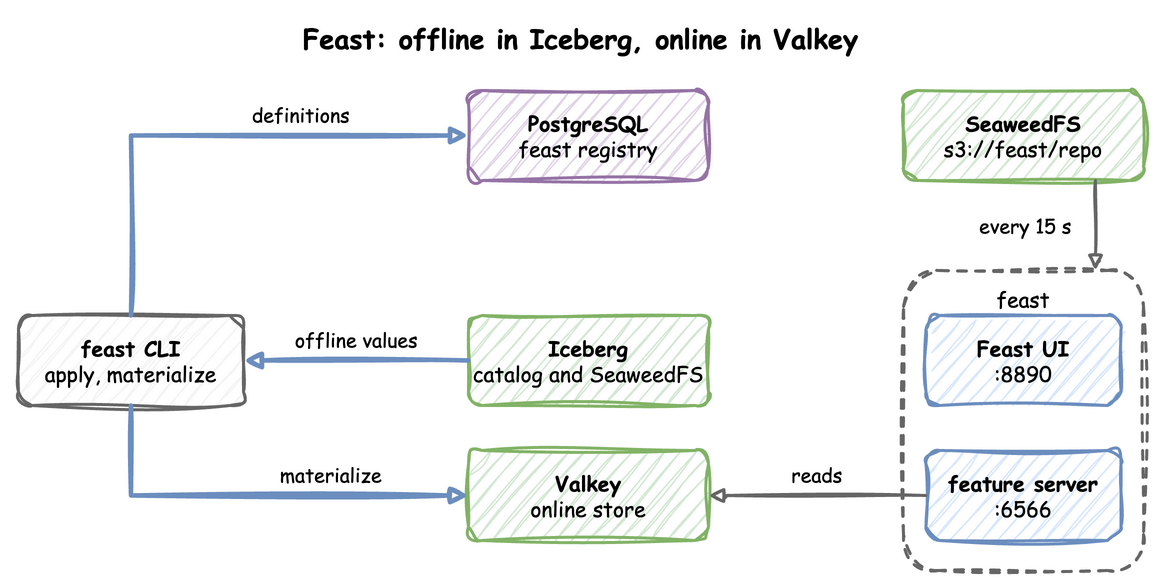
Feast is a feature store: it keeps the definitions of a model's input features and serves their values. The offline store holds the history of each feature, for training. The online store holds each entity's latest value, for serving a prediction quickly. Materialising copies values from the offline store to the online store. The feast profile runs the Feast UI and the online feature server. Feast stores no feature values of its own. Feature definitions live in a SQL registry in PostgreSQL, offline values come from Iceberg tables through the REST catalog, and online values are served from Valkey. You run feast apply and the other client commands from your own environment. The end-to-end tests run the steps below on every release.
This guide builds on Ingest into Iceberg, which writes Iceberg tables through the catalog, and Flink SQL, whose SQL client the last step uses. Follow the arrows from the feast CLI on the left: definitions go to the registry, and values go from Iceberg to Valkey.
Start the profile and install the client, with the extras that read Iceberg, PostgreSQL and Valkey:
| docs/snippets/feast-iceberg/commands.sh:install |
|---|
| odctl up feast
pip install "feast[duckdb,iceberg,redis,postgres]==0.66.0" pyarrow
|
Point the Clients at the Stack
PyIceberg, which Feast uses to read Iceberg, takes its catalog settings from the environment. Run these in the shell where you run the next steps:
| docs/snippets/feast-iceberg/commands.sh:catalog-env |
|---|
| export PYICEBERG_CATALOG__ODCTL__TYPE=rest
export PYICEBERG_CATALOG__ODCTL__URI=http://127.0.0.1:8181
export PYICEBERG_CATALOG__ODCTL__WAREHOUSE=s3://warehouse/
export PYICEBERG_CATALOG__ODCTL__S3__ENDPOINT=http://127.0.0.1:8333
export PYICEBERG_CATALOG__ODCTL__S3__ACCESS_KEY_ID=user
export PYICEBERG_CATALOG__ODCTL__S3__SECRET_ACCESS_KEY=password
export PYICEBERG_CATALOG__ODCTL__S3__PATH_STYLE_ACCESS=true
export PYICEBERG_CATALOG__ODCTL__S3__REGION=us-east-1
|
Create an Iceberg Table
Save this code as create_table.py and run it with python create_table.py. It creates demo.driver_stats and writes one hour-old row for each of two drivers:
| docs/snippets/feast-iceberg/steps.py:create-table |
|---|
| import datetime, pyarrow as pa
from pyiceberg.catalog import load_catalog
cat = load_catalog("odctl")
cat.create_namespace_if_not_exists("demo")
schema = pa.schema([
pa.field("driver_id", pa.int64(), nullable=False),
pa.field("event_timestamp", pa.timestamp("us", tz="UTC"), nullable=False),
pa.field("conv_rate", pa.float32(), nullable=False),
])
t = cat.create_table("demo.driver_stats", schema=schema)
now = datetime.datetime.now(datetime.timezone.utc).replace(microsecond=0)
t.append(pa.Table.from_pydict({
"driver_id": [1001, 1002],
"event_timestamp": [now - datetime.timedelta(hours=1)] * 2,
"conv_rate": [0.5, 0.75],
}, schema=schema))
|
Define the Feature Repository
A feature repository is a folder of configuration and definitions. Save this file as feature_repo/feature_store.yaml. It names the registry, the offline store and the online store:
| docs/snippets/feast-iceberg/feature_repo/feature_store.yaml |
|---|
| project: demo
provider: local
registry:
registry_type: sql
path: postgresql+psycopg://user:password@127.0.0.1:5432/feast
offline_store:
type: duckdb
online_store:
type: redis
connection_string: "127.0.0.1:6379,username=user,password=password"
entity_key_serialization_version: 3
|
Save the definitions as feature_repo/definitions.py. They declare the entity driver and the feature view driver_stats over the Iceberg table:
| docs/snippets/feast-iceberg/feature_repo/definitions.py |
|---|
| from datetime import timedelta
from feast import Entity, FeatureView, Field
from feast.types import Float32
from feast.infra.data_sources.contrib.iceberg_catalog.iceberg_source import IcebergSource
driver = Entity(name="driver", join_keys=["driver_id"])
src = IcebergSource(
warehouse="", namespace="demo", table="driver_stats",
catalog_type="rest", catalog_name="odctl",
endpoint="http://127.0.0.1:8181",
timestamp_field="event_timestamp",
)
fv = FeatureView(
name="driver_stats", entities=[driver], ttl=timedelta(days=365),
schema=[Field(name="conv_rate", dtype=Float32)], source=src, online=True,
)
|
Pass warehouse="" and catalog_name="odctl". Feast's REST client puts the warehouse into the URL path, and the catalog serves its API with no prefix, so a real warehouse value fails with HTTP 400.
Register and Materialise
Run these from the folder that holds feature_repo. apply writes the definitions to the registry, and materialize-incremental copies the latest values into Valkey:
| docs/snippets/feast-iceberg/commands.sh:apply-materialize |
|---|
| feast -c feature_repo apply
feast -c feature_repo materialize-incremental "$(date -u +%Y-%m-%dT%H:%M:%S)"
|
apply prints Applying changes for project demo and Deploying infrastructure for driver_stats, and materialize-incremental names the feature view and the time range it copied.
Read the Features
FeatureStore(repo_path="feature_repo").get_historical_features(...) takes a point-in-time join from Iceberg through DuckDB, for training. This reads the materialised values from Valkey instead, as a model server would:
| docs/snippets/feast-iceberg/steps.py:read |
|---|
| from feast import FeatureStore
fs = FeatureStore(repo_path="feature_repo")
print(fs.get_online_features(
features=["driver_stats:conv_rate"],
entity_rows=[{"driver_id": 1001}, {"driver_id": 1002}],
).to_dict())
|
It prints {'driver_id': [1001, 1002], 'conv_rate': [0.5, 0.75]}.
Serve from the Stack
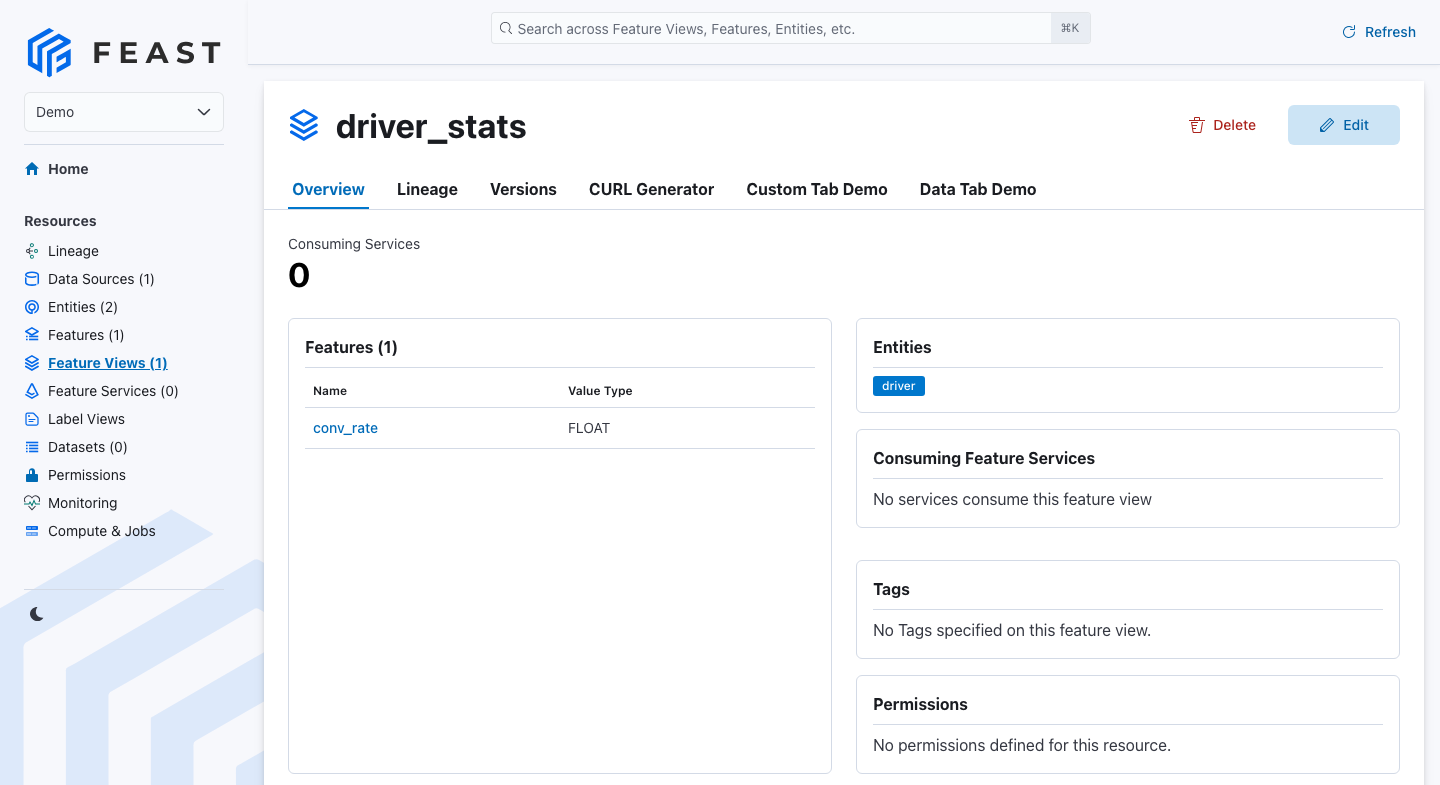
The UI at http://127.0.0.1:8890 and the online feature server at http://127.0.0.1:6566 load their repository from s3://feast/repo. To serve your features, upload the repository there with container addresses in its feature_store.yaml: postgres:5432, valkey:6379 and http://catalog:8181. The services check that prefix every 15 seconds and restart Feast when it changes. The interval is set today by time.sleep(15) in x-feast-repo-sync in .odctl/compose-mlops.yml.
Once the repository is uploaded, the UI lists the project and its feature views:
Push Features from Flink SQL
A push source lets a client write a feature value straight to the online store, through the feature server's /push endpoint, instead of materialising it. Flink's HTTP connector sends rows to a URL, so a Flink SQL job can push each value it computes. Start Flink beside Feast:
| docs/snippets/feast-iceberg/commands.sh:up |
|---|
| |
Feast needs a push source before it accepts a push, and the feature server reads its own repository, so the definitions go into the feast-serve container. Save these definitions as push_definitions.py. They declare the push source driver_push and the feature view driver_pushed:
| docs/snippets/feast-iceberg/push_definitions.py |
|---|
| from datetime import timedelta
from feast import Entity, FeatureView, Field, FileSource, PushSource
from feast.types import Float32, Int64
from feast.value_type import ValueType
driver = Entity(name="driver", join_keys=["driver_id"], value_type=ValueType.INT64)
# Nothing reads this file. A push source needs a batch source behind it.
batch = FileSource(path="/tmp/driver_stats.parquet", timestamp_field="event_timestamp")
push = PushSource(name="driver_push", batch_source=batch)
driver_pushed = FeatureView(
name="driver_pushed",
entities=[driver],
ttl=timedelta(days=1),
schema=[Field(name="driver_id", dtype=Int64), Field(name="conv_rate", dtype=Float32)],
source=push,
online=True,
)
|
Copy the definitions into the Feast container and apply them. --skip-source-validation stops Feast from looking for the file behind the batch source:
| docs/snippets/feast-iceberg/commands.sh:push-apply |
|---|
| docker cp push_definitions.py feast-serve:/tmp/feature_repo/push_definitions.py
docker exec feast-serve feast -c /tmp/feature_repo apply --skip-source-validation
|
apply prints Applying changes for project odctl and Deploying infrastructure for driver_pushed. Open the SQL client:
| docs/snippets/feast-iceberg/commands.sh:sql-client |
|---|
| docker exec -it flink-jobmanager /opt/flink/bin/sql-client.sh
|
Then run these statements, which push the value 0.9 for driver 1001:
| docs/snippets/feast-iceberg/steps.sql:feast-push |
|---|
| SET 'execution.runtime-mode' = 'batch';
SET 'table.dml-sync' = 'true';
CREATE TABLE feast_push (
push_source_name STRING,
df ROW<driver_id ARRAY<BIGINT>, conv_rate ARRAY<DOUBLE>, event_timestamp ARRAY<TIMESTAMP_LTZ(3)>>,
allow_registry_cache BOOLEAN
) WITH (
'connector' = 'http-async-sink',
'url' = 'http://feast-serve:6566/push',
'format' = 'json',
'http.sink.writer.request.mode' = 'single',
'http.sink.header.Content-Type' = 'application/json'
);
INSERT INTO feast_push SELECT 'driver_push', ROW(ARRAY[CAST(1001 AS BIGINT)], ARRAY[CAST(0.9 AS DOUBLE)], ARRAY[CURRENT_TIMESTAMP]), FALSE;
|
The connector is http-async-sink. Its default sends rows in batches as one JSON array. Feast's /push takes one JSON object, so http.sink.writer.request.mode is single, which sends one request for each row. The sink sends no Content-Type header, and Feast answers 422 without one, so http.sink.header.Content-Type sets it. The column names are the field names of the request body. Feast reads df as a table of columns, so each field holds an array.
Feast caches its registry for up to a minute after apply. allow_registry_cache set to FALSE makes the push read the registry again, so it works at once. The timestamp must be new: a push with the same event_timestamp as the stored value does not replace it, so the statement uses CURRENT_TIMESTAMP.
The Flink job finishes and prints Complete execution of the SQL update statement. even when Feast rejects the request. The failure is only in the TaskManager log as Http Sink failed to write. Read the value back from Feast to check the push:
| docs/snippets/feast-iceberg/commands.sh:push-read |
|---|
| curl -s -X POST http://127.0.0.1:6566/get-online-features \
-H 'Content-Type: application/json' \
-d '{"features": ["driver_pushed:conv_rate"], "entities": {"driver_id": [1001]}}'
|
The answer holds 0.8999999761581421 for conv_rate, which is 0.9 as a 32-bit float. The read also uses the cached registry, so right after apply it can answer that the feature view does not exist. Run it again after a minute.
From Another Container
Inside the odctl network, the feature server is http://feast-serve:6566. A repository for the services uses postgres:5432 for the registry, valkey:6379 for the online store and http://catalog:8181 for Iceberg.
Runnable Example
Save this file as example.sh and run it with bash example.sh in the folder that holds your .odctl workspace, in an environment with the client installed as above. It writes the repository files into feature_repo in that folder, and appends two rows to demo.driver_stats on each run:
| docs/snippets/feast-iceberg/example.sh |
|---|
| #!/usr/bin/env bash
# Starts feast and flink-lite, builds an Iceberg table of driver features,
# registers a feature view over it, materialises it into Valkey and reads it
# back, then pushes a value to the feature server through Flink SQL and reads
# that back. Run it in an environment with
# "feast[duckdb,iceberg,redis,postgres]==0.66.0" and pyarrow installed.
set -euo pipefail
odctl up feast flink-lite
export PYICEBERG_CATALOG__ODCTL__TYPE=rest
export PYICEBERG_CATALOG__ODCTL__URI=http://127.0.0.1:8181
export PYICEBERG_CATALOG__ODCTL__WAREHOUSE=s3://warehouse/
export PYICEBERG_CATALOG__ODCTL__S3__ENDPOINT=http://127.0.0.1:8333
export PYICEBERG_CATALOG__ODCTL__S3__ACCESS_KEY_ID=user
export PYICEBERG_CATALOG__ODCTL__S3__SECRET_ACCESS_KEY=password
export PYICEBERG_CATALOG__ODCTL__S3__PATH_STYLE_ACCESS=true
export PYICEBERG_CATALOG__ODCTL__S3__REGION=us-east-1
python - <<'PY'
import datetime, pyarrow as pa
from pyiceberg.catalog import load_catalog
cat = load_catalog("odctl")
cat.create_namespace_if_not_exists("demo")
schema = pa.schema([
pa.field("driver_id", pa.int64(), nullable=False),
pa.field("event_timestamp", pa.timestamp("us", tz="UTC"), nullable=False),
pa.field("conv_rate", pa.float32(), nullable=False),
])
t = cat.create_table_if_not_exists("demo.driver_stats", schema=schema)
now = datetime.datetime.now(datetime.timezone.utc).replace(microsecond=0)
t.append(pa.Table.from_pydict({
"driver_id": [1001, 1002],
"event_timestamp": [now - datetime.timedelta(hours=1)] * 2,
"conv_rate": [0.5, 0.75],
}, schema=schema))
PY
mkdir -p feature_repo
cat > feature_repo/feature_store.yaml <<'YAML'
project: demo
provider: local
registry:
  registry_type: sql
  path: postgresql+psycopg://user:password@127.0.0.1:5432/feast
offline_store:
  type: duckdb
online_store:
  type: redis
  connection_string: "127.0.0.1:6379,username=user,password=password"
entity_key_serialization_version: 3
YAML
cat > feature_repo/definitions.py <<'PY'
from datetime import timedelta
from feast import Entity, FeatureView, Field
from feast.types import Float32
from feast.infra.data_sources.contrib.iceberg_catalog.iceberg_source import IcebergSource

driver = Entity(name="driver", join_keys=["driver_id"])
src = IcebergSource(
    warehouse="", namespace="demo", table="driver_stats",
    catalog_type="rest", catalog_name="odctl",
    endpoint="http://127.0.0.1:8181",
    timestamp_field="event_timestamp",
)
fv = FeatureView(
    name="driver_stats", entities=[driver], ttl=timedelta(days=365),
    schema=[Field(name="conv_rate", dtype=Float32)], source=src, online=True,
)
PY
feast -c feature_repo apply
feast -c feature_repo materialize-incremental "$(date -u +%Y-%m-%dT%H:%M:%S)"
python - <<'PY'
from feast import FeatureStore

fs = FeatureStore(repo_path="feature_repo")
print(fs.get_online_features(
    features=["driver_stats:conv_rate"],
    entity_rows=[{"driver_id": 1001}, {"driver_id": 1002}],
).to_dict())
PY
# The push source goes into the feature server's own repository.
cat > push_definitions.py <<'PY'
from datetime import timedelta
from feast import Entity, FeatureView, Field, FileSource, PushSource
from feast.types import Float32, Int64
from feast.value_type import ValueType

driver = Entity(name="driver", join_keys=["driver_id"], value_type=ValueType.INT64)
# Nothing reads this file. A push source needs a batch source behind it.
batch = FileSource(path="/tmp/driver_stats.parquet", timestamp_field="event_timestamp")
push = PushSource(name="driver_push", batch_source=batch)
driver_pushed = FeatureView(
    name="driver_pushed",
    entities=[driver],
    ttl=timedelta(days=1),
    schema=[Field(name="driver_id", dtype=Int64), Field(name="conv_rate", dtype=Float32)],
    source=push,
    online=True,
)
PY
docker cp push_definitions.py feast-serve:/tmp/feature_repo/push_definitions.py
docker exec feast-serve feast -c /tmp/feature_repo apply --skip-source-validation
docker exec -i flink-jobmanager /opt/flink/bin/sql-client.sh <<'SQL' | grep -E 'ERROR|Complete'
SET 'execution.runtime-mode' = 'batch';
SET 'table.dml-sync' = 'true';
CREATE TABLE feast_push (
  push_source_name STRING,
  df ROW<driver_id ARRAY<BIGINT>, conv_rate ARRAY<DOUBLE>, event_timestamp ARRAY<TIMESTAMP_LTZ(3)>>,
  allow_registry_cache BOOLEAN
) WITH (
  'connector' = 'http-async-sink',
  'url' = 'http://feast-serve:6566/push',
  'format' = 'json',
  'http.sink.writer.request.mode' = 'single',
  'http.sink.header.Content-Type' = 'application/json'
);
INSERT INTO feast_push SELECT 'driver_push', ROW(ARRAY[CAST(1001 AS BIGINT)], ARRAY[CAST(0.9 AS DOUBLE)], ARRAY[CURRENT_TIMESTAMP]), FALSE;
SQL
# The feature server can take up to a minute to see a new feature view.
until curl -s -X POST http://127.0.0.1:6566/get-online-features \
-H 'Content-Type: application/json' \
-d '{"features": ["driver_pushed:conv_rate"], "entities": {"driver_id": [1001]}}' \
| grep 0.8999999761581421; do
sleep 5
done
|
It prints {'driver_id': [1001, 1002], 'conv_rate': [0.5, 0.75]} and then the feature server's answer with 0.8999999761581421.