Produce and Consume with Kafka
The kafka-lite profile runs one Kafka broker in KRaft mode, the Karapace schema registry, a Kafka Connect worker and Kafka UI. KRaft mode means the brokers keep the cluster's metadata themselves, with no ZooKeeper. kafka-full runs three brokers with the same services beside them. The end-to-end tests run the commands below on every release.
This guide builds on Getting Started, which installs odctl and says where the code on this page comes from.
Start the profile:
| docs/snippets/kafka/commands.sh:up | |
|---|---|
| Endpoint | Address |
|---|---|
| Bootstrap servers from the host | 127.0.0.1:9092 (kafka-full adds 127.0.0.1:9093 and 127.0.0.1:9094) |
Bootstrap servers inside the odctl network |
broker-1:19092 |
| Kafka UI | http://127.0.0.1:8086 |
| Schema registry (Karapace) | http://127.0.0.1:8081 |
| Kafka Connect REST API | http://127.0.0.1:8083 |
Create a Topic
The Kafka command-line tools are in the broker container, which is kafka in kafka-lite and kafka-1 in kafka-full. This creates the topic demo with one partition:
| docs/snippets/kafka/commands.sh:create-topic | |
|---|---|
The command prints Created topic demo.
Produce and Consume
The producer writes five JSON records to demo, and the consumer reads them back from the start of the topic:
The consumer prints the five records, {"n":1} to {"n":5}, one per line, and then Processed a total of 5 messages. It reads through a consumer group, so its offsets are stored in the broker's __consumer_offsets topic.
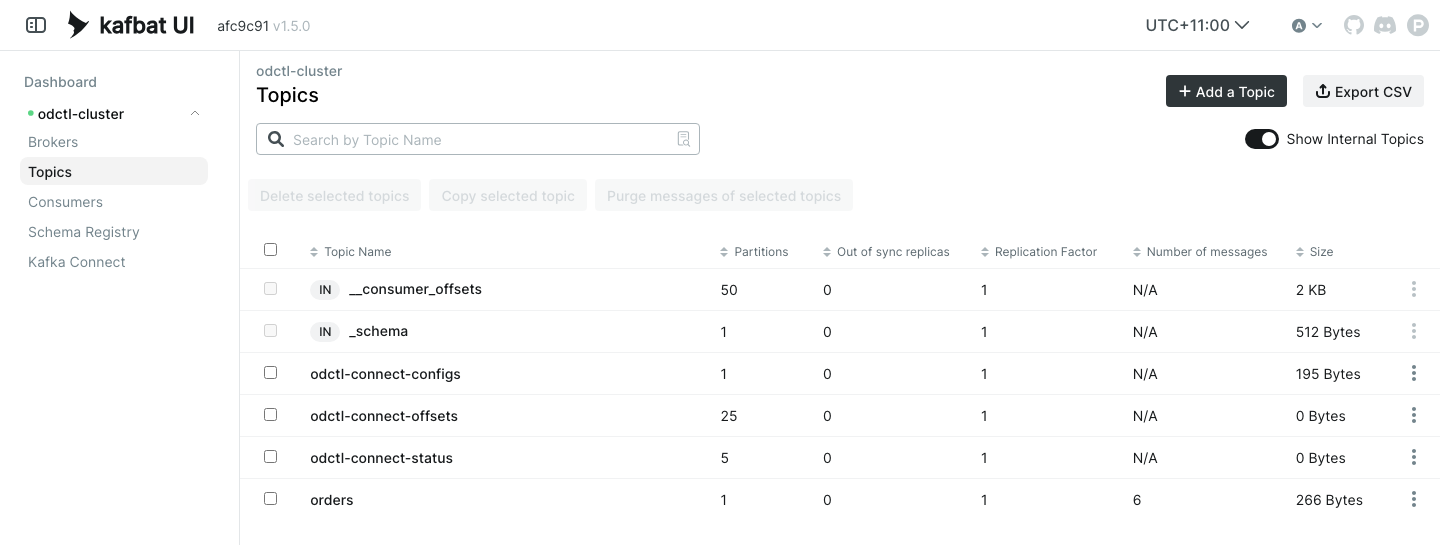
Kafka UI at http://127.0.0.1:8086 shows the topics, their messages, the consumer groups and the schemas in Karapace.
Keep Messages Longer
The brokers delete old messages. A partition keeps data for one day or up to 500 MB, and a segment is deleted once either limit is passed. Both limits are set today in .odctl/compose-kafka.yml, where an edit can change them: KAFKA_LOG_RETENTION_MS is 86400000 and KAFKA_LOG_RETENTION_BYTES is 524288000. A topic created without settings takes these values, which this command reads:
| docs/snippets/kafka/commands.sh:retention-default | |
|---|---|
The output shows retention.ms=86400000 and retention.bytes=524288000. To keep everything in one topic, set retention.ms and retention.bytes to -1 when you create it. -1 means no limit. Other topics keep the broker defaults. This creates the topic history with no limits and describes it:
The describe command lists the settings of that topic: retention.ms=-1 and retention.bytes=-1. retention.bytes applies to each partition, so a topic with three partitions at 500 MB can hold 1.5 GB. To change an existing topic, use kafka-configs.sh --alter --add-config with the same two settings. If older messages are missing, see Troubleshooting.
From Another Container
Inside the odctl network, clients reach the broker at broker-1:19092, and kafka-full adds broker-2:19093 and broker-3:19094. Karapace is http://karapace:8081 and Kafka UI is http://kafka-ui:8080.
Runnable Example
Save this file as example.sh and run it with bash example.sh in the folder that holds your .odctl workspace. It starts kafka-lite, creates demo if it does not exist, writes five records and reads five back:
It prints {"n":1} to {"n":5} and Processed a total of 5 messages. When you run it again, it adds five more records and still reads the first five.