YAML Format
Every key a blueprint accepts, section by section. YAML Blueprints describes how a file is read and where an error points, and each User Guide page shows its keys in use.
Every section is optional except simulation. Unknown keys are refused, so a misspelt key is reported with its line rather than ignored. A time is seconds or a duration such as 10 min, and an instant is now, a signed duration such as -1d, or an ISO datetime. ${VAR} and ${VAR:-default} read environment variables anywhere in the file.
Each section becomes one builder call:
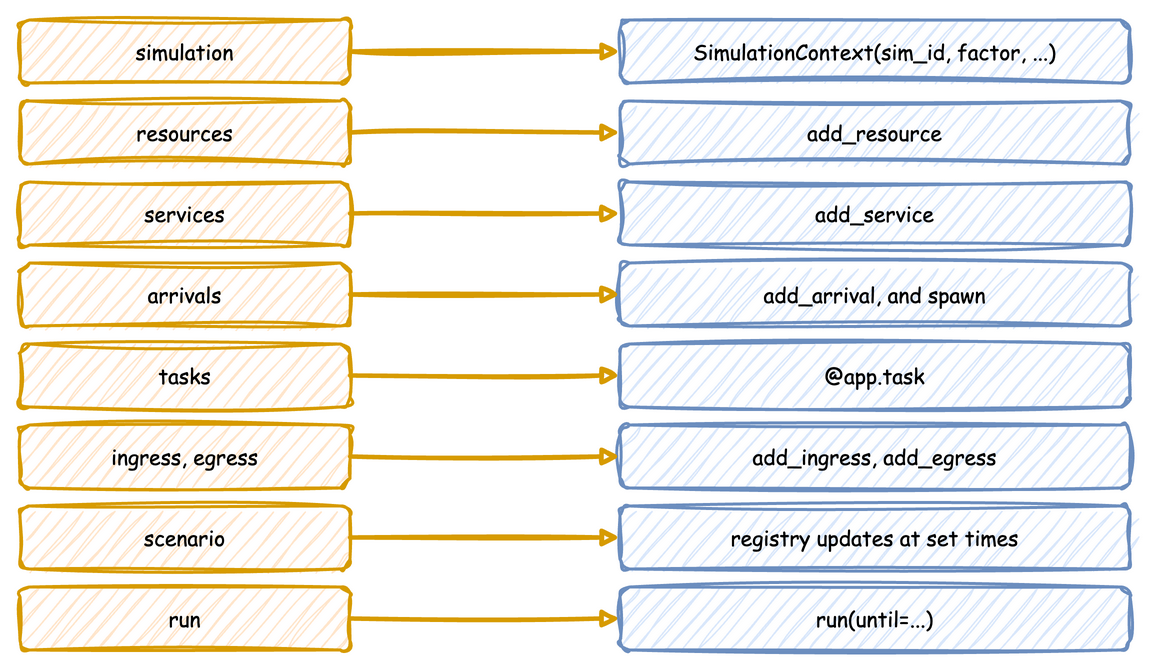
A blueprint with logic in Python beside it, which the sections below refer to:
# The shop with its logic in Python. YAML keeps the blueprint and the
# experiment; shop_logic.py beside this file holds what YAML cannot express.
simulation:
  sim_id: Shop
  factor: 0
  random_seed: 1

egress:
  - type: Console
    # Only events reach the terminal; telemetry is dropped.
    when: !python shop_logic.events_only

resources:
  packers: {current_cap: 1, max_cap: 3}

services:
  packing: {dist: normal, mean: 4.0, std: 1.0}

arrivals:
  orders: {dist: exponential, rate: 0.2, spawn: pack_order}

tasks:
  pack_order:
    service: packing
    resource: packers
    # Called as choose_delivery(task_id, context) for every packed order.
    payload: !python shop_logic.choose_delivery

processes:
  # Called as breaks(context, resource="packers", every=50, duration=5).
  - function: !python shop_logic.breaks
    kwargs: {resource: packers, every: 50, duration: 5}

scenario:
  - {at: 1 min, path: Shop.arrival.orders.rate, value: 0.4}

run:
  until: 3 min
simulation
The arguments of SimulationContext. Time and Pacing describes the clock.
| Key | Value |
|---|---|
sim_id |
required; the first part of every registry path and statistic name |
factor |
1.0 follows the wall clock, 0 does not wait; 1.0 by default |
random_seed |
a whole number; without one, the run draws a seed and logs it |
logical_start_time |
the instant simulation time 0 maps to; the load time by default |
go_live_at |
the instant from which the run is paced in real time |
warmup |
a time, 0 or more, before which no sink receives a record and at which the statistics restart |
resources, stores and containers
name: {...} entries. Resources and Stores and Containers describe them.
| Section | Keys |
|---|---|
resources |
current_cap and max_cap, whole numbers; queue: fifo (the default), lifo or priority |
stores |
current_cap and max_cap, whole numbers of items |
containers |
current_cap and max_cap, the largest amount; level, the amount at the start, 0 by default |
A store and a container cannot share a name.
variables
name: value entries, any YAML value, each at the registry path <sim_id>.variables.<name>. Live Parameters describes them.
services and arrivals
name: {dist, ...} entries: a distribution family and the parameters it takes. Time-valued parameters take durations, and rate is per second. Arrivals and Services shows each family, and Reference, Distributions lists their parameters and rules.
An arrival also takes:
| Key | Value |
|---|---|
spawn |
the task each arrival starts |
attributes |
a mapping each new entity starts with, read as attr.<name> |
tasks
name: {...} entries, each built with @app.task. Tasks and Processes and Task Flow describe them.
| Key | Value |
|---|---|
service |
the service whose time the task takes; needed with a resource |
resource |
the resource the task holds while it works |
payload |
required: the finished event's value, a mapping, or a !python function called as function(task_id, context) |
id_field |
adds the task id to a mapping payload under this key |
attributes |
a list of entity attributes added to a mapping payload |
priority |
a number or an expression such as attr.tier, for a resource with queue: priority |
get |
{container: name, amount: ...} or {store: name}: taken after the resource, before the work |
put |
the same form: added after the work; a store receives the payload |
next |
a task name; {when: [{condition, task}, ...], default: task}; or {weights: {task: number, ...}} |
set |
a mapping applied to the entity's attributes when the task finishes |
An amount is a number or an expression, 1 when left out. A task with a service and no resource is a timed step; one with neither, and no get, takes no time.
processes
A list of !python generator functions, each written as {function: ..., kwargs: {...}} or as the bare reference, started as function(context, **kwargs); Python in a Blueprint shows them.
telemetry
A list of custom readings, each {interval, function}: every interval simulation seconds, greater than 0, function(context) is called and publishes with context.publish. The built-in readings of resources, stores and containers come from stats instead.
telemetry:
  # Every 5 simulation seconds, calls packers_report(context), which publishes
  # Shop.waiting_per_packer and Shop.arrival_rate with context.publish
  - interval: 5
    function: !python shop_logic.packers_report
stats
The built-in statistics, as a level, stats: basic, or as a mapping, stats: {level: all, interval: 1 min}. The level is none, minimal, basic, typical or all, and the interval, 10 seconds by default, is a time greater than 0. Statistics describes them.
scenario
A list of steps, applied in time order on the simulation clock:
| Key | Value |
|---|---|
at |
the time of the step |
path |
a registry path, checked when the file loads; needs a value |
value |
the new value, which must convert to the type the path holds |
record |
a mapping, published as a ground-truth label to the when: labels sinks |
A step needs a path and value, a record, or both. Live Parameters shows scenarios and labels.
ingress and egress
Lists of connectors, each with a type and a config of the constructor's keyword arguments. type is one of the short names below, or a !python class from another package. A connector's module is imported only when a blueprint names it, so a blueprint that uses Kafka does not need the PostgreSQL driver; a missing package stops the load with its line and the pip install command, except Parquet and JSON Lines, which import PyArrow when they start writing.
| Direction | type |
Class | Extra |
|---|---|---|---|
| ingress | Local |
LocalIngress |
none |
| ingress | Kafka |
KafkaIngress |
kafka |
| ingress | Postgres |
PostgresIngress |
postgres |
| ingress | Redis |
RedisIngress |
redis |
| egress | Console |
ConsoleEgress |
none |
| egress | Kafka |
KafkaEgress |
kafka |
| egress | Parquet |
ParquetStorageEgress |
parquet |
| egress | Jsonl |
JsonlStorageEgress |
parquet |
| egress | Iceberg |
IcebergStorageEgress |
iceberg |
| egress | Postgres |
PostgresEgress |
postgres |
| egress | Redis |
RedisEgress |
redis |
An egress entry also takes when: history or live, both needing simulation.go_live_at, labels, or a !python function of one record; and batch_size and flush_interval, both greater than 0. Ingress and Egress describe them.
Settings that the Python API takes as objects are plain values:
type |
Setting | Plain value |
|---|---|---|
Kafka |
topics | Without a topic_router, event_topic and telemetry_topic are created when the run starts, with one partition each, if they do not exist. |
Parquet, Jsonl |
filesystem |
A mapping. type is local (the default) or s3, and the other keys are passed to PyArrow's S3FileSystem, such as endpoint_override, access_key, secret_key and region. An endpoint_override starting with http:// sets the scheme. A key whose value is empty is left out. |
Parquet, Jsonl |
default_path |
Without a path_router, each event is written there as one flat row, with its value mapping unpacked into columns, and telemetry is left out. The folder is created on the first write. |
Iceberg |
catalog |
A mapping of PyIceberg catalog properties, such as type, uri, warehouse and s3.endpoint, passed to load_catalog on the first write. An optional name key names the catalog. |
Iceberg |
default_table, schemas |
Without a table_router, each event is written to default_table as one flat row. schemas maps a table to its columns, each with a type: string, int, long, float, double, boolean, timestamp, timestamptz, date or binary. |
Postgres |
tables |
Tables created when the run starts, if they do not exist. Each maps to columns, a mapping of column name to SQL type, and an optional primary_key. table_name defaults to the table when tables names one. |
An ISO time string bound for a timestamp or date column of Iceberg or PostgreSQL is converted before the write.
batching
The arguments of with_batching, the defaults for every sink: batch_size and flush_interval, and optionally max_queued_batches and drain_stall_seconds, all greater than 0. Egress describes them.
run
| Key | Value |
|---|---|
until |
a time greater than 0; desflow run --until overrides it |
before |
a list of !python functions called with no arguments before the run, for setup such as creating topics |
Security
A blueprint with no !python references is read entirely by yaml.SafeLoader, and loading it imports only the connector modules its type entries name. A file that references Python runs the imports it names, so it is as trusted as a Python script: run blueprints from people you would take a script from. Python in a Blueprint explains.