Building Blocks
A model is made of a few kinds of parts. This page is the map: which block models what, and what it is called in each way of writing. Each block has a page of its own.
What It Is
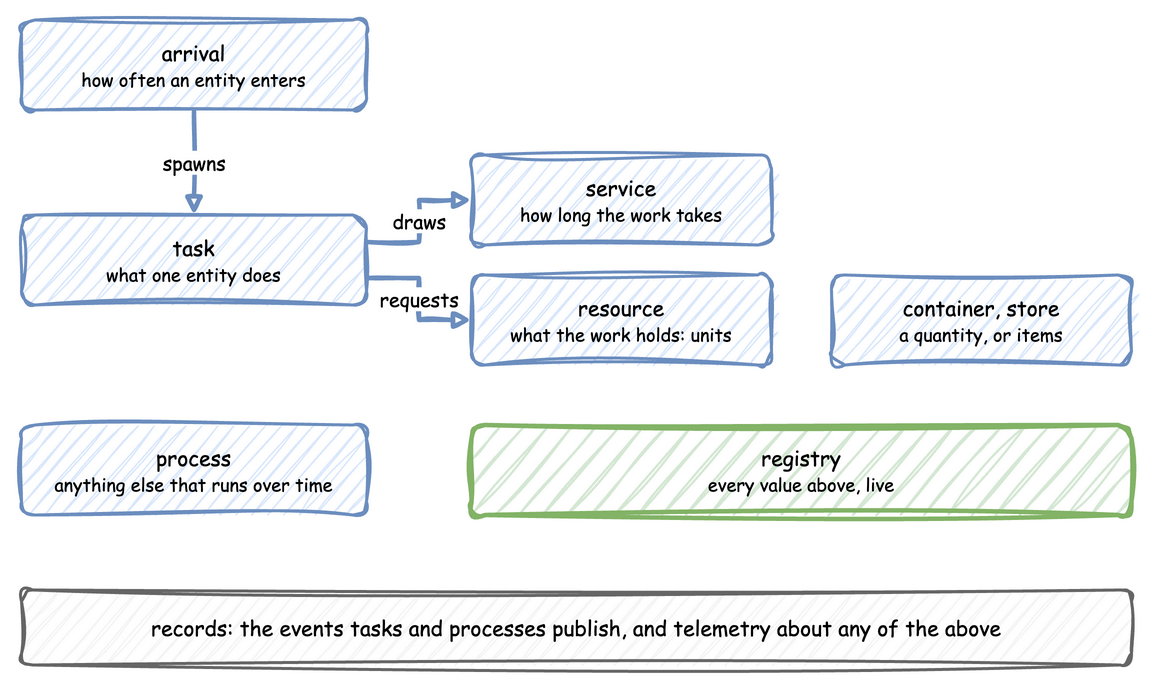
An entity is the thing that flows through a model: an order, a visitor, a support call. It enters through an arrival, does the work its task describes, holds a resource while it works, may take from or add to a store or container, and goes on to the next task. What Is DES? explains the simulation they run in. Look at how the blocks connect:
| Block | What it models | YAML | Builder | Low-level | Page |
|---|---|---|---|---|---|
| Arrival | how often an entity enters, and what it starts with | arrivals |
add_arrival, @app.arrival_loop |
a process that waits for a drawn gap | Arrivals and Services |
| Service | how long a piece of work takes | services |
add_service |
a DistributionConfig drawn with a Sampler |
Arrivals and Services |
| Task | what one entity does, with its events | tasks |
@app.task |
a SimPy process | Tasks and Processes |
| Resource | packers, benches, lanes: whole units held by a task | resources |
add_resource |
DynamicResource |
Resources |
| Container | an amount, such as a stock of boxes, that tasks take and add | containers |
add_container |
DynamicContainer |
Stores and Containers |
| Store | items, such as parcels on a shelf, that tasks put and get | stores |
add_store |
DynamicStore |
Stores and Containers |
| Task flow | the task that follows a finished one, and what the entity carries | next, attributes, set |
next=, attributes=, set= |
Router, Entity |
Task Flow |
| Process | anything else that runs over time: a break, a drift, a schedule | processes |
add_process |
env.process |
Tasks and Processes |
| Statistics | what the run measures about itself | stats |
with_stats |
env.setup_stats, env.stats |
Statistics |
| Variable | any other live value, such as a speed | variables |
add_variable |
SimParameter(variables=...) |
Live Parameters |
Tutorial: the Shop, in the Learn section, puts them together one at a time, in a small online shop.