Live Parameters: SimulationRegistry
Every parameter of a run can change while the run goes on: an arrival rate, a number of packers, a stock level. This page shows how to name a parameter, the ways to change it, how to record what a change was for, and what happens to a value once it arrives.
What It Is
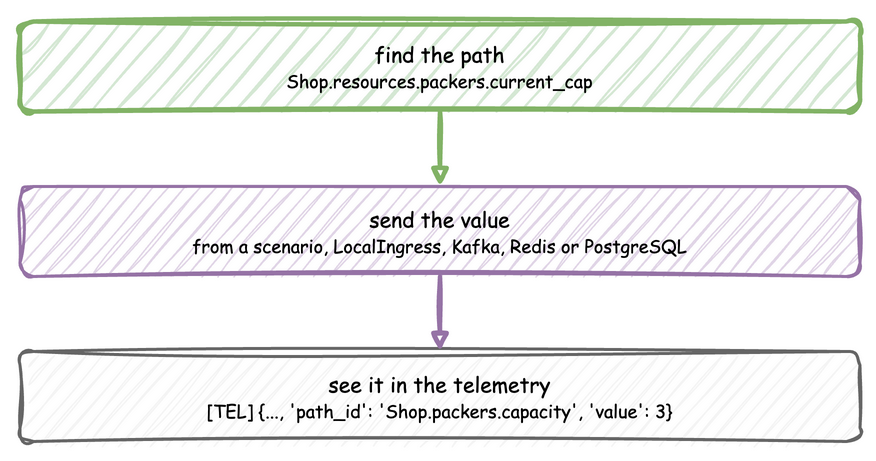
Every run has one SimulationRegistry, at env.registry. It maps dot-notation paths, such as Shop.resources.packers.current_cap, to the values the simulation reads. A scenario, an ingress connector or a process changes a parameter by updating its path, and the simulation follows the change without restarting. Changing a parameter takes three steps:
How to Use It
Find the Path
A path is the sim_id, the kind of parameter, its name and the field:
| Declared with | Paths |
|---|---|
| an arrival or a service | <sim_id>.arrival.<name>.<parameter> and <sim_id>.service.<name>.<parameter>, one per scalar parameter of its family: .rate for an exponential, .mean and .std for a normal, .low, .mode and .high for a triangular, and so on; an empirical has none |
| a resource | <sim_id>.resources.<name>.current_cap and .max_cap |
| a container | <sim_id>.containers.<name>.current_cap, .max_cap and .level |
| a store | <sim_id>.stores.<name>.current_cap and .max_cap |
| a variable | <sim_id>.variables.<name> |
Arrivals and Services lists each family's parameters. An update to a path that does not exist, including a parameter the family does not take, is logged as a warning and ignored, so a misspelt path changes nothing. compile_parameters() returns the SimParameter a SimulationContext will register, which shows the names to use:
In the low-level API you register the parameters yourself, and read a value with registry.get(path).value:
params = SimParameter(
    sim_id="Shop",
    arrival={"orders": DistributionConfig(dist="exponential", rate=0.5)},
    service={"packing": DistributionConfig(dist="normal", mean=3.0, std=0.5)},
    resources={"packers": CapacityConfig(current_cap=2, max_cap=5)},
    containers={"stock": ContainerConfig(current_cap=100, max_cap=100, level=40)},
    variables={"conveyor_speed": 1.5},
)
env = DynamicRealtimeEnvironment(factor=0.0)
env.registry.register_sim_parameter(params)
# Registered paths include:
#   Shop.arrival.orders.rate
#   Shop.service.packing.mean, Shop.service.packing.std
#   Shop.resources.packers.current_cap, Shop.resources.packers.max_cap
#   Shop.containers.stock.current_cap, .max_cap and .level
#   Shop.variables.conveyor_speed
print(env.registry.get("Shop.resources.packers.current_cap").value)  # 2
Send a Value
Each source of a change suits a different job and lands at a different moment:
| Source | Use it for | Lands at |
|---|---|---|
a YAML scenario |
an experiment that must repeat exactly | the exact simulation time given |
LocalIngress |
a local run with changes after set wall-clock delays | a wall-clock delay from the start |
KafkaIngress, RedisIngress, PostgresIngress |
an operator or another program steering a running model | when the message arrives |
a process calling env.registry.update |
a change that depends on the state of the simulation | when the process makes it |
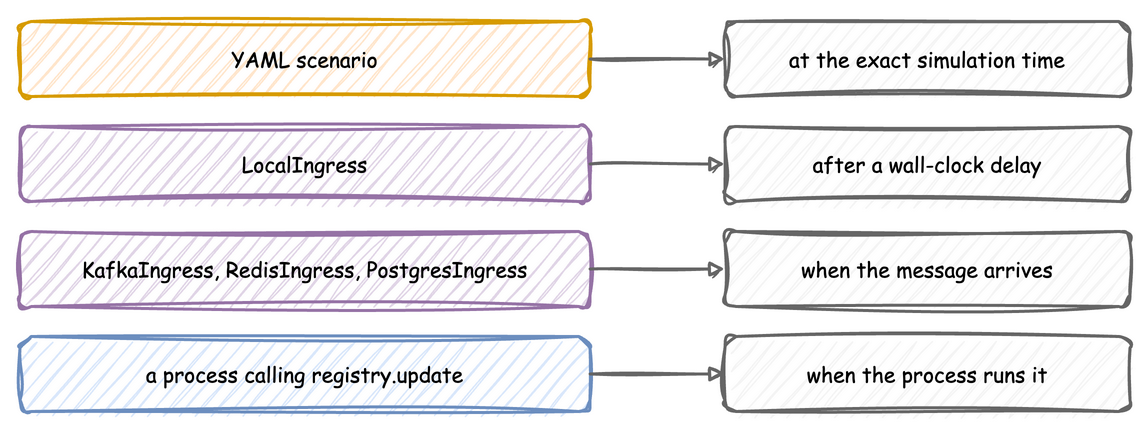
Ingress gives the message each connector reads. A process changes a value directly:
env.registry.update("Shop.resources.packers.current_cap", 3)  # applied
env.registry.update("Shop.resources.packers.current_cap", 9)  # stored as 5, the max_cap
env.registry.update("Shop.service.packing.std", -1.0)  # refused, the old 0.5 stays
env.registry.update("Shop.resources.lath.current_cap", 3)  # no such path: ignored
env.registry.update("Shop.service.packing.rate", 2.0)  # normal has no rate: ignored
env.registry.update("Shop.containers.stock.level", 150)  # stored as 100, the capacity
Script an Experiment
A blueprint's scenario lists changes, each with the simulation time it applies at. Here a second packer starts at 30 seconds, orders arrive twice as fast from one minute, and the extra packer leaves at two minutes:
# The first blueprint with a scripted experiment: a second packer starts at 30 s,
# orders arrive twice as fast from 1 min, and the extra packer leaves at
# 2 min. Every change lands at exactly that simulation time, on every run.
simulation:
  sim_id: Shop
  factor: 0
  random_seed: 1

egress:
  - type: Console

resources:
  packers: {current_cap: 1, max_cap: 3}

services:
  packing: {dist: normal, mean: 4 s, std: 1 s}

arrivals:
  orders: {dist: exponential, rate: 0.2, spawn: pack_order}

tasks:
  pack_order:
    service: packing
    resource: packers
    payload: {event_type: order_packed}

# The packers' capacity and queue every 10 seconds, to see each change land
stats: minimal

scenario:
  - {at: 30, path: Shop.resources.packers.current_cap, value: 2}
  - {at: 1 min, path: Shop.arrival.orders.rate, value: 0.4}
  - {at: 2 min, path: Shop.resources.packers.current_cap, value: 1}

run:
  until: 3 min
A scenario is not a connector. It is a SimPy process that waits on the simulation clock, so each step lands at exactly its at, on every run and at any factor, including 0. Every path is checked against the model's registry when the file loads, so a misspelt path stops the load with its line. LocalIngress waits on the wall clock instead, and an unknown path is only logged when it is due. A scenario and an ingress connector can run together, so a scripted baseline can run while an operator steers over Kafka; when both change the same path, the later write wins.
Record What a Change Was For
A detector or an agent that watches the data is scored against what really happened. A scenario step with a record publishes a ground-truth record of it: stream_type: "label", with the step's path, the value before (old) and after (new), and the step's record mapping as label. A step can have a record and no path, for something that happened outside the model, and then path, old and new are null.
scenario:
  # Changes the rate and publishes a ground-truth record of the change
  - at: 30
    path: Shop.arrival.orders.rate
    value: 1.5
    record: {fault: order_surge, cause: flash sale}
  # A record with no change, such as a fault planted outside the model
  - at: 45
    record: {fault: label_printer_offline}
Labels go only to sinks with when: labels, and those sinks receive nothing else, so the labels never reach the pipeline under test and a scorer reads them apart from the data:
egress:
  # The data under test: events and telemetry, and no label
  - type: Console
  # The labels only, for a scorer that checks what a detector found
  - type: Jsonl
    config: {default_path: labels/labels.jsonl}
    when: labels
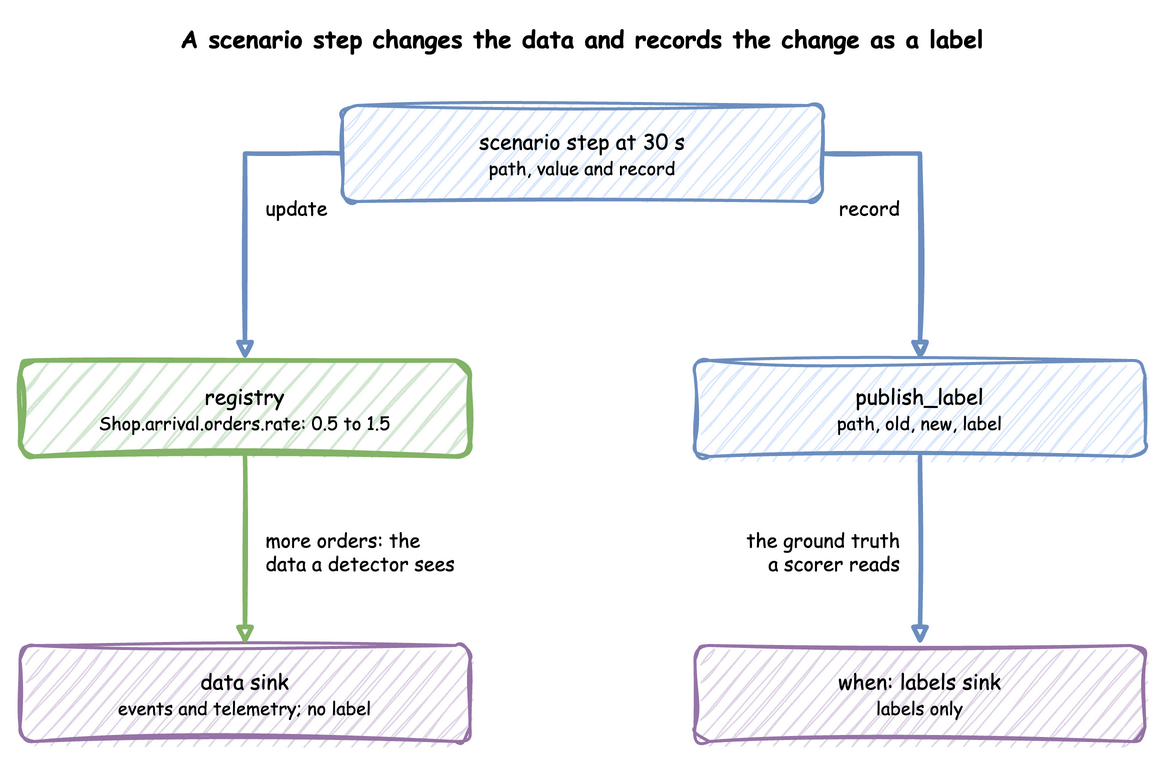
The labels sink writes one line per label:
{"stream_type":"label","sim_ts":30.0,"timestamp":"...","path":"Shop.arrival.orders.rate","old":0.5,"new":1.5,"label":{"fault":"order_surge","cause":"flash sale"}}
{"stream_type":"label","sim_ts":45.0,"timestamp":"...","path":null,"old":null,"new":null,"label":{"fault":"label_printer_offline"}}
In Python, env.publish_label(label, path=..., old=..., new=...) publishes one, and add_egress(sink, when="labels") or setup_egress(..., labels=[...]) makes a labels sink, as the measuring example shows.
How It Works
Registration. run(), or register_sim_parameter in the low-level API, flattens the SimParameter into the registry: one DynamicValue per path, holding the value and a change signal, and beside them the configuration objects the paths belong to, such as each DistributionConfig.
An update. registry.update(path, value) applies one change. The checks run in order, and an accepted value reaches the parts that read it:
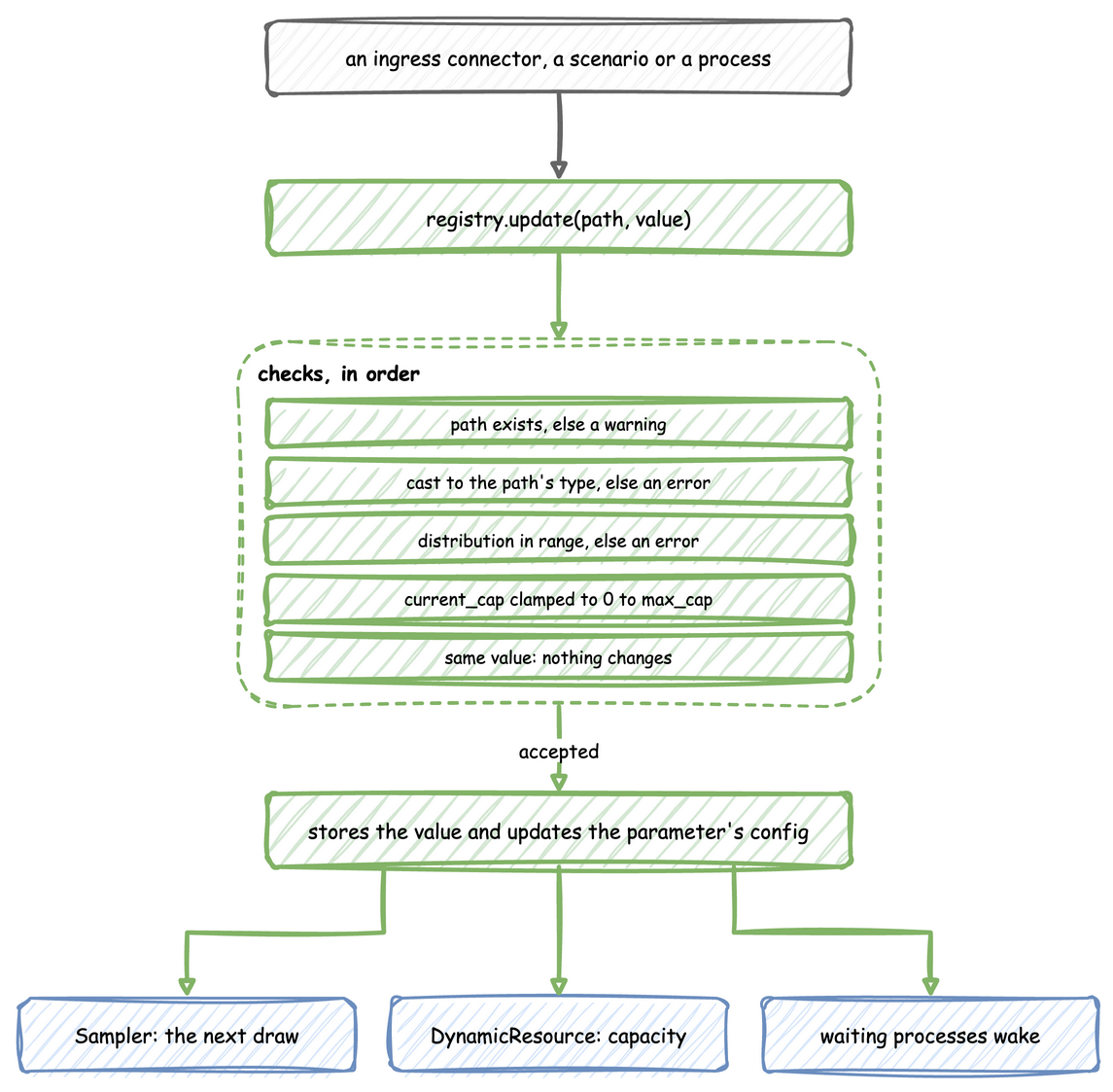
- A path that does not exist is logged as a warning, and the update is ignored.
- A value of another type is converted to the type the path holds, so the string
"5"sent to an integer path becomes 5; Python's conversion is used, so 2.5 sent to an integer path becomes 2. A value that cannot be converted is logged as an error and ignored. - A distribution parameter is checked on a copy of its configuration, by the rules used at build. One out of range is logged as an error, and the old value stays.
- A
current_capoutside 0 tomax_cap, or a containerleveloutside 0 tocurrent_cap, is stored clamped to that range, with a warning. A lowermax_capclamps the storedcurrent_capthe same way. - A value equal to the current one changes nothing.
- Otherwise the value is stored, and the attribute of the configuration object is set too, found by splitting the path at its last dot:
Shop.service.packing.meansetsmeanon the object atShop.service.packing. That is why theSampler, which reads that object at every draw, sees the new value.
The change signal. Each value has a SimPy Store with one slot as its signal. An update puts a token in it if it is empty, and wait_for_change() waits for that token, so several changes before a waiter wakes give one signal, and one waiting process takes it. Resources, stores and containers already wait on their own paths, so wait only on paths nothing else waits on, such as variables:
def watch_speed(env):
    """Logs the conveyor speed every time it changes."""
    speed = env.registry.get("Shop.variables.conveyor_speed")
    while True:
        yield speed.wait_for_change()
        print(f"t={env.now}: conveyor speed is now {speed.value}")


env.process(watch_speed(env))
A container's level changes with every put and get as well; the registry keeps that level so a reader sees it, without signalling the container again.
Under Live Changes
What follows a change:
- Distributions. The next draw uses the new value. The arrival already being waited for keeps its gap, and a task that has drawn its service time keeps it.
- Resources, stores and containers. The capacity follows at once, and a container's level follows its path, as Resources and Stores and Containers describe.
- Variables. The new value is stored; a process reads it with
env.registry.get(path).value.
A change is easiest to see in the telemetry. With stats: minimal, the scenario above shows the second packer land:
[TEL] {'sim_ts': 20.0, 'timestamp': '...', 'path_id': 'Shop.stats.resources.packers.capacity', 'value': 1}
[TEL] {'sim_ts': 30.0, 'timestamp': '...', 'path_id': 'Shop.stats.resources.packers.capacity', 'value': 1}
[TEL] {'sim_ts': 40.0, 'timestamp': '...', 'path_id': 'Shop.stats.resources.packers.capacity', 'value': 2}
The reading at 30 seconds still shows 1: the resource applies a change within the same simulation instant, but after the step that made it, and the reading was taken first. The builder publishes the same readings with with_stats:
# The packers' capacity, in use, queue and utilization every 2 seconds
app.with_stats("minimal", interval=2.0)
Stability and Limits
- An unknown path is a warning, not an error, for an ingress message or a process; only a scenario is checked when it loads.
- A family is fixed. There is no path that turns a
normalinto anexponential; that is a new model. - Several changes, one signal. A process waiting on a path wakes once for several changes made before it runs, and reads the latest value.
- Ingress lands on the wall clock. A message's change lands at whatever simulation time the run has reached when it arrives; a change that must happen at an exact simulation time is a scenario step.