Queues and Capacity
In its busy hour the shop gets 1.8 orders a second, and packing still takes 1.5 seconds. One packer cannot keep up. This page asks: how many packers keep the mean wait under 10 seconds?
What You Add
More orders, then more packers. The shop is the one from First Simulation, with the arrival rate of the busy hour, a run of one hour, and the number of packers as a setting you change between runs.
Work Out the Load
Before running anything, work out how busy the packers would be. Utilisation is the share of time a resource is busy:
utilisation = arrival rate × mean service time ÷ number of units
The load is the top half of that: 1.8 orders a second × 1.5 seconds = 2.7 packers' worth of work arriving every second. One packer would be busy 270% of the time, which is impossible: it falls further behind with every order.
- With utilisation below 1 a model is stable: the queue rises and falls, but stays bounded.
- At 1 or above it is not: the queue grows for as long as the run lasts, and every order waits longer than the one before.
So the shop needs at least 3 packers (2.7 ÷ 3 = 0.9). Each resource in a model has its own utilisation, and the one closest to 1 is the bottleneck: it decides how long everything waits.
Here is the busy hour. The arrival rate is 1.8, and until is one hour of simulation time:
simulation:
  sim_id: Shop
  factor: 0  # unpaced: the hour runs in about a second
  random_seed: 42

services:
  packing: {dist: constant, value: 1.5 s}

arrivals:
  # The busy hour: 1.8 orders a second, more than one packer can pack
  orders: {dist: exponential, rate: 1.8, spawn: pack_order}

tasks:
  pack_order:
    service: packing
    resource: packers
    payload: {event_type: order_packed}

egress:
  - type: Console

run:
  until: 1 h
app = SimulationContext(sim_id="Shop", factor=0, random_seed=42)  # unpaced
app.add_service("packing", dist="constant", value=1.5)
# The busy hour: 1.8 orders a second, more than one packer can pack
app.add_arrival("orders", dist="exponential", rate=1.8)
A blueprint takes durations wherever it takes a time, such as until: 1 h and value: 1.5 s; a plain number is seconds. factor: 0 runs the hour unpaced, in about a second, because nobody needs to watch it in real time.
Run It With More Packers
The number of packers is the resource's current_cap. Each run sets it once:
resources:
# The number of packers comes from the PACKERS variable, 1 when it is not set
packers:
current_cap: ${PACKERS:-1}
max_cap: 10
${PACKERS:-1} reads the environment variable PACKERS, and uses 1 when it is not set.
resources={"packers": CapacityConfig(current_cap=packers, max_cap=10)},
A DynamicResource with a current_cap of 3 behaves like a SimPy resource with three units: a request is granted as soon as any unit is free, so three orders are packed at once. Resources describes how it is built and why.
To read the mean wait, switch on the built-in statistics at the typical level, which keeps the mean wait of every task; Measuring a Run explains the levels.
Now run the hour with 1, 2, 3 and 4 packers:
The run publishes the mean wait as Shop.stats.tasks.pack_order.wait_mean at the end, among every event. grep keeps that line:
def mean_wait(packers: int) -> float:
"""Runs the busy hour with `packers` packers and returns the mean wait."""
app = shop(packers)
app.run(until=UNTIL)
return app.env.stats.readings()["Shop.stats.tasks.pack_order.wait_mean"]
if __name__ == "__main__":
for packers in range(1, 5):
print(f"packers {packers}: mean wait {mean_wait(packers):8.2f} s")
def mean_wait(packers: int) -> float:
"""Runs the busy hour with `packers` packers and returns the mean wait."""
env = run(packers)
return env.stats.readings()["Shop.stats.tasks.pack_order.wait_mean"]
if __name__ == "__main__":
for packers in range(1, 5):
print(f"packers {packers}: mean wait {mean_wait(packers):8.2f} s")
The Builder and Low-level scripts print one line per run. The YAML runs print the same numbers, as the value of their wait_mean lines:
packers 1: mean wait 1127.21 s
packers 2: mean wait 426.31 s
packers 3: mean wait 1.27 s
packers 4: mean wait 0.20 s
Waits Near Full Use
With 2 packers, utilisation is 1.35. The queue grows all hour, so the mean wait says only how long the run was: run two hours and it roughly doubles. With 3 packers, utilisation is 0.9 and the wait settles. With 4 it is 0.675, and almost nobody waits.
A stable model can still wait a long time. Waits grow sharply as utilisation approaches 1, and more variable times make it worse. These are measured mean waits in the queue for one packer with a mean service of 1.5 seconds, each over 200,000 simulated seconds:
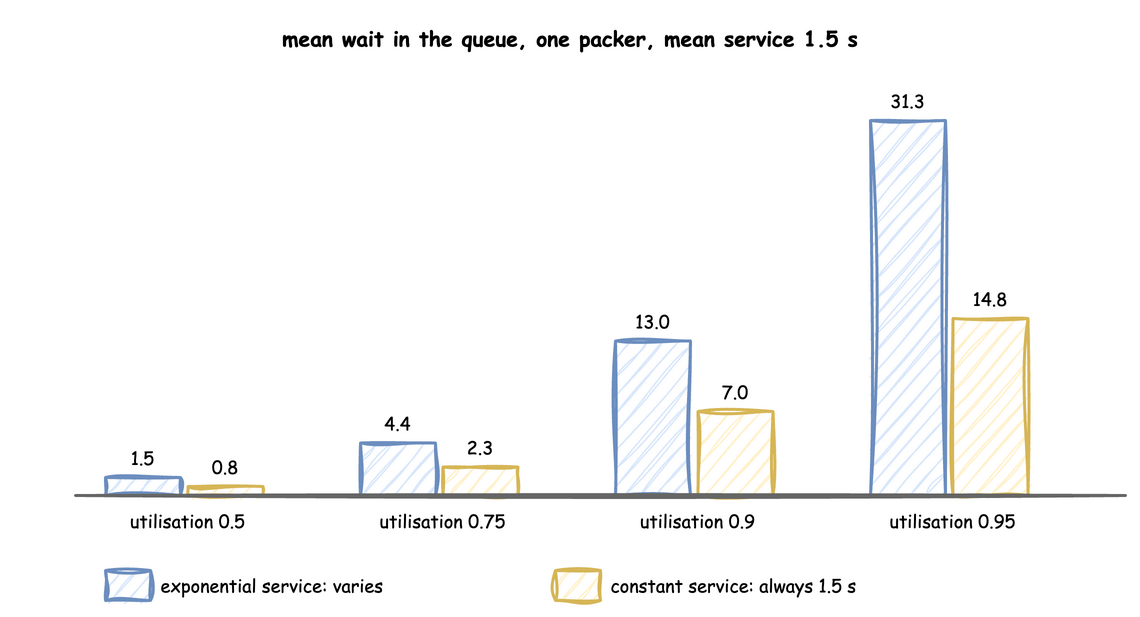
- With exponential service times, the mean wait for one unit is
utilisation ÷ (1 − utilisation) × mean service time. At 0.75 that is 3 × 1.5 = 4.5 seconds. Going from 0.9 to 0.95 more than doubles it. - With constant service times, as in this shop, the wait is half of that, because no unusually long job holds up the queue. Spread in the service time, or in the gaps between arrivals, always lengthens waits; Choosing Inputs measures it.
Result
How many packers keep the mean wait under 10 seconds? 3 packers, as the mean wait for 1 to 4 packers shows:
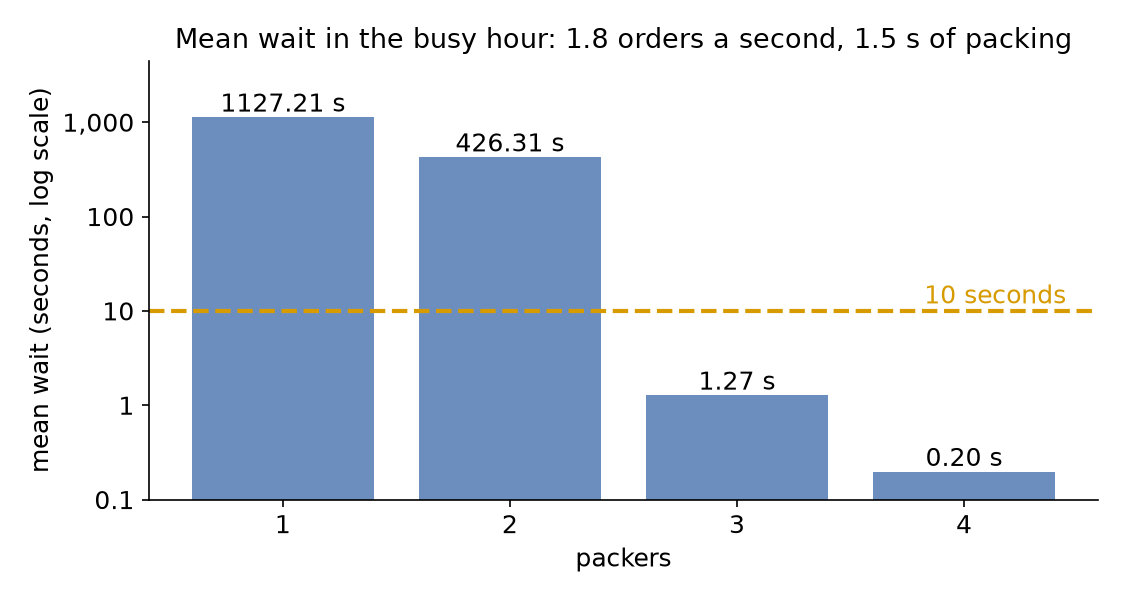
With 3 packers the mean wait is 1.27 seconds. With 2 packers it is over 400 seconds and still growing when the hour ends. The answer is the first number of packers that brings utilisation below 1, because the shop's packing time is constant and 0.9 is not yet close enough to 1 for the wait to pass 10 seconds.
Why It Works
Three packers serving one queue is the M/M/c model of queueing theory when both the gaps and the service times are exponential, and M/D/c when the service time is constant, as here. For both, the wait, measured in service times, depends on utilisation alone once c is fixed, and grows without limit as utilisation reaches 1, which is what the table shows. To bring a resource below 1, change any term of the utilisation: add units (current_cap), work faster (a shorter service time) or take fewer arrivals (a lower rate). Each is a live parameter, so a running model can be relieved, or overloaded on purpose, as Live Parameters shows. Statistics describes how the mean wait is measured.
Full Files
Full files
# The Queues and Capacity tutorial: the shop in its busy hour, as a blueprint.
# Run it once per number of packers, and read the mean wait from the last lines:
# PACKERS=3 desflow run queues_and_capacity.yaml 2>&1 | grep wait_mean
simulation:
sim_id: Shop
factor: 0 # unpaced: the hour runs in about a second
random_seed: 42
services:
packing: {dist: constant, value: 1.5 s}
arrivals:
# The busy hour: 1.8 orders a second, more than one packer can pack
orders: {dist: exponential, rate: 1.8, spawn: pack_order}
tasks:
pack_order:
service: packing
resource: packers
payload: {event_type: order_packed}
egress:
- type: Console
run:
until: 1 h
resources:
# The number of packers comes from the PACKERS variable, 1 when it is not set
packers:
current_cap: ${PACKERS:-1}
max_cap: 10
# The mean wait of pack_order, published once an hour and at the end
stats: {level: typical, interval: 1 h}
"""The Queues and Capacity tutorial: the shop's busy hour, with the builder.
Orders arrive at 1.8 a second and each takes 1.5 seconds to pack. The script runs the
hour once for each number of packers, unpaced, and prints the mean wait of each run.
"""
from desflow import SimulationContext
UNTIL = "1 h" # the busy hour
def shop(packers: int) -> SimulationContext:
"""The shop in its busy hour, with `packers` packers."""
app = SimulationContext(sim_id="Shop", factor=0, random_seed=42) # unpaced
app.add_service("packing", dist="constant", value=1.5)
# The busy hour: 1.8 orders a second, more than one packer can pack
app.add_arrival("orders", dist="exponential", rate=1.8)
app.add_resource("packers", current_cap=packers, max_cap=10)
# The mean wait of pack_order, kept by the run and read at the end
app.with_stats("typical", interval=3600)
@app.task(service_id="packing", resource_id="packers")
def pack_order(task_id):
return {"event_type": "order_packed"}
@app.arrival_loop("orders")
def order_generator(context):
task_id = 0
while True:
order = yield context.wait_for_arrival("orders")
context.spawn(pack_order(task_id, entity=order))
task_id += 1
return app
def mean_wait(packers: int) -> float:
"""Runs the busy hour with `packers` packers and returns the mean wait."""
app = shop(packers)
app.run(until=UNTIL)
return app.env.stats.readings()["Shop.stats.tasks.pack_order.wait_mean"]
if __name__ == "__main__":
for packers in range(1, 5):
print(f"packers {packers}: mean wait {mean_wait(packers):8.2f} s")
"""The Queues and Capacity tutorial: the shop's busy hour, on the low-level API.
Orders arrive at 1.8 a second and each takes 1.5 seconds to pack. The script runs the
hour once for each number of packers, unpaced, and prints the mean wait of each run.
"""
from desflow import (
CapacityConfig,
DistributionConfig,
DynamicRealtimeEnvironment,
DynamicResource,
Sampler,
SimParameter,
)
UNTIL = 3600 # the busy hour, in seconds
def params(packers: int) -> SimParameter:
"""The shop in its busy hour, with `packers` packers."""
return SimParameter(
sim_id="Shop",
service={"packing": DistributionConfig(dist="constant", value=1.5)},
# The busy hour: 1.8 orders a second, more than one packer can pack
arrival={"orders": DistributionConfig(dist="exponential", rate=1.8)},
resources={"packers": CapacityConfig(current_cap=packers, max_cap=10)},
)
def pack_order(env, sampler, packers, task_id):
"""One order, which reports each step to the statistics."""
path_id = "Shop.service.packing"
env.stats.task_queued("pack_order", task_id)
with packers.request() as request:
yield request
env.stats.task_started("pack_order", task_id)
yield env.timeout(sampler.sample(env.registry.get_config(path_id)))
env.stats.task_finished("pack_order", task_id)
def order_generator(env, sampler, packers):
arrival = env.registry.get_config("Shop.arrival.orders")
task_id = 0
while True:
yield env.timeout(sampler.sample(arrival))
env.process(pack_order(env, sampler, packers, task_id))
task_id += 1
def run(packers: int, until=UNTIL, factor=0.0):
"""Runs the busy hour with `packers` packers, unpaced, and returns the environment."""
env = DynamicRealtimeEnvironment(factor=factor)
env.registry.register_sim_parameter(params(packers))
# The mean wait of pack_order, kept by the environment and read at the end
env.setup_stats("Shop", "typical", interval=3600)
packers_resource = DynamicResource(env, "Shop", "packers")
sampler = Sampler(seed=42)
env.process(order_generator(env, sampler, packers_resource))
try:
env.run(until=until)
finally:
env.teardown()
return env
def mean_wait(packers: int) -> float:
    """Runs the busy hour with `packers` packers and returns the mean wait."""
    env = run(packers)
    return env.stats.readings()["Shop.stats.tasks.pack_order.wait_mean"]


if __name__ == "__main__":
    for packers in range(1, 5):
        print(f"packers {packers}: mean wait {mean_wait(packers):8.2f} s")
Next, Randomness and Seeds asks why each run differs, and how to repeat one.