Stores and Containers: DynamicStore and DynamicContainer
A resource is held and given back. Stores and containers hold things that tasks take away and add: items, or an amount. This page shows how to declare them, how tasks put and get, and what a live change does.
What It Is
- A store holds items, each one a value of its own: parcels on a shelf waiting for a courier, orders in a buffer. A task puts an item in, and another takes the oldest out.
- A container holds an amount: boxes in a bin, fuel in a tank, a stock level. A task takes some, and another adds some.
Both have a capacity. A task that takes waits while there is not enough, and a task that adds waits while there is no room. Stock uses a container in the shop.
How to Use It
Declare Them
A container has a current_cap, its capacity, the largest amount it holds; a max_cap, the largest capacity a live change can set; and a level, the amount it holds when the run starts, 0 when left out. A store has a current_cap and a max_cap, in whole items, and starts empty. run() builds a DynamicContainer and a DynamicStore for each one the context declares; a store and a container cannot share a name.
env = DynamicRealtimeEnvironment(factor=0.0)
env.registry.register_sim_parameter(
    SimParameter(
        sim_id="Shop",
        # An amount: room for 100 boxes, 20 when the run starts
        containers={"stock": ContainerConfig(current_cap=100, max_cap=100, level=20)},
        # Items: room for 5 parcels, empty when the run starts
        stores={"parcels": CapacityConfig(current_cap=5, max_cap=10)},
    )
)
stock = DynamicContainer(env, "Shop", "stock")  # starts at the level above, 20
parcels = DynamicStore(env, "Shop", "parcels")
A DynamicContainer built with no init starts at the level its ContainerConfig gives; init= sets another.
Take and Add
A task takes with get and adds with put. For a container, each names the container and an amount: a number; an expression, such as payload.boxes for a field of the previous task's payload; or in the builder, a function of the task id and the previous task's payload. The amount is 1 when left out. For a store, each names the store: a put adds the task's finished payload as the item, and a get takes the oldest item and passes it to the task's function as item.
# Takes the boxes the previous task's payload names, once it has a packer.
# The amount is a number, an expression, or a function of the task id and the
# previous task's payload, such as lambda task_id, payload: payload["boxes"].
@app.task(
    service_id="packing",
    resource_id="packers",
    get={"container": "stock", "amount": "payload.boxes"},
    put={"store": "parcels"},  # adds the finished payload as an item
)
def pack_order(task_id: int):
    return {"event_type": "order_packed"}


# Takes the oldest parcel, waiting while the store is empty; `item` is that parcel
@app.task(service_id="collecting", get={"store": "parcels"})
def collect(task_id: int, item):
    return {"event_type": "parcel_collected", "parcel": item["event_type"]}
def pack(env, order_id):
    yield stock.get(2)  # takes 2 boxes, waiting while fewer are left
    yield parcels.put({"order_id": order_id})  # waits while the store is full


def collect_parcel(env):
    parcel = yield parcels.get()  # waits while the store is empty
    print(f"collected order {parcel['order_id']}; {stock.level:g} boxes left")
get(amount), put(amount), put(item) and get() are SimPy events: yielding one waits until it succeeds, and a store's get() succeeds with the item.
A task with a resource gets its unit first and then takes its get, so it waits for stock while holding the unit. A task adds its put after its service time, then publishes the finished event. Tasks and Processes lists every step.
Registry Paths, Readings and Conditions
A container has three registry paths, <sim_id>.containers.<name>.current_cap, .max_cap and .level; a store has <sim_id>.stores.<name>.current_cap and .max_cap. With statistics at the minimal level or above, each publishes four readings, such as Shop.stats.containers.stock.level:
| Reading | Store | Container |
|---|---|---|
capacity |
items it can hold | largest amount |
level |
items held | amount held |
getters_waiting |
tasks waiting to get an item | tasks waiting to take an amount |
putters_waiting |
tasks waiting to put an item | tasks waiting to add an amount |
basic adds level_avg, the level averaged over time; Statistics describes it. These are the readings of the blueprint above at 30 and 40 seconds, before and after the stock count below:
[TEL] {'sim_ts': 30.0, 'timestamp': '...', 'path_id': 'Shop.stats.stores.parcels.level', 'value': 3}
[TEL] {'sim_ts': 30.0, 'timestamp': '...', 'path_id': 'Shop.stats.stores.parcels.putters_waiting', 'value': 0}
[TEL] {'sim_ts': 30.0, 'timestamp': '...', 'path_id': 'Shop.stats.containers.stock.level', 'value': 0.0}
[TEL] {'sim_ts': 30.0, 'timestamp': '...', 'path_id': 'Shop.stats.containers.stock.getters_waiting', 'value': 2}
[TEL] {'sim_ts': 40.0, 'timestamp': '...', 'path_id': 'Shop.stats.stores.parcels.level', 'value': 5}
[TEL] {'sim_ts': 40.0, 'timestamp': '...', 'path_id': 'Shop.stats.stores.parcels.putters_waiting', 'value': 2}
[TEL] {'sim_ts': 40.0, 'timestamp': '...', 'path_id': 'Shop.stats.containers.stock.level', 'value': 38.0}
[TEL] {'sim_ts': 40.0, 'timestamp': '...', 'path_id': 'Shop.stats.containers.stock.getters_waiting', 'value': 0}
At 30 seconds the bin is empty and two orders wait for boxes; at 40 seconds the count has put 50 boxes in, those two have taken theirs, and the shelf of parcels is full, with two packed orders waiting for room.
A condition in a task's next reads a level as level.<name>, so an order can go to backorder when level.stock == 0, as Task Flow shows.
Example: Stock, Parcels and Express Orders
The stock example puts it together: packing takes a box from a container and puts the parcel in a store, a courier collects it, and express orders go first. The stock runs out, so packing waits until a restock at 40 seconds sets the level to 30. It needs no Docker service and ends on its own.
Quick Start
desflow examples get downloads the example at the release you install, into a folder of its own. Pick uv or pip:
tasks:
  pack:
    service: packing
    resource: packers
    # Each order's own attribute, read when it joins the queue.
    priority: attr.priority
    # Takes one box once it has a packer, and waits while the stock is empty.
    get: {container: stock, amount: 1}
    # Puts the finished payload in the store as a parcel.
    put: {store: parcels}
    payload: {event_type: order_packed}
    attributes: [priority]
The whole file is examples/yaml/stock.yaml.
Quick Start
desflow examples get downloads the example at the release you install, into a folder of its own. Pick uv or pip:
@app.task(
    service_id="packing",
    resource_id="packers",
    # Each order's own attribute, read when it joins the queue
    priority="attr.priority",
    # Takes one box once it has a packer, and waits while the stock is empty
    get={"container": "stock", "amount": 1},
    # Puts the finished payload in the store as a parcel
    put={"store": "parcels"},
)
def pack(task_id, context, entity):
    """Packs one order."""
    return {"event_type": "order_packed", "priority": entity.attributes["priority"]}
The whole file is examples/builder/stock_example.py.
Quick Start
desflow examples get downloads the example at the release you install, into a folder of its own. Pick uv or pip:
def pack(env, sampler, shop, key, priority, task_id):
    """Queued, a packer by priority, a box from stock, packing, then a parcel."""
    path_id = "Shop.service.packing"

    def publish(value):
        env.publish_event(key, value, task="pack", instance=task_id)

    publish({"path_id": path_id, "status": "queued"})
    with shop["packers"].request(priority=priority) as req:
        yield req
        # Waits while the stock is empty
        yield shop["stock"].get(1)
        publish({"path_id": path_id, "status": "started"})
        payload = {"event_type": "order_packed", "priority": priority}
        yield env.timeout(sampler.sample(env.registry.get_config(path_id)))
        # Waits while the store is full
        yield shop["parcels"].put(payload)
        publish(payload)
The whole file is examples/low-level/stock_example.py.
How It Works
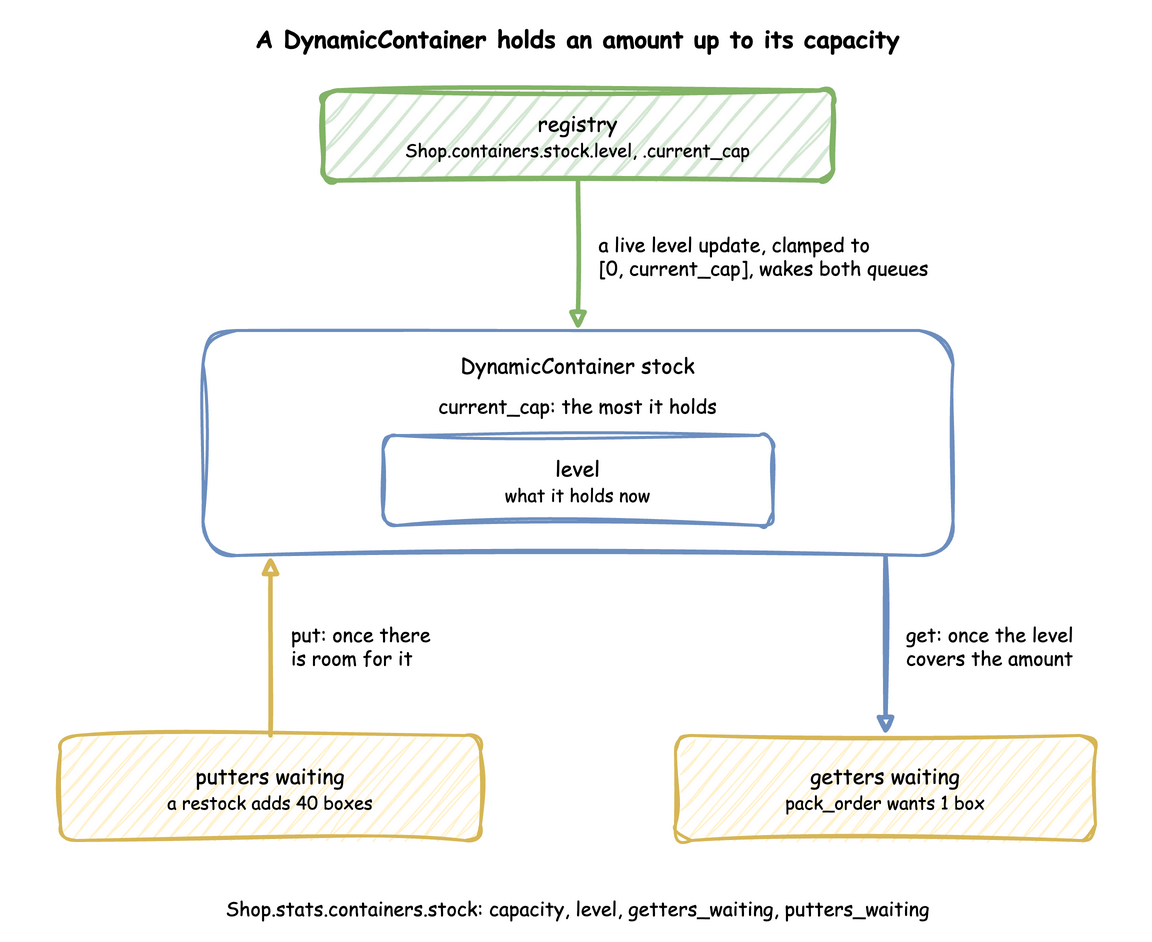
A container keeps a level between 0 and its capacity, with a queue of getters and a queue of putters. A get succeeds as soon as the level covers its amount, and a put as soon as there is room for all of it; until then each waits in its queue, in the order it arrived:
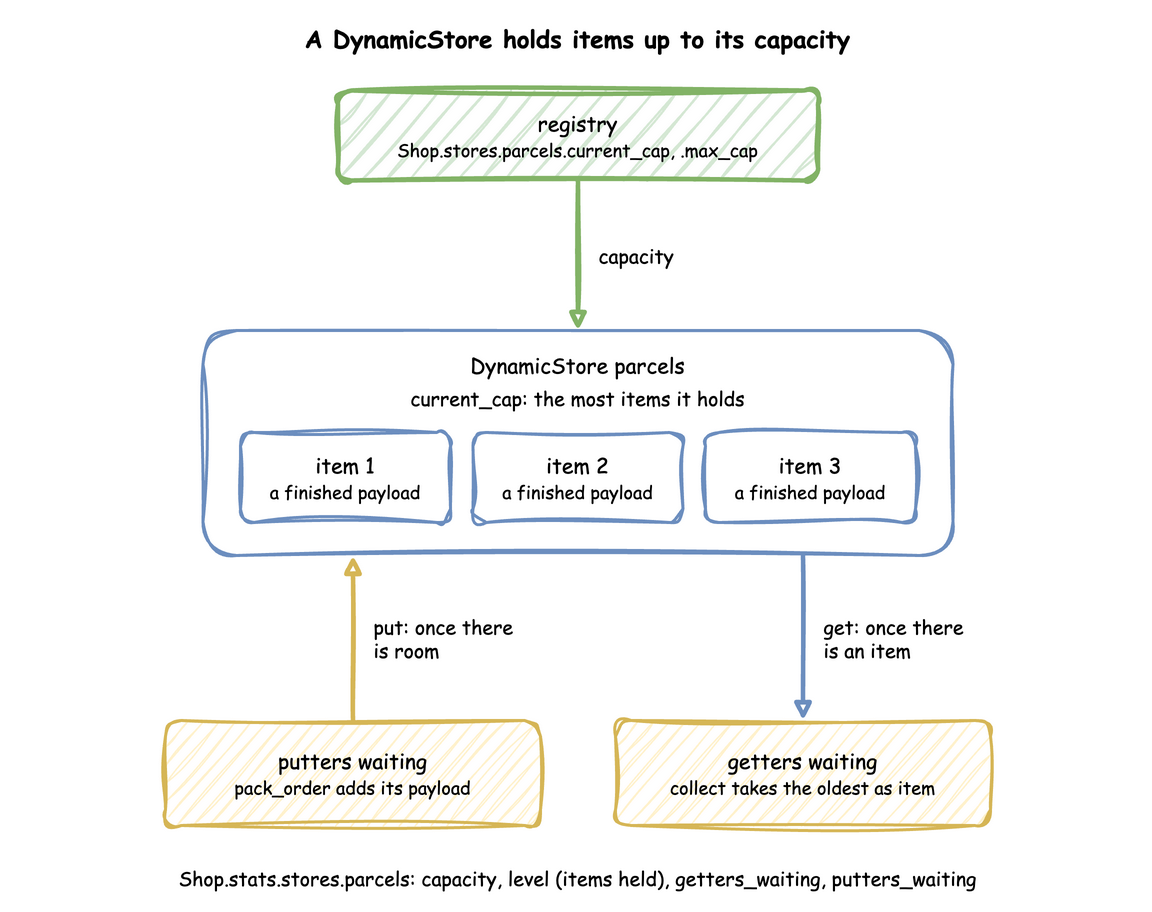
A store keeps a list of items, up to its capacity. A put adds an item at the end, and a get takes the first, so items leave in the order they came:
SimPy and desflow. Underneath are SimPy's Container and Store, and a PriorityStore for a DynamicStore(..., priority=True) in the low-level API, which hands out the lowest item first. SimPy's capacities are fixed when they are created; desflow's follow the registry, keep the registry's level in step with every put and get, and report each change to the statistics. SimPy and desflow compares the two.
Under Live Changes
- Capacity follows
current_cap, clamped to between 0 andmax_cap. A higher capacity wakes waiting putters. A capacity below what is held destroys nothing: puts wait until enough has been taken. - A container's level is set by an update to its
levelpath, as a stock count or a restock from outside would. The new level is clamped to between 0 andcurrent_cap, with a warning, and it wakes both queues: a higher level serves waiting getters, and a lower one can make room for putters. current_capis the capacity, not a level. A model that used a container'scurrent_capas a level, such as the wear of a roll, moves it tolevel.
The stock count in the blueprint above, in each way of writing:
def stock_count(context: SimulationContext):
    """A stock count at 30 seconds: the level path sets what the container holds."""
    yield context.env.timeout(30)
    context.env.registry.update("Shop.containers.stock.level", 50)


app.add_process(stock_count)
Stability and Limits
- A container that never refills blocks its getters for good, and a task that waits for stock while holding a resource blocks the resource too. Supply has to keep up with demand, as Stock shows.
- Whole items. A store's capacity is a whole number, and it holds items, not amounts.
- No filter. A
gettakes the oldest item; a get that picks an item by a condition (SimPy'sFilterStore) is not available before 1.0. - One store or container per get or put. A task has at most one
getand oneput.