Labelling Data with Label Studio
The label-studio profile runs Label Studio, where people label data: a person reads each task and picks its label. A project holds the tasks and the labelling setup, and each label a person gives is an annotation. Label Studio keeps projects, tasks and annotations in the labelstudio database on odctl's PostgreSQL. The end-to-end tests run the commands below on every release.
This guide builds on Getting Started. Its samples are requests to the driver model of the MLflow guide, which scores a driver 1 when the conv_rate feature is above 0.5. Run the commands in the folder that holds your .odctl workspace, and in one terminal, because later steps use the variables that earlier ones set. Start the profile:
| docs/snippets/label-studio/commands.sh:up |
|---|
| |
| Endpoint |
Address |
UI and API from the host (user user@odctl.io, password password) |
http://127.0.0.1:8088 |
API inside the odctl network |
http://label-studio:8080 |
API token, sent as Authorization: Token <token> |
odctl-label-studio-token |
odctl up label-studio starts PostgreSQL first. Label Studio creates the user and its token on its first start, from the settings in .odctl/compose-mlops.yml, where you can change them before the first start.
Labels go from Label Studio to a table that your training and monitoring code can join to its predictions:
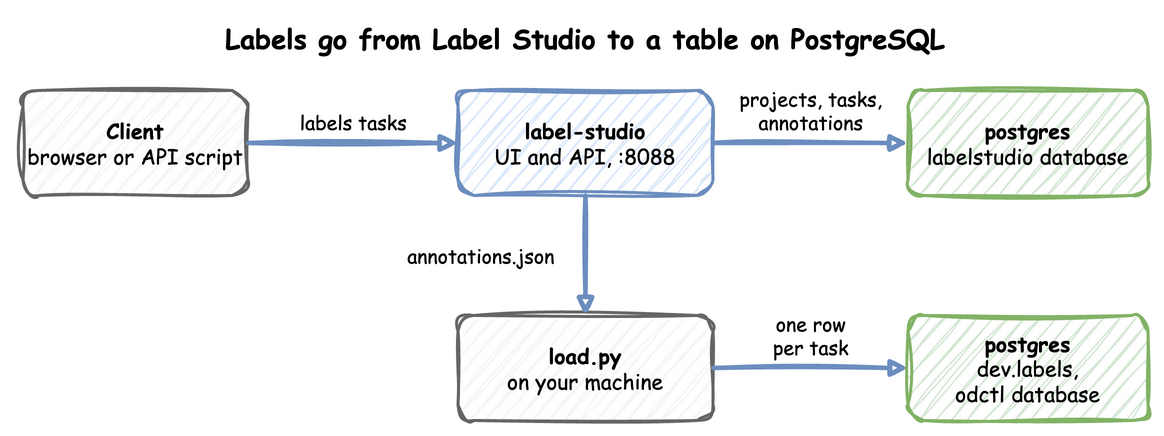
Both green boxes are the same postgres container: Label Studio's own data is in the labelstudio database, and the label table is dev.labels in the odctl database.
Log In
Open http://127.0.0.1:8088 and log in with the user and password in the table above. The login takes an email address, not a user name. The API steps below use the same user's token instead of the password.
Create a Project
A project's label config is the labelling setup, written in Label Studio's XML tags. This one shows each task's text and offers two choices, 1 and 0, the two scores the driver model gives. The command creates the project and keeps its ID in PROJECT_ID:
| docs/snippets/label-studio/commands.sh:project |
|---|
| # A project that labels each request 1 or 0, the two scores the driver model
# gives. It prints the project ID. $text names each task's text field, which
# Label Studio fills in, so it stays in single quotes. The shellcheck line tells
# the repository's shell linter that this is intended.
TOKEN=odctl-label-studio-token
# shellcheck disable=SC2016
PROJECT_ID=$(curl -s -X POST http://127.0.0.1:8088/api/projects \
-H "Authorization: Token $TOKEN" -H "Content-Type: application/json" \
-d '{"title": "Driver requests", "label_config": "<View><Text name=\"text\" value=\"$text\"/><Choices name=\"label\" toName=\"text\"><Choice value=\"1\"/><Choice value=\"0\"/></Choices></View>"}' \
| python3 -c "import json, sys; print(json.load(sys.stdin)['id'])")
echo "$PROJECT_ID"
|
It prints the project ID, which is 1 for the first project:
Import Tasks
Each task is a JSON object. Its keys become the task's data: text is the field the label config shows, and sample_id is the ID of the request, so the label can be joined back to the request's prediction later:
| docs/snippets/label-studio/commands.sh:import |
|---|
| # Two tasks, each a request's ID and a text that describes the request.
curl -s -X POST "http://127.0.0.1:8088/api/projects/$PROJECT_ID/import" \
-H "Authorization: Token $TOKEN" -H "Content-Type: application/json" \
-d '[{"sample_id": "r-1", "text": "Driver 1001, conv_rate 0.9"}, {"sample_id": "r-2", "text": "Driver 1002, conv_rate 0.75"}]'
echo
|
| {"task_count":2,"annotation_count":0,"prediction_count":0,"duration":0.013175487518310547,"file_upload_ids":[],"could_be_tasks_list":false,"found_formats":[],"data_columns":[]}
|
Read the tasks back:
| docs/snippets/label-studio/commands.sh:read |
|---|
| # This prints the sample ID and text of each task in the project.
curl -s "http://127.0.0.1:8088/api/tasks?project=$PROJECT_ID" -H "Authorization: Token $TOKEN" \
| python3 -c "import json, sys; [print(t['data']['sample_id'], t['data']['text']) for t in json.load(sys.stdin)['tasks']]"
|
| r-1 Driver 1001, conv_rate 0.9
r-2 Driver 1002, conv_rate 0.75
|
Label the Tasks
Open the project at http://127.0.0.1:8088/projects/1, or use your PROJECT_ID in place of 1. Open a task, pick a choice and click Submit. This is the labelling view of the first task after it was labelled 1. The task list is on the left, and the task's text and the two choices are in the middle:
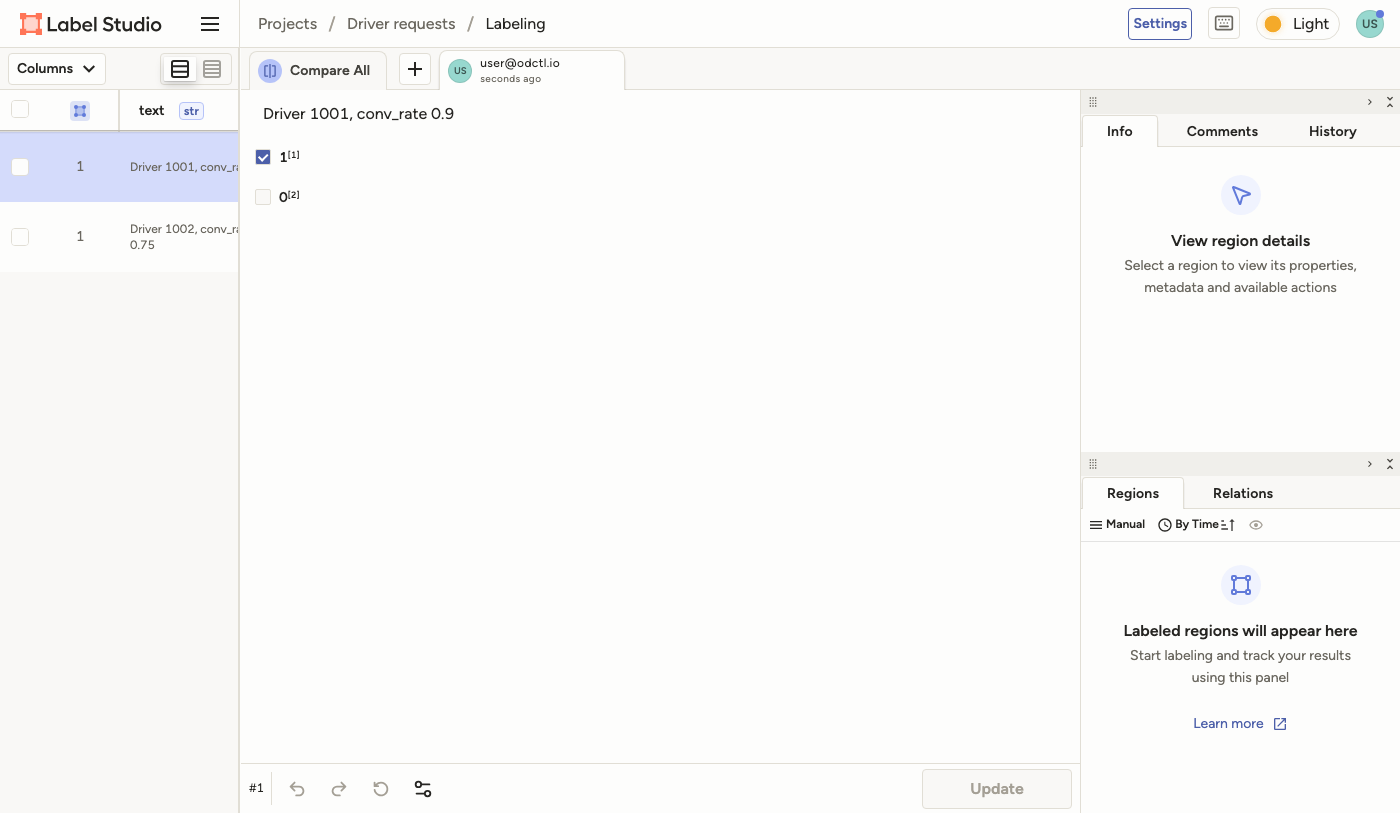
If you labelled the tasks in the UI, skip the next command, because it adds a second annotation to each task. Otherwise a script can add the annotations through the API, which is how the end-to-end tests label them. This labels r-1 with 1 and r-2 with 0. A label is what a person judges, so it can differ from the model's score:
| docs/snippets/label-studio/commands.sh:annotate |
|---|
| # Labels the first task 1 and the second 0 from a script, as a person does in
# the UI.
read -r FIRST SECOND < <(curl -s "http://127.0.0.1:8088/api/tasks?project=$PROJECT_ID" -H "Authorization: Token $TOKEN" \
| python3 -c "import json, sys; print(*[t['id'] for t in json.load(sys.stdin)['tasks']])")
annotate() {
curl -s -o /dev/null -w "%{http_code}\n" -X POST "http://127.0.0.1:8088/api/tasks/$1/annotations" \
-H "Authorization: Token $TOKEN" -H "Content-Type: application/json" \
-d "{\"result\": [{\"from_name\": \"label\", \"to_name\": \"text\", \"type\": \"choices\", \"value\": {\"choices\": [\"$2\"]}}]}"
}
annotate "$FIRST" 1
annotate "$SECOND" 0
|
Label Studio answers 201 for each annotation it creates:
Load the Labels into PostgreSQL
Export the project's tasks with their annotations as JSON. The file annotations.json holds one object for each task that has at least one annotation, with its data and its list of annotations:
| docs/snippets/label-studio/commands.sh:export |
|---|
| # Exports the project's tasks with their annotations as JSON.
curl -s "http://127.0.0.1:8088/api/projects/$PROJECT_ID/export?exportType=JSON" \
-H "Authorization: Token $TOKEN" -o annotations.json
|
The label table, dev.labels, has four columns: the sample ID, the label, the source of the label and its arrival time, which is when the label reached the table. Labels can come from more than one source, such as people in Label Studio and a script that labels by rule, so the table's primary key is the sample ID and the source together.
The table is in the dev schema of the odctl database. The database's search path starts with cdc, and a Debezium source reads every table in cdc, as the Kafka Connect guide shows, so the SQL names dev. Save this script as load.py. It creates the label table if it does not exist, and writes one row for each labelled task, from its latest annotation, with the source label-studio. A task you skipped in the UI gives no row. Loading a later export again changes a row only when its label changed, and then sets its arrival time again:
| docs/snippets/label-studio/steps.py:load |
|---|
| import json
import subprocess
def quote(text):
"""Quote a value as an SQL string literal."""
return "'" + text.replace("'", "''") + "'"
statements = [
"SET client_min_messages = warning;",
"""CREATE TABLE IF NOT EXISTS dev.labels (
sample_id text NOT NULL,
label text NOT NULL,
source text NOT NULL,
arrived_at timestamptz NOT NULL DEFAULT now(),
PRIMARY KEY (sample_id, source)
);""",
]
with open("annotations.json") as file:
tasks = json.load(file)
for task in tasks:
# A task skipped in the UI has an annotation with no result. A task with
# more than one annotation keeps its latest.
done = [a for a in task["annotations"] if not a["was_cancelled"] and a["result"]]
if not done:
continue
latest = max(done, key=lambda annotation: annotation["updated_at"])
label = latest["result"][0]["value"]["choices"][0]
statements.append(
"INSERT INTO dev.labels (sample_id, label, source)"
f" VALUES ({quote(task['data']['sample_id'])}, {quote(label)}, 'label-studio')"
" ON CONFLICT (sample_id, source) DO UPDATE"
" SET label = EXCLUDED.label, arrived_at = now()"
" WHERE labels.label <> EXCLUDED.label;"
)
subprocess.run(
["docker", "exec", "-i", "postgres", "psql", "-q", "-v", "ON_ERROR_STOP=1", "-U", "user", "-d", "odctl"],
input="\n".join(statements),
text=True,
check=True,
)
|
Run it and read the table:
| docs/snippets/label-studio/commands.sh:load |
|---|
| python3 load.py &&
docker exec postgres psql -U user -d odctl -c "SELECT sample_id, label, source FROM dev.labels ORDER BY sample_id"
|
| sample_id | label | source
-----------+-------+--------------
r-1 | 1 | label-studio
r-2 | 0 | label-studio
(2 rows)
|
From Another Container
Inside the odctl network, call the API at http://label-studio:8080 with the same token. The container calls Label Studio's own port, 8080, not the port published on the host:
| docs/snippets/label-studio/commands.sh:container |
|---|
| # Inside the odctl network, Label Studio is label-studio:8080. This prints the
# email of the user that the token belongs to.
docker run --rm --network odctl curlimages/curl:8.17.0 -s \
-H "Authorization: Token odctl-label-studio-token" http://label-studio:8080/api/current-user/whoami \
| python3 -c "import json, sys; print(json.load(sys.stdin)['email'])"
|
Connect Other Services
Label Studio 1.23.1 and later refuse calls to private addresses, and every container on the odctl network has one. odctl sets ML_BLOCK_LOCAL_IP and USE_DEFAULT_BANNED_SUBNETS to false in .odctl/compose-mlops.yml, so Label Studio can call an ML backend or a webhook receiver that runs as a container on that network. The UI and API are published on 127.0.0.1 only.
Give that container a network alias with a dot, such as docker run --network odctl --network-alias my-backend.odctl ..., and use http://my-backend.odctl:9090. Label Studio's URL check refuses a host name with no dot: a webhook at http://my-backend:9090 is refused with "Enter a valid URL", and an ML backend at that address connects but gets no automatic webhook, so annotation events never reach it. The Start Training button still works, because it calls the backend's address directly.
For S3 storage, start the storage profile with odctl up storage, which creates the label-studio bucket. odctl sets LABEL_STUDIO_S3_ENDPOINT to http://seaweed:8333, an address Label Studio trusts, so leave the endpoint field of a storage connection empty and give the bucket label-studio with the access key user and the secret password. Turn off pre-signed URLs (presign=False in the API) for files that a browser loads: a pre-signed URL names seaweed:8333, which the browser on your host cannot open. With them off, Label Studio sends each file itself.
Runnable Example
Save this file as example.py. It creates a project, imports two tasks, labels them through the API and loads the labels into the label table. Start the profile first, then run it with python3 example.py:
| docs/snippets/label-studio/example.py |
|---|
| """Labels two samples in Label Studio and loads the labels into PostgreSQL.
It creates a project, imports two tasks, labels them through the API, exports the
annotations and loads them into the label table, `dev.labels`, in the odctl database. Start the
profile with `odctl up label-studio` first, then run `python3 example.py`. It uses
only the Python standard library and `docker exec` for psql.
"""
import json
import subprocess
import urllib.request
URL = "http://127.0.0.1:8088"
TOKEN = "odctl-label-studio-token"
LABEL_CONFIG = (
'<View><Text name="text" value="$text"/>'
'<Choices name="label" toName="text">'
'<Choice value="1"/><Choice value="0"/></Choices></View>'
)
# Each sample is a request to the driver model: its ID, a text that describes it,
# and the score a person gives it.
SAMPLES = [
("e-1", "Driver 1001, conv_rate 0.9", "1"),
("e-2", "Driver 1002, conv_rate 0.75", "0"),
]
def call(path, body=None):
"""Send one request to the Label Studio API and return its JSON answer."""
request = urllib.request.Request(
URL + path,
data=None if body is None else json.dumps(body).encode(),
headers={"Authorization": f"Token {TOKEN}", "Content-Type": "application/json"},
)
with urllib.request.urlopen(request) as response:
return json.load(response)
def quote(text):
"""Quote a value as an SQL string literal."""
return "'" + text.replace("'", "''") + "'"
project = call("/api/projects", {"title": "Example", "label_config": LABEL_CONFIG})
call(
f"/api/projects/{project['id']}/import",
[{"sample_id": sample_id, "text": text} for sample_id, text, _ in SAMPLES],
)
tasks = call(f"/api/tasks?project={project['id']}")["tasks"]
labels = {sample_id: label for sample_id, _, label in SAMPLES}
for task in tasks:
# A person labels each task in the UI; this script stands in for them.
choice = {"choices": [labels[task["data"]["sample_id"]]]}
result = {"from_name": "label", "to_name": "text", "type": "choices", "value": choice}
call(f"/api/tasks/{task['id']}/annotations", {"result": [result]})
statements = [
"SET client_min_messages = warning;",
"CREATE TABLE IF NOT EXISTS dev.labels (sample_id text NOT NULL, label text NOT NULL,"
" source text NOT NULL, arrived_at timestamptz NOT NULL DEFAULT now(),"
" PRIMARY KEY (sample_id, source));",
]
for task in call(f"/api/projects/{project['id']}/export?exportType=JSON"):
done = [a for a in task["annotations"] if not a["was_cancelled"] and a["result"]]
if not done:
continue
latest = max(done, key=lambda annotation: annotation["updated_at"])
label = latest["result"][0]["value"]["choices"][0]
statements.append(
"INSERT INTO dev.labels (sample_id, label, source)"
f" VALUES ({quote(task['data']['sample_id'])}, {quote(label)}, 'label-studio')"
" ON CONFLICT (sample_id, source) DO UPDATE"
" SET label = EXCLUDED.label, arrived_at = now()"
" WHERE labels.label <> EXCLUDED.label;"
)
statements.append(
"SELECT sample_id, label, source FROM dev.labels WHERE sample_id LIKE 'e-%' ORDER BY sample_id;"
)
subprocess.run(
["docker", "exec", "-i", "postgres", "psql", "-q", "-v", "ON_ERROR_STOP=1", "-U", "user", "-d", "odctl"],
input="\n".join(statements),
text=True,
check=True,
)
|
It prints the two rows it loaded:
| sample_id | label | source
-----------+-------+--------------
e-1 | 1 | label-studio
e-2 | 0 | label-studio
(2 rows)
|