Local Replay
Level: Intermediate
The shop recorded every order of one morning, 09:00 to 10:00 on 1 October 2026: 1,963 orders, 0.545 a second on average. A model with exponential gaps at that rate says one packer keeps waits short. This page asks: what does the shop do with the same orders, at the times they were really placed? It replays the recorded morning and compares it with the model.
What You Add
A replayed arrival: arrivals taken from the rows of a file instead of a distribution. The shop is the one from First Simulation, with packing at a constant 1.5 seconds. The recorded orders are local_replay_orders.csv, one row per order; download it into the folder that holds the blueprint and the scripts:
Replay the Rows
Each row becomes one arrival at its time, and the fields named in fields become the order's attributes. unit says what the time column holds: ms, s, min or h from the start of the run, or timestamp, a date and time read from the run's logical_start_time, here 09:00 on the recorded day:
| docs/snippets/tutorials/local_replay.yaml:replay | |
|---|---|
The path is relative to the blueprint.
| docs/snippets/tutorials/local_replay.py:replay | |
|---|---|
The source can also be a list of dicts. The arrival loop is written as for any other arrival:
| docs/snippets/tutorials/local_replay.py:loop | |
|---|---|
read_trace reads and checks the rows; each row has its simulation time, its row number and its fields.
The rows are read and checked when the run starts:
- Rows must be in time order. The first row out of order stops the run, named with its row number.
- Rows at equal times arrive at that time in the order of the file. Times are recorded to a tenth of a second, so 74 rows of the recorded morning have the same time as the row above them.
-
A row without a valid time stops the run, unless
on_invalidisskip: then it is left out with a warning. Row 501 of the recorded morning has no time: -
A row before the start of the run stops it; rows at or after
untilnever arrive. The file holds 19 orders after 10:00, which this run leaves out. - After the last row the arrival stops, with one INFO line, and the run goes on until
until.
A Parquet file works the same way and needs the parquet extra.
Result
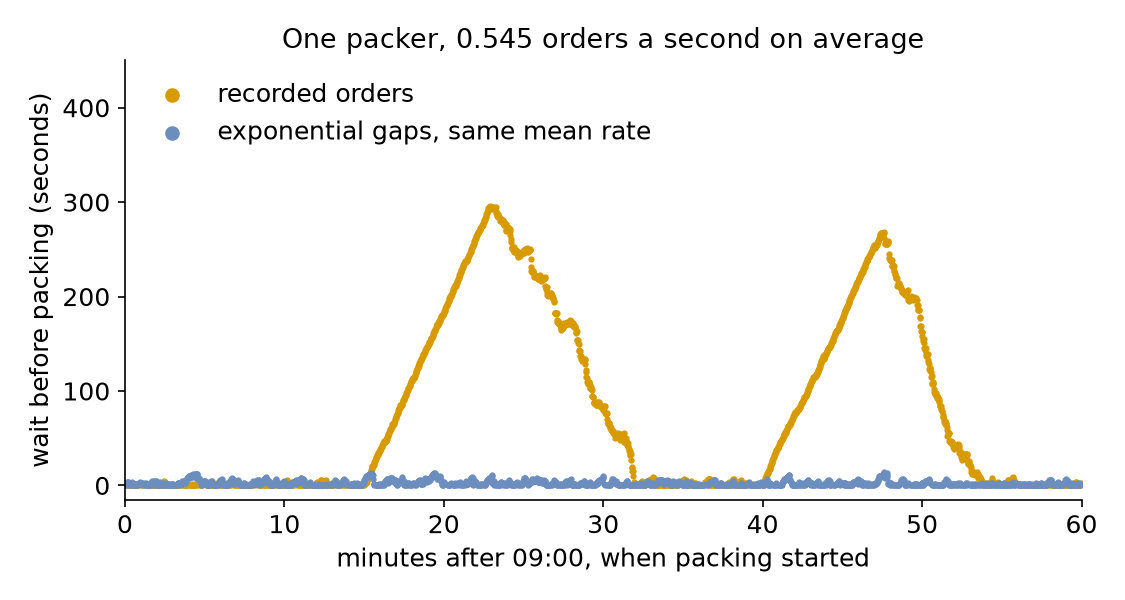
What does the shop do with the orders of the real morning? Something the model does not show. Replayed, the orders wait 91.31 seconds on average and up to 295.40 seconds; the model at the same mean rate waits 2.57 seconds on average and at most 14.34. The recorded morning holds two bursts, at 09:15 and 09:40, of three minutes each. Each builds a queue that the packer clears only by about 32 and 54 minutes:
The Builder and Low-level scripts print both runs:
Why It Works
A mean rate says how many orders come in an hour, not when they come. Exponential gaps spread the orders evenly over the hour, with small random clusters; the recorded morning has bursts that push the load above one packer for minutes at a time, a finite overload like the rush of Changing Demand. Replaying the recorded rows keeps the bursts, so it shows waits the fitted model cannot. Use a replay to check a model against the data it was fitted to: when the two disagree, the arrivals are not exponential at one rate, and the model needs a schedule, as on Time-varying Arrivals, or the replay itself.
Full Files
Full files
| docs/snippets/tutorials/local_replay_low_level.py | |
|---|---|
1 2 3 4 5 6 7 8 9 10 11 12 13 14 15 16 17 18 19 20 21 22 23 24 25 26 27 28 29 30 31 32 33 34 35 36 37 38 39 40 41 42 43 44 45 46 47 48 49 50 51 52 53 54 55 56 57 58 59 60 61 62 63 64 65 66 67 68 69 70 71 72 73 74 75 76 77 78 79 80 81 82 83 84 85 86 87 88 89 90 91 92 93 94 95 96 97 98 99 100 101 102 103 104 105 106 107 108 109 110 111 112 113 114 115 116 117 118 | |
Next, Comparing Designs asks whether a fourth packer cuts the mean wait, and by how much.